Cloud Platforms
How do we deploy our AI applications? Infrastructure - of course! Let’s talk about that, starting with the three largest cloud platforms.
Cloud platforms provide easy access to infrastructure for deploying and scaling AI applications.
The alternative is on-premises (“on-prem”) infrastructure, which can be more cost-effective for large-scale, consistent workloads. However, the operational overhead for on-prem is huge.
At small to mid-scale, cloud platforms are the obvious choice.
This Lesson Will Cover
- ☁️ AWS AI Services and Infrastructure
- 🔍 Google Cloud AI Platform and Services
- 🏢 Azure AI Solutions and Capabilities
- ⚖️ Cloud Platform Comparison
- 🤖 AI-Specific vs Generic Cloud Services
Cloud Services
Cloud platforms offer many services, e.g. compute servers, serverless functions, databases, storage systems, machine learning APIs, content delivery networks, and container orchestration platforms.
Here are some examples of what they’re called across different providers:
| Platform | Compute | Serverless | Storage | Database |
|---|---|---|---|---|
| AWS | EC2 | Lambda | S3 | RDS |
| Google Cloud | Compute Engine | Cloud Functions | Cloud Storage | Cloud SQL |
| Azure | Virtual Machines | Azure Functions | Blob Storage | Azure SQL Database |
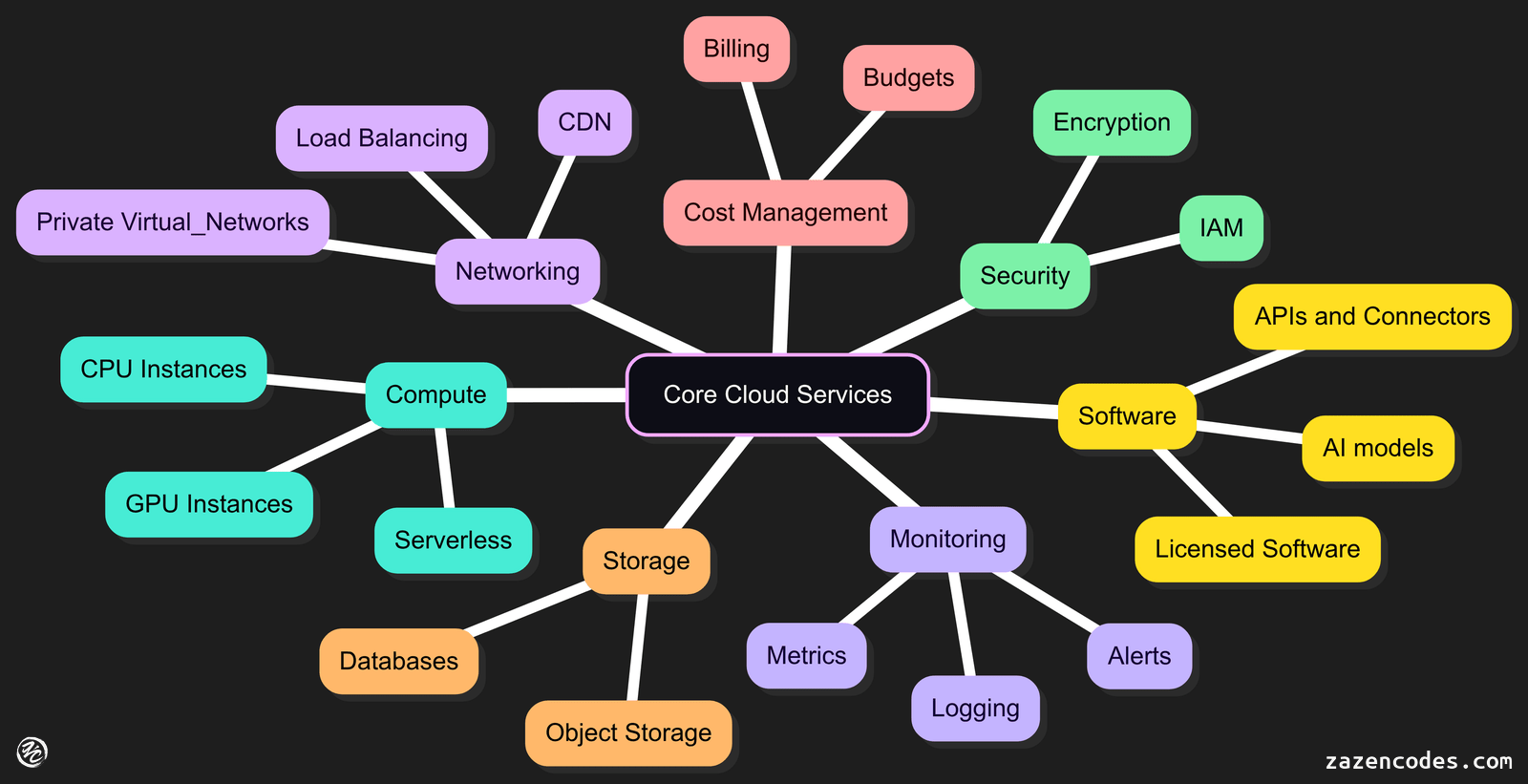
Fundamentally, all of the products provided by cloud platforms are some combination of the following core services:
- Compute Resources: GPU and CPU instances optimized for AI/ML workloads
- Storage Solutions: Object storage and databases
- Networking: Load balancing, CDN, and virtual private networks
- Security: Identity management, encryption, and compliance tools
- Monitoring & Logging: Application metrics, logs, alerts and observability
- Cost Management: Billing analysis, budget controls, and resource optimization
- Software: Proprietary AI models, APIs, algorithms, and licensed software
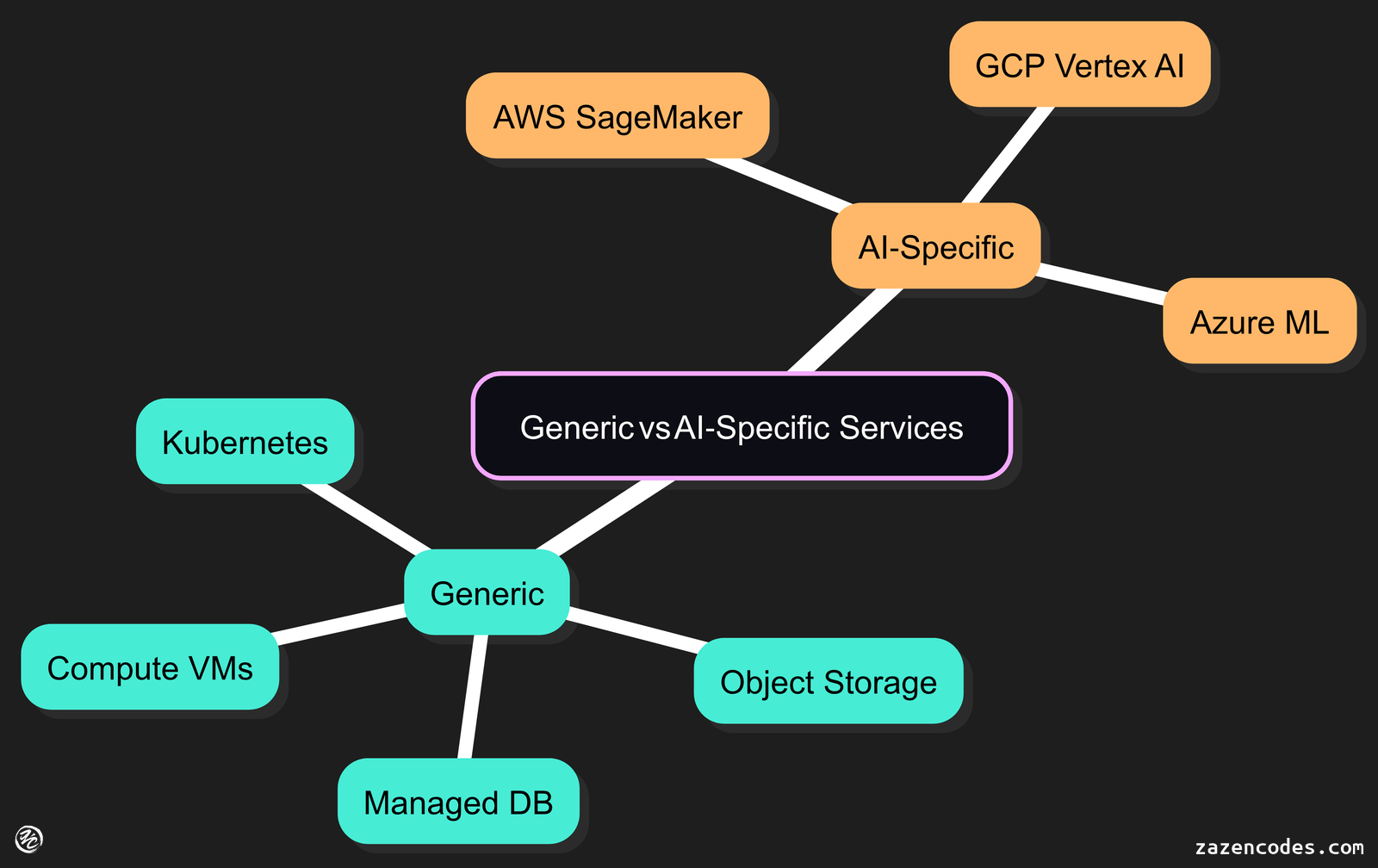
Generic VS AI Cloud Services
The remainder of this lesson will focus on examples of AI-related service offerings from major cloud providers - AWS, Google Cloud, and Azure. Each platform offers similar capabilities for building, training, and deploying AI models, along with pre-trained models and APIs for common use cases.
It’s worth noting that AI applications are typically deployed using a combination of cloud services, often without utilizing the cloud provider’s AI-specific offerings at all.
For instance, a typical AI application might use:
- Regular virtual machines for inference
- Object storage for model artifacts
- Managed databases for metadata
- Container orchestration for deployment
All of these are standard cloud services that aren’t specifically AI-focused.
Cloud services are a deep topic. Even though we’ve talked about them many times in this course, we’ve barely scratched the surface. With that in mind, let’s consider some AI services available through AWS, Google Cloud, and Azure.
AWS AI Services
AWS (Amazon Web Services) offers a robust and versatile suite of AI and machine learning services.
- Amazon SageMaker: End-to-end machine learning service for building, training, and deploying models.
- Use SageMaker notebooks for data exploration
- Deploy models with managed endpoints
- AutoML capabilities with SageMaker Autopilot
- Built-in algorithms and frameworks
- Model monitoring and MLOps tools
Example: Invoking a SageMaker Endpoint
import boto3
import json

# Connect to runtime to use for invoking deployed SageMaker models
sagemaker_runtime = boto3.client('sagemaker-runtime')

endpoint_name = 'my-endpoint'  # Replace with your actual endpoint name

payload = {"input": "Hello, SageMaker!"}

try:
    response = sagemaker_runtime.invoke_endpoint(
        EndpointName=endpoint_name,
        ContentType='application/json',
        Body=json.dumps(payload).encode('utf-8')
    )

    result = response['Body'].read().decode('utf-8')
    print(result)

except Exception as e:
    print(f"Error invoking endpoint: {e}")
Here’s a list of other AWS products for common AI use cases:
- Amazon Bedrock: Managed service for foundation models from leading providers
- Amazon CodeWhisperer: AI-powered code suggestions and generation
- Amazon Comprehend: Natural language processing (NLP) tasks like sentiment analysis and entity extraction
- Amazon Rekognition: Image and video analysis
- Amazon Polly: Text-to-speech conversion
- Amazon Transcribe: Speech-to-text conversion
- Amazon Lex: Conversational AI and chatbot building
- Amazon Textract: Extract text and data from documents
- Amazon Kendra: Intelligent enterprise search
- Amazon Personalize: Real-time personalization and recommendations
Example: Using Amazon Polly for Text-to-Speech
import boto3
polly = boto3.client('polly')

response = polly.synthesize_speech(
    Text="嗚呼涙が出るんだ それだけで 形ない音楽に溶け込むの",
    OutputFormat='mp3',
    VoiceId='Joanna'
)

# Save the audio to a file
with open('speech.mp3', 'wb') as file:
    file.write(response['AudioStream'].read())

# Play in Jupyter Notebook
from IPython.display import Audio
Audio('speech.mp3')
Yup. AWS poly can do Japanese[1].
Google Cloud AI Services
GCP (Google Cloud Platform) specializes in cutting-edge AI research and development and is prominent in the data analytics cloud space[2].
- Vertex AI: Google’s unified platform for AI workflows.
- Train and deploy models with AutoML or custom pipelines
- Integrates with BigQuery for data analysis
- Managed datasets and feature stores
- Model monitoring and other MLOps capabilities
- Foundation models and generative AI support
Example: Training a Model with Vertex AI
from google.cloud import aiplatform

PROJECT_ID="your-project-id"  # Replace with your project ID
LOCATION="us-central1"        # Replace with your desired region

# Initialize Vertex AI
aiplatform.init(
    project=PROJECT_ID,
    location=LOCATION,
)

# 1.  **Assume you have a Vertex AI Dataset resource already created.**
#     Replace with your actual Dataset resource name.
dataset_resource_name = f"projects/{PROJECT_ID}/locations/{LOCATION}/datasets/your-dataset-id"

# 2. Fetch the Dataset object using its resource name.
my_dataset = aiplatform.Dataset(dataset_resource_name)


# 3. Create a Custom Training Job
job = aiplatform.CustomTrainingJob(
    display_name="my-training-job",
    script_path="training_script.py",
    container_uri="gcr.io/cloud-aiplatform/training/pytorch-gpu.1-13",
    requirements=["torch", "transformers"],
)

# 4. Run the Training Job, providing the Vertex AI Dataset
model = job.run(
    dataset=my_dataset, # Use the Vertex AI Dataset object
    model_display_name="my-trained-model",
    machine_type="n1-standard-4",
    accelerator_type="NVIDIA_TESLA_T4",
    accelerator_count=1
)

# 5. Deploy the Model to an Endpoint
# Training and serving are configured separately; this example uses the same hardware.
endpoint = model.deploy(
    machine_type="n1-standard-4",
    accelerator_type="NVIDIA_TESLA_T4",
    accelerator_count=1
)

print(f"Endpoint: {endpoint.resource_name}")
Training and inference hardware can be selected independently. This written example uses the same machine and accelerator for both; a serving deployment can use more modest hardware when its model, memory requirements and expected traffic allow it.
Here’s a list of other GCP products for common AI use cases:
- Cloud Natural Language: Text classification, sentiment analysis, and entity recognition
- Cloud Vision: Image analysis and object detection
- Cloud Speech-to-Text: Audio transcription in 125+ languages
- Cloud Text-to-Speech: Natural sounding speech synthesis
- Cloud Translation: Neural machine translation
- Dialogflow: Building conversational AI for chatbots and voice assistants
- Document AI: Intelligent document processing
- Cloud Video Intelligence: Video content analysis
- Generative AI Studio: Access to foundation models like PaLM 2
Example: Using Cloud Vision API for Image Analysis
from google.cloud import vision

client = vision.ImageAnnotatorClient()

with open('image.jpg', 'rb') as image_file:
    content = image_file.read()
image = vision.Image(content=content)

response = client.label_detection(image=image)
labels = [label.description for label in response.label_annotations]

print("Labels:", labels)
Azure AI Solutions
Microsoft Azure provides AI solutions deeply integrated with its enterprise applications, prioritizing hybrid cloud capabilities and ease of deployment in existing business ecosystems.
- Azure Machine Learning:
- Automate model training and deployment with ML pipelines
- Use Azure ML SDK for Python to manage experiments
- MLOps capabilities for end-to-end ML lifecycle management
- AutoML for automated model training and tuning
- Managed compute clusters and inference endpoints
Example: Using Azure ML SDK for Training and Deployment
from azureml.core import Workspace, Experiment, Environment, ScriptRunConfig
from azureml.core.compute import ComputeTarget, AmlCompute

# Step 1: Connect to Azure ML Workspace
ws = Workspace.from_config()
print(f"Connected to workspace {ws.name} in resource group {ws.resource_group}")

# Step 2: Create compute cluster
compute_name = "gpu-cluster"
vm_size = "STANDARD_NC6"

print(f"Compute target '{compute_name}' not found. Creating...")
compute_config = AmlCompute.provisioning_configuration(
    vm_size=vm_size,
    max_nodes=4,
)
compute_target = ComputeTarget.create(ws, compute_name, compute_config)
compute_target.wait_for_completion(show_output=True)

# Step 3: Set up training environment from a conda specification file
env_name = "training-env"
conda_file = "conda.yml"
env = Environment.from_conda_specification(env_name, conda_file)
print(f"Environment '{env_name}' created from {conda_file}")

# Step 4: Configure training job
experiment_name = "my-training-experiment"

config = ScriptRunConfig(
    source_directory="./src",
    script="train.py",
    compute_target=compute_target,
    environment=env,
    arguments=[
        "--data_path", "data/",
        "--learning_rate", 0.001,
        "--epochs", 10
    ]
)

# Step 5: Create an experiment to group runs and submit the training run
experiment = Experiment(workspace=ws, name=experiment_name)
run = experiment.submit(config)
print(f"Submitted experiment '{experiment_name}', Run ID: {run.id}")

run.wait_for_completion(show_output=True)

# Step 6: Register the trained model to the workspace for deployment
model_name = "my-model"
model = run.register_model(
    model_name=model_name,
    model_path="outputs/model.pkl" # Path of the model file relative to the outputs directory of the run.
)
print(f"Model '{model_name}' registered. Model ID: {model.id}")
Here’s a list of other Azure products for common AI use cases:
- Azure OpenAI Service: Access to GPT-4, GPT-3.5, DALL-E, and other OpenAI models
- Text Analytics: Sentiment analysis, key phrase extraction, named entity recognition
- Computer Vision: Image tagging, OCR, face detection, spatial analysis
- Azure Bot Service: Build and manage conversational AI applications
- Speech Services: Text-to-speech and speech-to-text
- Language Understanding (LUIS): Natural language understanding
- Translator: Neural machine translation
- Form Recognizer: Extract text and data from documents
- Anomaly Detector: Real-time anomaly detection
- Cognitive Search: AI-powered cloud search service
- Content Safety: Content moderation and filtering
Example: Text Analysis with Azure Cognitive Services
import os

from azure.ai.textanalytics import TextAnalyticsClient
from azure.core.credentials import AzureKeyCredential

# Replace with your actual endpoint from Azure portal
endpoint = "https://<your-resource-name>.cognitiveservices.azure.com/"
key = os.getenv("AZURE_KEY")

client = TextAnalyticsClient(endpoint, AzureKeyCredential(key))

documents = [
    "Chainsaw Man's animation is absolutely mind-blowing! MAPPA outdid themselves!",
    "The pacing in Chainsaw Man is terrible, I couldn't even finish it.",
    "Chainsaw Man is overrated garbage. The plot makes no sense.",
    "Can't wait for Season 2 of Chainsaw Man to see more of Makima's story",
    "Just finished episode 12 of Chainsaw Man and I'm emotional. What a rollercoaster!",
]
response = client.analyze_sentiment(documents=documents)

for doc in response:
    print(f"Sentiment: {doc.sentiment}, Scores: {doc.confidence_scores}")

# Outputs:
# Sentiment: positive, Scores: {'positive': 1.0, 'neutral': 0.0, 'negative': 0.0}
# Sentiment: negative, Scores: {'positive': 0.0, 'neutral': 0.0, 'negative': 1.0}
# Sentiment: negative, Scores: {'positive': 0.0, 'neutral': 0.02, 'negative': 0.98}
# Sentiment: positive, Scores: {'positive': 0.99, 'neutral': 0.01, 'negative': 0.0}
# Sentiment: positive, Scores: {'positive': 0.8, 'neutral': 0.17, 'negative': 0.02}
I literally setup an Azure account to run this last example[3]
Conclusion
I’ve recently got my hands on an O’Reilly book on using AWS for generative AI, which I’ll be posting about on Patreon soon[4].
As you might expect, there’s a lot you can do with AWS in AI. But the same applies to other cloud platforms.
They are all competing aggressively, and I expect many new generative AI products to emerge on each platform in the coming years.
Key Takeaways
☁️ Cloud platforms provide essential infrastructure for AI deployment with options like AWS, Google Cloud, and Azure.
📉 Cloud platforms reduce operational overhead compared to on-premises solutions.
🛠️ Each platform offers both generic cloud services and AI-specific solutions.
⚖️ Each platform offers similar core capabilities but with different strengths and integrations.
🏢 AWS excels in enterprise integration with services like SageMaker and comprehensive AI APIs.
🤖 Google Cloud specializes in cutting-edge AI research with Vertex AI and strong TensorFlow integration.
🔗 Azure provides deep enterprise integration and unique access to OpenAI models.
Next: Scaling and Load Balancing
Next up, we’ll take a step back and talk about some fundamental concepts for application deployments: scaling and load balancing, and how they are done on cloud platforms.
Footnotes
This particular sentence translate roughly as “Ah, tears come out, and just like that, I melt into the formless music”. Lyrics from a beautiful song. ↩︎
I got hooked into the GCP ecosystem because of BigQuery and its integration with Data Studio (now Looker Studio). Now that I’m in it, I really am hooked. It offers a great developer experience overall. ↩︎
As a GCP user, I can confirm that the Azure platform UX and documentation is pretty rough. ↩︎
Generative AI on AWS book from O’Reilly. Notes coming soon to a Patreon near you (feel free to ping me on Discord in the #ai-engineer-roadmap channel and I’ll send you the PDF). ↩︎
Comments (0)
No comments yet.