Infrastructure as Code
Infrastructure as Code (IaC) tools provide a framework to define the provisioning of cloud resources using code. They help us build more reliable applications that can be easily and consistently deployed across different cloud platforms.
This Lesson Will Cover
- 🏗️ Infrastructure as Code (IaC) fundamentals
- 🛠️ Popular IaC tools: Terraform, CloudFormation, and Pulumi
- ⚙️ Configuration management and automation
- ✅ Best practices for infrastructure deployment
What is Infrastructure as Code?
We already explained this pretty well, but let’s break it down again. IaC allows us to define and manage infrastructure using code instead of manual processes.
This approach ensures that infrastructure configurations are:
- Declarative: Define the desired state (e.g., deploy 3 Ubuntu 22.04 servers with 4 vCPUs and 3 GiB RAM).
- Versioned: Store configurations in version control systems like Git.
- Repeatable: Apply the same configuration across multiple environments (e.g., development, staging, production).
Now, let’s see some examples with the top IaC frameworks.
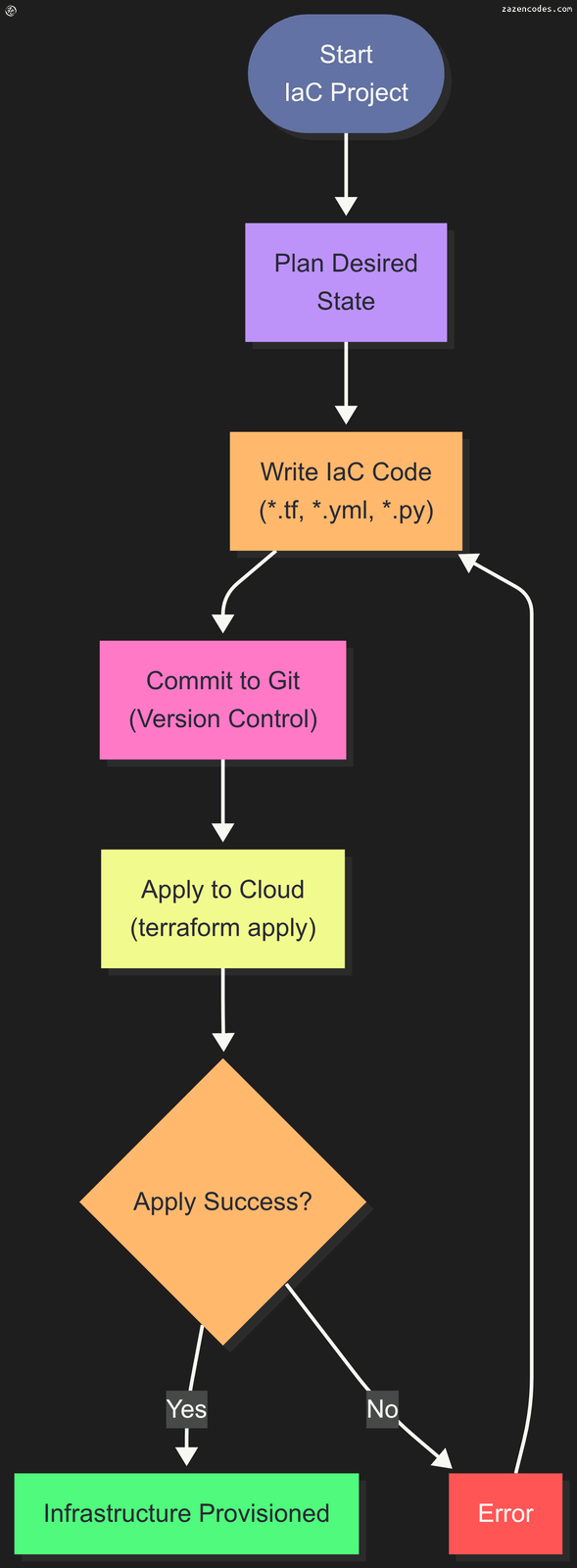
Terraform
Terraform by HashiCorp is a widely used, platform-agnostic IaC tool that supports multiple cloud providers like AWS, Google Cloud, and Azure. Licensing depends on the release: older versions used MPL 2.0, while the current license for version 1.6.0 and later is the Business Source License (BSL) 1.1. Review the license for the version you use; source availability does not make BSL the same as the older open-source license.
Key Features
- State Management: Maintains a record of deployed infrastructure.
- Modules: Reusable components for complex configurations.
- Multi-Cloud Support: Manage resources across different providers.
Example: Deploying an EC2 Instance on AWS
This configuration deploys a single EC2 instance on AWS.
- Create a Terraform configuration file
main.tf:
provider "aws" {
  region = "us-west-2"
}

resource "aws_instance" "example" {
  ami           = "ami-12345678"
  instance_type = "t2.micro"

  tags = {
    Name = "TerraformExample"
  }
}
- Deploy the configuration:
terraform init
terraform apply
Now, let’s look at a more complicated example.
This configuration creates a complete environment with a VPC, subnet, security group, and an EC2 instance. The instance will have a 20GB root volume and allow SSH access. After deployment, Terraform will output the instance’s public IP address.
- Create a Terraform configuration file
main.tf:
# Configure the AWS Provider
provider "aws" {
  region = "us-west-2"
  # Credentials can be specified here or via environment variables AWS_ACCESS_KEY_ID and AWS_SECRET_ACCESS_KEY
}

# Create a VPC for our instance
resource "aws_vpc" "main" {
  cidr_block = "10.0.0.0/16"

  tags = {
    Name = "MainVPC"
  }
}

# Create a subnet within the VPC
resource "aws_subnet" "main" {
  vpc_id     = aws_vpc.main.id
  cidr_block = "10.0.1.0/24"

  tags = {
    Name = "MainSubnet"
  }
}

# Create a security group
resource "aws_security_group" "allow_ssh" {
  name        = "allow_ssh"
  description = "Allow SSH inbound traffic"
  vpc_id      = aws_vpc.main.id

  ingress {
    description = "SSH from anywhere"
    from_port   = 22
    to_port     = 22
    protocol    = "tcp"
    cidr_blocks = ["0.0.0.0/0"]
  }

  egress {
    from_port   = 0
    to_port     = 0
    protocol    = "-1"
    cidr_blocks = ["0.0.0.0/0"]
  }
}

# Create an EC2 instance
resource "aws_instance" "example" {
  ami           = "ami-12345678"  # Amazon Linux 2 AMI ID
  instance_type = "t2.micro"
  subnet_id     = aws_subnet.main.id

  vpc_security_group_ids = [aws_security_group.allow_ssh.id]

  root_block_device {
    volume_size = 20  # GB
    volume_type = "gp3"
  }

  tags = {
    Name        = "TerraformExample"
    Environment = "Development"
    Managed_By  = "Terraform"
  }
}

# Output the instance's public IP
output "instance_public_ip" {
  value = aws_instance.example.public_ip
}
- Deploy and then tear down the configuration:
# Initialize Terraform and download required providers
terraform init

# See what changes will be made
terraform plan

# Apply the changes
terraform apply

# When finished, you can destroy all created resources
terraform destroy
CloudFormation
CloudFormation is AWS’s native IaC tool, tightly integrated with the AWS ecosystem. It uses YAML or JSON templates to define infrastructure.
Key Features
- Deep AWS Integration: Access all AWS resources natively.
- Change Sets: Preview changes before applying updates.
- Drift Detection: Identify discrepancies between configurations and deployed resources.
Example: Deploying an S3 Bucket
This example creates an S3 bucket named my-cloudformation-bucket.
- Create a CloudFormation template
template.yml:
Resources:
  MyS3Bucket:
    Type: AWS::S3::Bucket
    Properties:
      BucketName: my-cloudformation-bucket
- Deploy the template:
aws cloudformation create-stack --stack-name MyS3Stack --template-body file://template.yml
Pulumi
Pulumi is a modern IaC tool that uses general-purpose programming languages (e.g., Python, TypeScript) instead of domain-specific languages.
Key Features
- Language Flexibility: Use familiar programming languages to define infrastructure.
- Multi-Cloud Support: Manage resources across providers.
- Rich Ecosystem: Integrates with CI/CD tools and monitoring platforms.
Example: Deploying Google Cloud Resources
In this example, we create a storage bucket and a cloud function on Google Cloud.
- Install Pulumi and its GCP plugin:
pip install pulumi pulumi-gcp
- Create a
__main__.pyfile:
import pulumi
from pulumi_gcp import storage, cloudfunctions

# Create a storage bucket
bucket = storage.Bucket("my-bucket", location="US")

# Create a bucket object containing the function code
bucket_object = storage.BucketObject(
    "function-code",
    bucket=bucket.name,
    source=pulumi.FileAsset("./function/main.py"),  # Path to your function code
)

# Create the Cloud Function
function = cloudfunctions.Function(
    "my-function",
    runtime="python312",
    entry_point="handler",
    source_archive_bucket=bucket.name,
    source_archive_object=bucket_object.name,
    trigger_http=True,
    region="us-central1"
)

# Export the function URL
pulumi.export("function_url", function.https_trigger_url)
pulumi.export("bucket_name", bucket.name)
- Deploy the configuration:
pulumi up
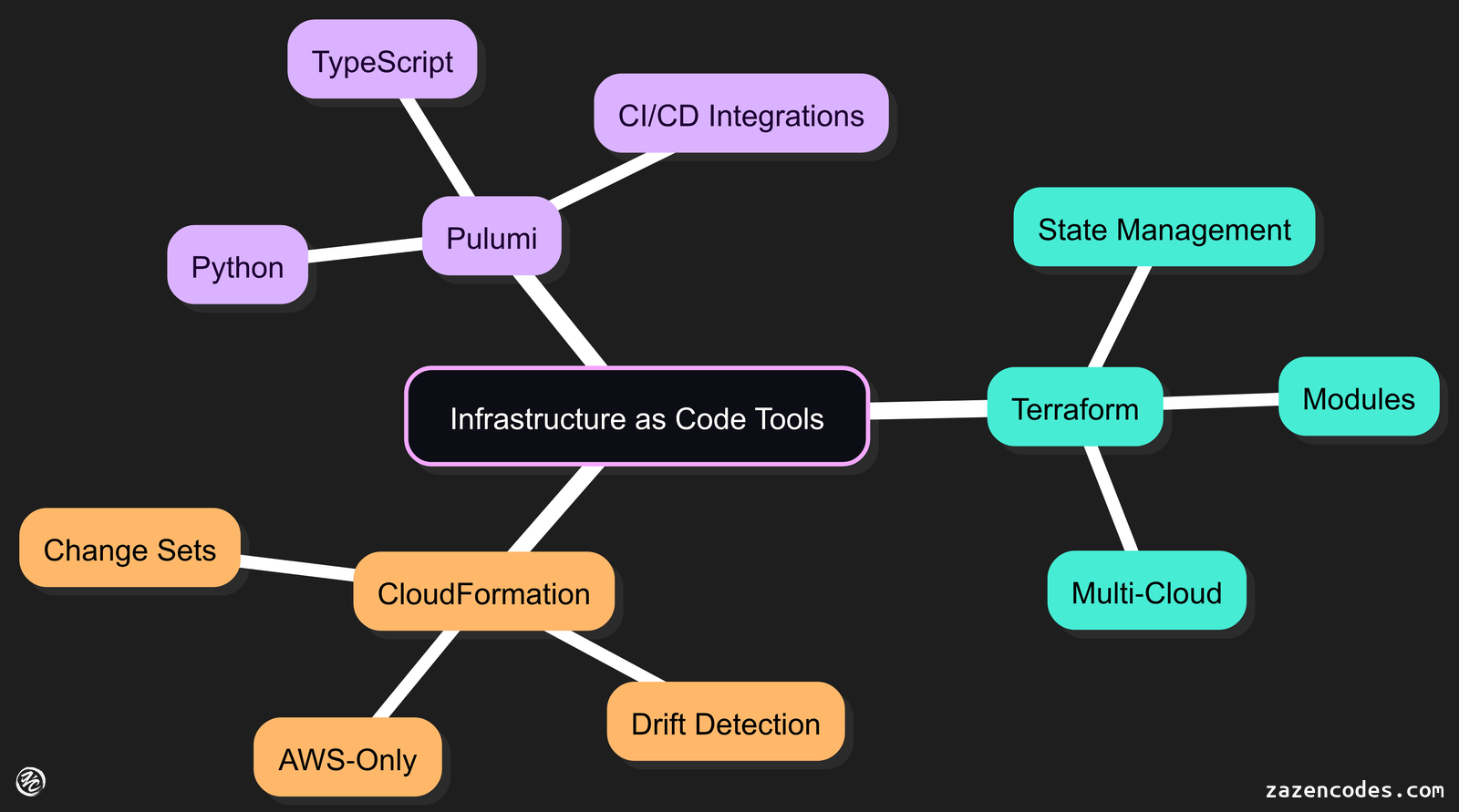
Configuration Management
IaC tools play very nicely with best practices for development. Namely:
-
Version Control:
- Store IaC code in Git repositories.
- Use branching strategies for changes (e.g., feature branches, pull requests).
-
Modular Design:
- Break infrastructure into smaller modules (e.g., networking, compute, storage).
- Reuse modules across projects.
-
Automation:
- Integrate IaC workflows into CI/CD pipelines for automated deployments.
Example: Automating Terraform with GitHub Actions
This GitHub Actions workflow file (typically saved as .github/workflows/terraform.yml) automates Terraform deployments.
It automatically deploys infrastructure changes whenever code is pushed to the main branch. GitHub’s serverless resources will:
- Fetch your code
- Set up Terraform
- Run commands to apply infrastructure changes
name: Terraform Deploy

on:  # Defines when this workflow runs
  push:
    branches:
      - main  # Triggers when code is pushed to main branch

jobs:
  deploy:
    runs-on: ubuntu-latest  # Uses Ubuntu runner
    steps:
    - name: Checkout code  # Gets your repository code
      uses: actions/checkout@v3

    - name: Set up Terraform  # Installs Terraform
      uses: hashicorp/setup-terraform@v2
      with:
        terraform_version: 1.3.6

    - name: Terraform Init  # Initializes Terraform working directory
      run: terraform init

    - name: Terraform Apply  # Applies infrastructure changes
      run: terraform apply -auto-approve
      env:  # You would typically add cloud credentials here
        AWS_ACCESS_KEY_ID: ${{ secrets.AWS_ACCESS_KEY_ID }}
        AWS_SECRET_ACCESS_KEY: ${{ secrets.AWS_SECRET_ACCESS_KEY }}
Conclusion
Did you see how we used YAML in the example above? You probably don’t know that I actually have some beef with YAML[1]. I will admit that it looks better than JSON, but the cost is too high for me[2].
On the bright side, I think we’re seeing a movement away from YAML configurations and towards expressing configuration as code, in the true sense of using a programming language (e.g., Pulumi, as seen above).
Key Takeaways
🏗️ Infrastructure as Code (IaC) enables automated, consistent, and version-controlled infrastructure deployment.
🛠️ Popular IaC tools include Terraform (multi-cloud), CloudFormation (AWS-specific), and Pulumi (programming language-based).
📌 Best practices include version control, modular design, and CI/CD integration.
🔄 IaC ensures infrastructure is declarative, versioned, and repeatable across environments.
🚀 Automation through CI/CD pipelines streamlines deployment and reduces human error.
Next: CI/CD for AI Applications
This concludes the infrastructure management section and leads us nicely into the final section of AI Deployment, where we talk about CI/CD for AI applications.
Footnotes
Replace your YAML configs with Pydantic YouTube video where I show you how I use Pydantic to generate YAML. ↩︎
The yaml document from hell blog post by Ruud van Asseldonk. If you use YAML then you have to give this a read. ↩︎
Comments (0)
No comments yet.