Continuous Integration
Welcome to the final section in AI Deployment. Let’s talk about one of the coolest areas in software development: DevOps.
Continuous Integration (CI) helps teams integrate changes frequently while ensuring the codebase remains stable and maintainable.
This Lesson Will Cover
- 🔄 What Continuous Integration is and why it matters
- 🏗️ Key components of CI pipelines
- 🧪 Automated testing for AI/ML applications
- 🛠️ Code quality tools and practices
- ⚙️ Build automation techniques
- 📜 Example CI pipeline configuration
DevOps for AI/ML
Back in the early 2000s, software teams realized there was a big gap between developers writing code and operations teams deploying it. This led to the birth of DevOps — a way to bring these two worlds together. Nowadays, DevOps is a staple of software engineering.
AI and ML introduced a new set of engineering challenges that required an extension of classic DevOps ideas. Challenges like handling massive datasets, model training and versioning, experiment tracking, and model deployment required new tools and practices.
This led to the emergence of MLOps - a specialized set of practices that combines DevOps principles with machine learning workflows.
We’ll talk about MLOps later in this section. But first, we’ll discuss the classic DevOps concepts of CI & CD.
What is Continuous Integration?
Continuous Integration involves automatically validating code changes through a series of tests and checks whenever new code is committed.
This helps to catch bugs early and prevent unsafe changes from being integrated into the codebase.
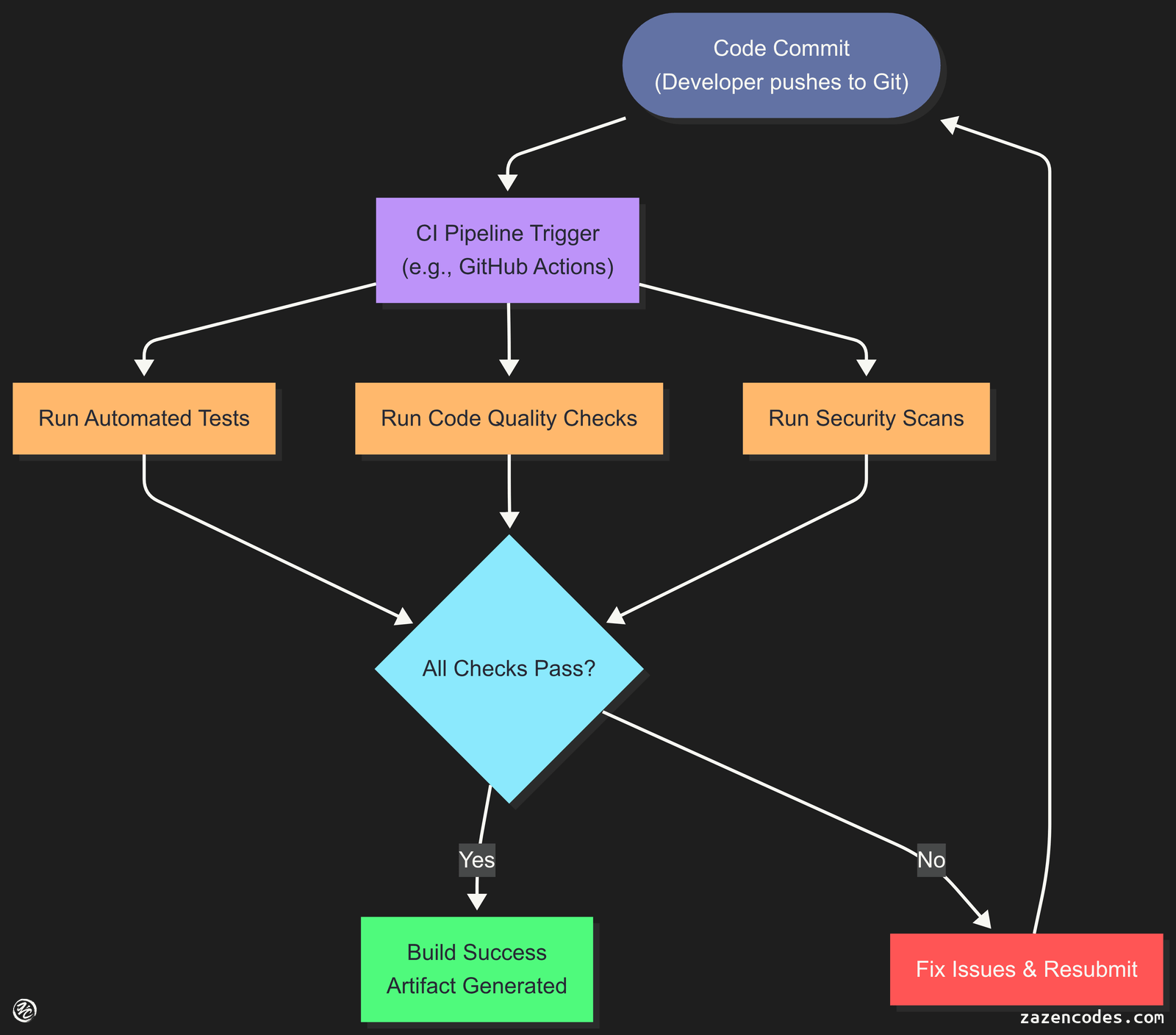
Example CI Workflow
- Developer pushes code to a version control system (e.g., GitHub).
- CI pipeline triggers and runs:
- Automated tests
- Code quality checks
- Security scans
- If all checks pass, the build is marked as successful.
Automated Testing
Testing ensures that code works as expected as we make changes, e.g., developing a new feature or fixing a bug. For AI/ML applications, this includes not only traditional unit and integration tests but also validation of data pipelines and models.
Types of Automated Tests
There are two classic types of tests:
-
Unit Tests: Validate individual components, such as preprocessing functions or model inference scripts.
Example: Unit Test for a Data Preprocessing Function
# preprocessing.py def clean_data(data): """Clean text data by converting to lowercase and removing punctuation.""" text = data["text"].lower() text = ''.join(c for c in text if c.isalnum() or c.isspace()) return {"text": text} # e.g. Output: # clean_data({"text": "It’s about doing. Do more, faster. - David Cohen"}) # {'text': 'its about doing do more faster david cohen'}# test_preprocessing.py import pytest from my_app.preprocessing import clean_data def test_clean_data(): raw_data = {"text": "Hello, World!!"} expected = {"text": "hello world"} assert clean_data(raw_data) == expected -
Integration Tests: Ensure components work together, such as verifying that a trained model integrates correctly with an API.
Example: Integration Test for Model API
import pytest
import requests
from my_app.api import ModelAPI

def test_model_api_integration():
    # Start API service
    api = ModelAPI()
    api.start()

    # Test prediction endpoint
    test_input = {"text": "Hello world"}
    response = requests.post("http://localhost:8000/predict", json=test_input)

    # Verify response
    assert response.status_code == 200
    assert "prediction" in response.json()

    # Cleanup
    api.stop()
And here are a couple types of tests that are important for AI/ML:
-
Data Quality Tests: Validate that data (e.g., training data) meets requirements.
Example: Data Quality Test
import pytest from my_app.data import load_training_data import numpy as np def test_training_data_quality(): train_data, train_labels = load_training_data() # Check for missing values assert not train_data.isnull().any().any(), "Training data contains missing values" # Check data shape assert train_data.shape[0] > 1000, "Insufficient training samples" assert train_data.shape[1] == 10, "Incorrect number of features" # Check label distribution unique_labels = np.unique(train_labels) assert len(unique_labels) >= 2, "Training data must have at least 2 classes" # Check for data type consistency assert train_data.dtypes.all() == np.float32, "Features must be float32 type" -
Model Validation Tests: Compare model outputs against expected results or thresholds.
Example: Model Accuracy Test
import pytest
from joblib import load as load_model
from my_app.data import load_test_data, load_training_data
from my_app.evaluation import evaluate_model

def test_model_accuracy():
    model = load_model("model.pkl")
    test_data, labels = load_test_data()
    accuracy = evaluate_model(model, test_data, labels)
    assert accuracy > 0.9, "Model accuracy is below acceptable threshold"
Code Quality Checks
Code quality tools help enforce consistency and best practices, making our codebases easier to maintain.
Tools for Code Quality
- Linters: Detect syntax errors, style violations, and potential bugs (e.g.,
flake8for Python). - Formatters: Automatically format code to conform to style guides (e.g.,
rufffor Python). - Language Servers: Provide real-time code analysis and intelligent features through the Language Server Protocol (LSP)[1]. Tools like Pyright and Pylance can leverage type hints to:
- Catch type-related bugs before runtime
- Provide better code completion
- Enable accurate refactoring
Example with Type Hints:
def process_data(data: list[float]) -> float:
    return sum(data) / len(data)

# Language servers can catch this error before runtime
result = process_data("not a list")  # Error: Expected list[float]
Build Automation
Build automation involves packaging code and sometimes other elements of AI/ML systems (data, model artifacts, etc.) so that we can build applications in a consistent and reproducible way.
Build automation for AI/ML might involve:
- Packaging code and model artifacts
- Managing dependencies (including specific versions of ML frameworks)
- Configuring hardware requirements (CPU/GPU/RAM)
- Setting up environment configurations
- Handling large model weights and datasets
Example Build Automation Setup
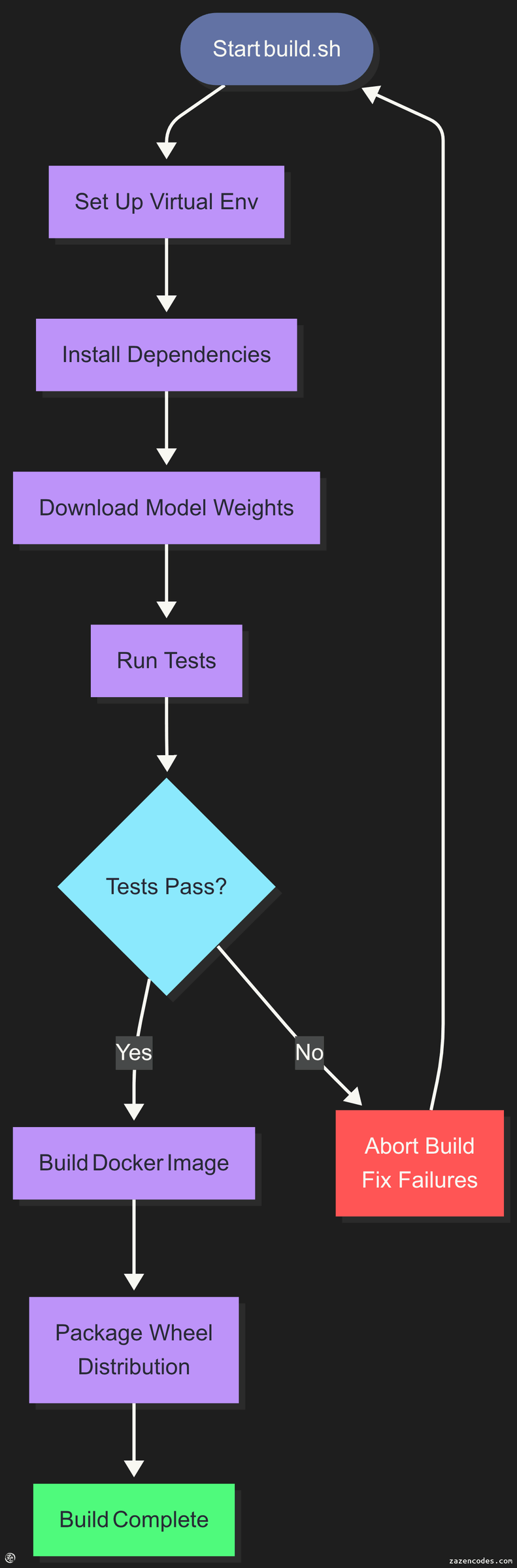
Let’s look at a complete example of build automation that packages a machine learning application with its dependencies, model weights, and Docker configuration:
- Project Structure:
ml_project/
├── setup.py
├── Dockerfile
├── models/
│   └── weights/
├── src/
│   ├── __init__.py
│   ├── train.py
│   └── predict.py
└── scripts/
    └── build.sh
from setuptools import setup, find_packages

setup(
    name="ml_project",
    version="1.0.0",
    packages=find_packages(),
    install_requires=[
        "torch>=2.0.0",
        "transformers>=4.30.0",
        "numpy>=1.24.0"
    ],
    python_requires=">=3.9",
)
- Dockerfile:
FROM python:3.9-slim

WORKDIR /app

# Install system dependencies
RUN apt-get update && apt-get install -y \
    build-essential \
    curl \
    && rm -rf /var/lib/apt/lists/*

# Copy project files
COPY setup.py .
COPY src/ src/
COPY models/ models/

# Install project dependencies using setup.py
RUN pip install -e .

# Set environment variables
ENV MODEL_PATH=/app/models/weights

# Command to run the application
CMD ["python", "src/predict.py"]
#!/bin/bash

# Create virtual environment
python -m venv venv
source venv/bin/activate

# Install dependencies using setup.py
pip install -e .

# Download model weights
mkdir -p models/weights
wget -O models/weights/model.pt https://example.com/model-weights

# Build Docker image
docker build -t ml-project:latest .

# Run tests
pytest

# Package application
python setup.py bdist_wheel

echo "Build completed successfully!"
To run the build automation:
- Make the build script executable:
chmod +x scripts/build.sh
- Execute the build script:
./scripts/build.sh
This will:
- Set up a virtual environment
- Install dependencies
- Download model weights
- Create a Docker image
- Run tests
- Package the application
The resulting artifacts will be:
- A wheel distribution in
dist/ - A Docker image tagged as
ml-project:latest - Model weights in
models/weights/
Example CI Pipeline
This lesson wouldn’t be complete without an example CI pipeline. Here’s an example using GitHub Actions:
This workflow:
- Triggers whenever code is pushed to the
mainbranch - Runs on an Ubuntu virtual machine
- Checks out the code from the repository
- Sets up Python 3.9
- Installs project dependencies from
requirements.txt - Runs automated tests using
pytest - Checks code quality using
flake8 - Performs security scanning using
safety
name: CI Pipeline

on:
  push:
    branches:
      - main

jobs:
  build-and-test:
    runs-on: ubuntu-latest

    steps:
      - name: Checkout code
        uses: actions/checkout@v3

      - name: Set up Python
        uses: actions/setup-python@v4
        with:
          python-version: 3.9

      - name: Install dependencies
        run: pip install -r requirements.txt

      - name: Install linting and security tools
        run: pip install flake8 safety

      - name: Lint code
        run: flake8

      - name: Security scan
        run: safety check

      - name: Run tests
        run: pytest
Conclusion
Having good testing in place for data applications is critical. We never know what data is going to do when we’re not watching it! That’s why CI is so awesome—it helps us write better code and sleep better at night.
Now, I’ve got a challenge for you: If you’ve never used GitHub Actions before, then I challenge you to create a new GitHub repo set up an action right now.
It doesn’t have to be anything serious, like the example above. Maybe you could spin up a server and have it print a string of emojis or make a web request to get the current weather in Anchorage, Alaska.
You’ll know that you’ve passed my challenge when you see a green checkmark appear in the GitHub Actions tab of your repo[2].
Key Takeaways
⚙️ Continuous Integration (CI) helps teams validate code changes automatically through tests and checks.
🧠 AI/ML applications require specialized testing approaches, including data quality and model validation tests.
🛠️ Code quality tools like linters, formatters, and language servers help maintain consistent, high-quality code.
📦 Build automation packages code, model artifacts, and dependencies in a reproducible way.
🚀 CI pipelines can be configured using tools like GitHub Actions to automate testing and quality checks.
📊 Testing is critical for data applications due to the unpredictable nature of data.
Next: Continuous Deployment
Now, with CI in place, we’re ready to talk about continuous deployment.
Footnotes
I can’t overstate how important having a good LSP setup is for your productivity as a developer. If you happen to want to do this in Neovim (which, of course you should want to do because Neovim is incredible) then I got you covered: Neovim Lazy Lua IDE—my simple but powerful setup for 2024 or just scope out my neovim dotfiles on github. ↩︎
Let me know when you get that green checkmark. Ping me in the #ai-engineer-roadmap channel on Discord. ↩︎
Comments (0)
No comments yet.