MLOps
MLOps (Machine Learning Operations) handles the technical challenges of the machine learning model lifecycle and system reliability in production.
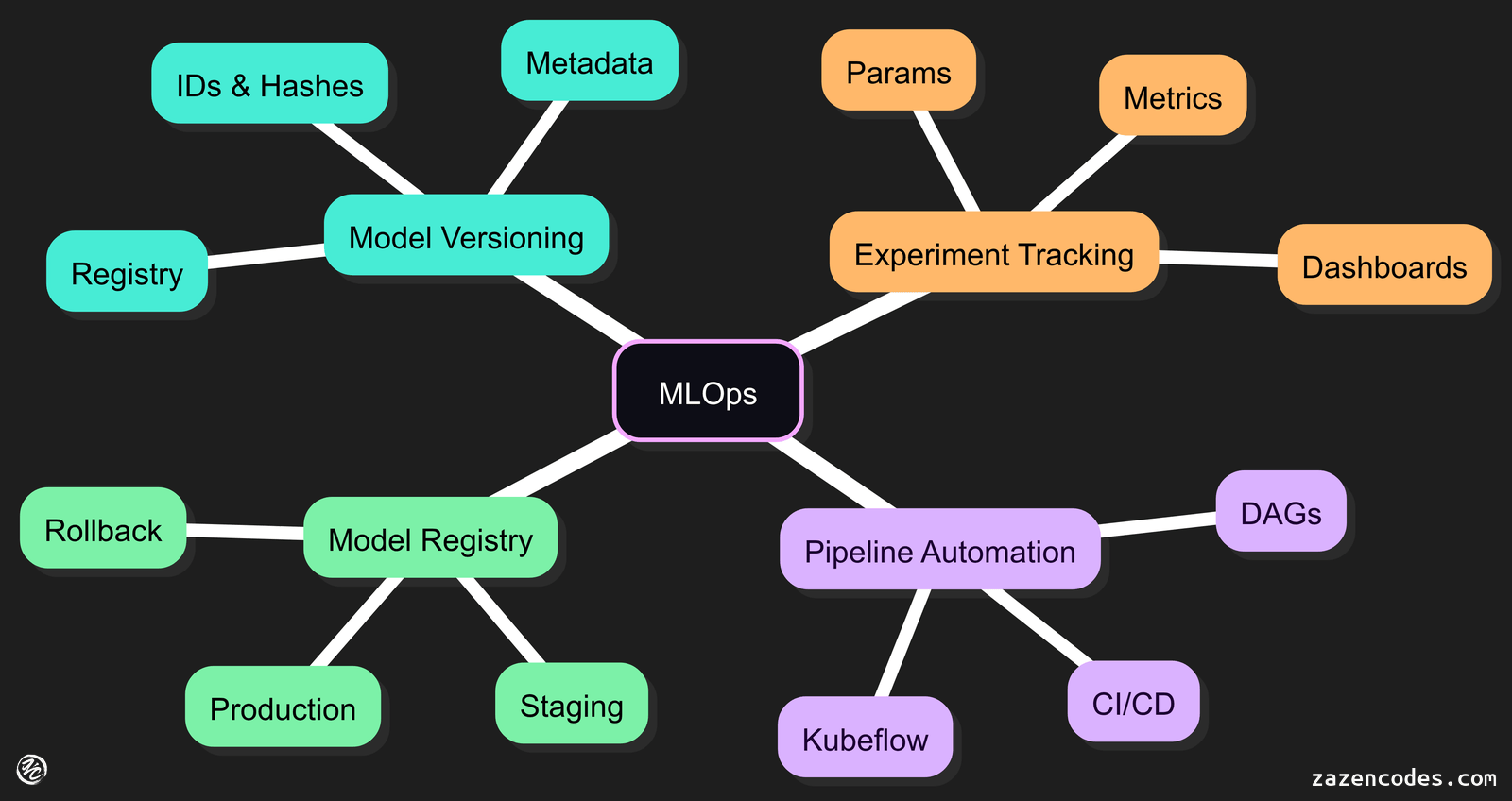
Unlike traditional software engineering, ML/AI applications involve unique challenges such as model versioning, experiment tracking, pipeline automation, and model registry management.
This Lesson Will Cover
- 📌 Model Versioning: Tracking changes and metadata for ML models
- 📝 Experiment Tracking: Documenting and comparing model training runs
- 🔄 Pipeline Automation: Creating consistent, repeatable ML workflows
- 📦 Model Registry Management: Storing and managing trained models
Model Versioning
Versioning is essential for managing changes to machine learning models over time. This includes tracking which dataset and code were used to train a model, as well as the model’s hyperparameters and evaluation metrics.
Best Practices for Model Versioning
- Track Metadata: Include details like dataset version, model architecture, and hyperparameters.
- Use Unique Identifiers: Assign a version number or hash to each model (e.g.,
model-v1.0). - Leverage Tools: Tools like MLflow or DVC[1] can help manage and version model artifacts.
Example: Versioning with MLflow
import mlflow

# Set up experiment
mlflow.set_experiment("my-experiment")

# Log model metadata
with mlflow.start_run():
    mlflow.log_param("learning_rate", 0.01)
    mlflow.log_metric("accuracy", 0.92)
    mlflow.log_artifact("model.pkl")  # Save model file
    mlflow.set_tag("version", "1.0")

print("Model version logged!")
Benefits:
- History of model evolution.
- Easy to reproduce past results.
Experiment Tracking
Experiment tracking ensures that every model training run is documented, making it easier to compare and analyze different approaches.
Tools for Experiment Tracking
- MLflow: A popular open-source tool for logging experiments.
- Weights & Biases: Offers a user-friendly dashboard for tracking experiments.
- DVC: Tracks experiments alongside data and code.
| Tool | Key Benefits | Best For | Cost | Deployment Options |
|---|---|---|---|---|
| MLflow | • Open-source & self-hostable • Language agnostic • Integrated model registry • Simple setup |
• Small to medium teams • Local development • Academic projects |
No software license fee; hosting and maintenance costs apply | • Self-hosted on cloud infrastructure |
| Weights & Biases | • Rich visualization tools • Real-time collaboration • Advanced experiment comparison • Automated reports |
• Large teams • Complex projects • Remote collaboration |
Pricing and support depend on the current plan; check the provider’s pricing | • Hosted SaaS platform • Self-hosted options available for enterprise customers |
| DVC | • Git-like versioning • Data pipeline focus • Works with any storage • Lightweight |
• Data-heavy projects • GitOps workflows • Cost-sensitive teams |
Free (open-source) | • Self-hosted on cloud infrastructure |
Self-hosting means operating the infrastructure, upgrades, monitoring and backups. A managed service handles much of that work for a service fee; its support coverage depends on the plan. The per-user price shown in the recording is a historical example, so use current provider pricing when budgeting.
Example: Experiment Tracking with Weights & Biases
import wandb

# Initialize project
wandb.init(project="my-project", name="experiment-1")

# Log hyperparameters and metrics
wandb.config.learning_rate = 0.01
wandb.config.epochs = 10

for epoch in range(10):
    loss = train_model()
    accuracy = evaluate_model()
    wandb.log({"epoch": epoch, "loss": loss, "accuracy": accuracy})

wandb.finish()
Benefits:
- Compare performance across experiments.
- Analyze trends and correlations (e.g., learning rate vs. accuracy).
Pipeline Automation
Automation is key to ensuring that data preprocessing, model training, and evaluation steps are consistent and repeatable.
Example: Automating Pipelines with Kubeflow
Kubeflow provides a framework for building and deploying ML workflows on Kubernetes.
Simple Pipeline Example:
import kfp
from kfp import dsl

@dsl.pipeline(name="ML Pipeline Example")
def pipeline():
    preprocess_op = dsl.ContainerOp(
        name="Preprocess Data",
        image="myregistry/preprocess-image",
        command=["python", "preprocess.py"]
    )
    train_op = dsl.ContainerOp(
        name="Train Model",
        image="myregistry/train-image",
        command=["python", "train.py"]
    )
    train_op.after(preprocess_op)  # Ensure preprocessing happens first

# Compile pipeline
kfp.compiler.Compiler().compile(pipeline, "pipeline.yaml")
Deploy the pipeline with:
kubectl apply -f pipeline.yaml
Benefits:
- Reproducible workflows.
- Scalable training and deployment processes.
Model Registry Management
A model registry provides a central repository to store and manage trained models. This ensures that the right model versions are deployed to production and simplifies collaboration across teams.
Tools for Model Registry Management
- MLflow Model Registry: Provides lifecycle management for models.
- AWS SageMaker Model Registry: Integrates with AWS services for seamless deployment.
- TensorFlow Model Management: Integrates with TensorFlow’s ecosystem.
Example: Managing Models with MLflow Registry
Register a model:
import mlflow

model_uri = "runs:/<run_id>/model"
mlflow.register_model(model_uri, "MyModel")
Transition a model to production:
from mlflow.tracking import MlflowClient

client = MlflowClient()
client.transition_model_version_stage(
    name="MyModel",
    version=1,
    stage="Production"
)
Benefits:
- Traceability: Clear history of which models were trained, tested, and deployed.
- Control: Easy rollback to previous versions if issues arise.
Example MLOps Workflows
Example #1
Here’s a high-level overview of an MLOps workflow with the tooling discussed above:
- Data Preparation: Automate data preprocessing using tools like Kubeflow or Airflow.
- Experiment Tracking: Use MLflow or Weights & Biases to log all training runs.
- Model Versioning: Assign unique identifiers to each model and log them in a registry.
- Model Deployment: Deploy the model with CI/CD pipelines, ensuring compatibility with production environments.
Diagram:
[Data Pipeline] → [Experiment Tracking] → [Model Registry] → [Deployment Pipeline]
Example #2
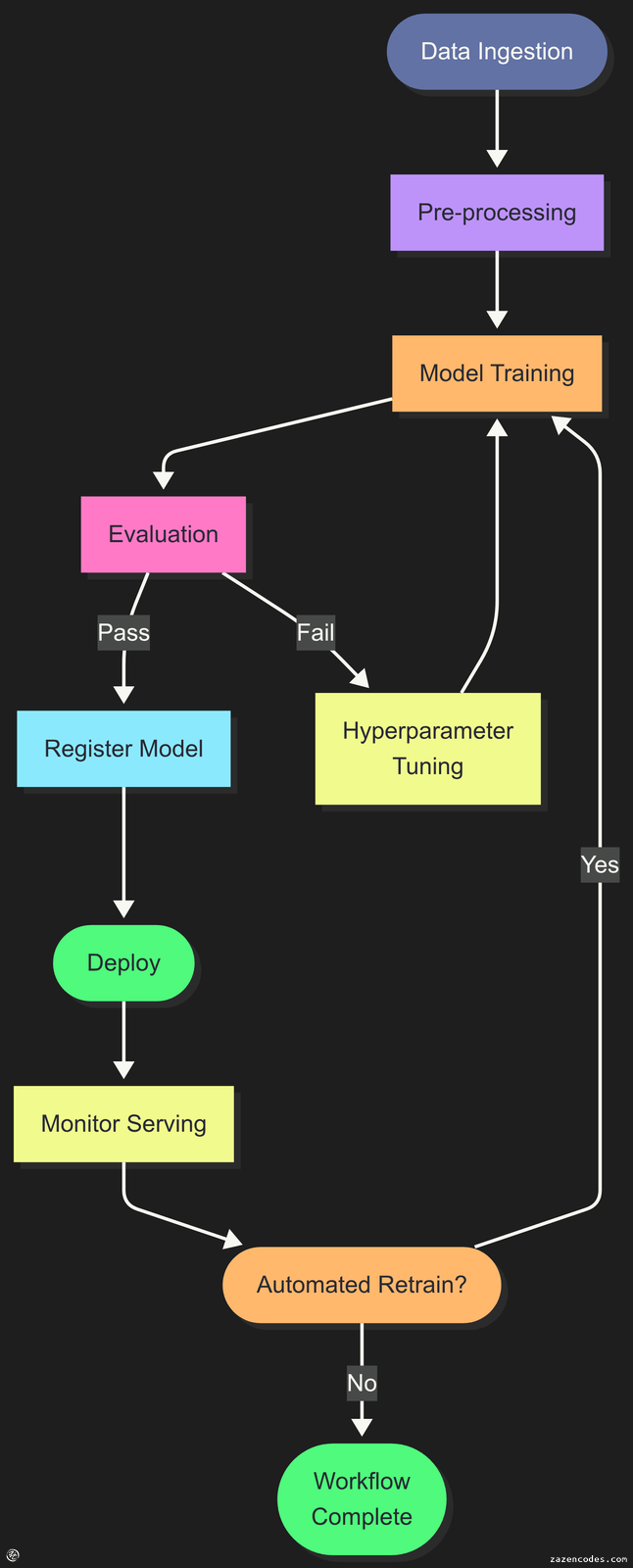
Here is a diagram of a more general MLOps workflow that is triggered when new data is available for training:
Conclusion
This takes us to the end of our AI Application Deployment section of the course and the end of our technical content.
Making it this far is a big accomplishment. I think it deserves at least 3 cake emojis, so here you go 🍰🍰🍰
After enjoying that cake though, I’ve got to pull you back down into reality…
As you’ve learned by now, we’re only scratching the surface of all these topics. And while learning them is one thing, knowing how to apply them is another. For that, you’ll need to get your hands dirty and build some stuff[2].
Key Takeaways
🤖 MLOps requires specialized tools and practices beyond traditional DevOps.
🔄 Model versioning allows us to track changes, datasets, and hyperparameters.
🧪 Experiment tracking helps compare and analyze different training approaches.
🔧 Pipeline automation ensures consistent and repeatable ML workflows.
📜 Model registry management provides centralized control over model versions.
🏗️ Integration of these components creates a robust MLOps workflow.
Next: AI Jobs
In the final section of the course, we’ll look at how to translate this course into real-world results for your career.
Footnotes
DVC (in this context) does not stand for “Disney Vacation Club”. It’s a software called “Data Version Control”. Currently DVC is sitting at 14k stars on GitHub, slightly behind MLflow at 19k. ↩︎
This course is about fundamental concepts and expanding your breadth of knowledge. The next course I create will be a lot more hands-on and will have a capstone project that you build out. It’s the doing that will take you to the next level. The next set of lessons is all about doing. ↩︎
Comments (0)
No comments yet.