API Integrations
In this section, we’ll continue to talk about deployment, but now in the context of LLM integrations.
This Lesson Will Cover
- 🔌 API Integration Methods (REST API, Client Libraries, gRPC)
- 🤖 OpenAI API Integration Examples
- 🦜 Anthropic Claude Integration Examples
- 🌍 Real-world Integration Scenarios and Architectures
What are API Integrations?
Large Language Model (LLM) integrations refers to the technical implementations of generative models into existing systems.
These integrations typically involve APIs (Application Programming Interfaces) that establish communication channels between applications and LLM services.
Through these interfaces, engineers can send text-based queries or data to remote LLM servers and receive various outputs such as generated text, classifications, or embeddings.
LLMOps Overview
Before diving into specific integrations, let’s introduce the concept of LLMOps - a specialized extension of MLOps focused on Large Language Models.
LLMOps encompasses the practices and tools needed to deploy, monitor, and maintain LLM applications in production, e.g.
- Prompt engineering and version control
- API integration and management
- Performance monitoring and optimization
- Cost tracking and optimization
- Response quality assessment
- Safety and content filtering
- A/B testing of prompts and model versions
In the upcoming lessons, we’ll dive deeper into key aspects of LLMOps, including:
- LLM deployment considerations – Best practices for deploying LLM applications to production.
- LLM security considerations – Securing LLM applications and protecting sensitive data.
Let’s begin by examining the core integration approaches available to developers.
Integration Methods
There are two core approaches for the integrations that we’ll talk about in this lesson:
-
REST API
- Standard HTTP endpoints
- Language-agnostic
- Good for distributed systems
- Higher latency (relative to, e.g. gRPC) due to HTTP overhead
-
Client Libraries
- Language-specific SDKs
- Simplified authentication
- Type safety and IDE support
- Better error handling
We’ll be looking at these in the context of LLM services from OpenAI and Anthropic.
Another integration option that would be relevant for self-developed LLM services (rather than direct integrations with providers like OpenAI or Anthropic) is gRPC:
- gRPC
- High performance
- Bi-directional streaming
- Strong typing with protocol buffers
- Good for microservices
Integration Scenarios
Here are a few specific integration scenario examples to consider (where the arrows ← denote the flow of data):
-
Web Application
- App Architecture: Django backend, React frontend
- Deployment: Containerized on Kubernetes or AWS ECS
- Integration: OpenAI Python client library, monolithic
- Integration Architecture: Client (Web App Frontend) ← Backend App (Django) ← OpenAI API
- Use Case: Real-time chat interface with streaming responses
-
Microservice Application
- App Architecture: Java Microservice
- Deployment: Kubernetes cluster on Azure AKS
- Integration: OpenAI Java client library, microservice
- Integration Architecture: Client (Java App) ← LLM Microservice (Java) ← OpenAI API
- Use Case: Document summarization
-
Serverless Data Pipeline
- App Architecture: AWS Lambda functions
- Deployment: Event-driven cloud infrastructure
- Integration: OpenAI REST API, AWS Lambda written in Go
- Integration Architecture: S3 Event ← Event Lambda ← SQS Queue ← LLM Lambda (Go) ← OpenAI API
- Use Case: Automated content moderation
We’ll revisit these scenarios in the following examples.
OpenAI API
OpenAI provides APIs for models like GPT-4 (multimodal), DALL-E (image), and Whisper (audio).
Let’s talk about how to get started with these APIs.
A small note of caution before we proceed -
The code examples below are intended to help us develop a deeper understanding of AI integrations. They would make a poor reference when working on your own coding project.
Authentication
To use OpenAI’s API, we’ll need to generate an API key:
- Visit OpenAI’s website and sign in
- Navigate to the API section
- Click on “Create new secret key”
- Store the API key securely
We should never expose our API keys in code or version control. Instead, we can use environment variables:
import os
import openai

openai.api_key = os.getenv("MY_OPENAI_API_KEY")
Note: Libraries like openai, anthropic, and others (google, boto3, etc…) look for default environment variables to use for authentication.
For OpenAI, we can just set
OPENAI_API_KEYin our environment (e.g. outside of our script) in order to automatically use that key.
For production deployments, secure secret management services like AWS Secrets Manager are a good idea.
Example: Chatbot with GPT-4o Mini in Django
This example shows a Django backend integration for a web app.
from django.http import JsonResponse
from django.views.decorators.csrf import csrf_exempt
import json
import os
from openai import OpenAI

# Initialize OpenAI client
client = OpenAI(api_key=os.getenv("OPENAI_API_KEY"))

@csrf_exempt
def chat_endpoint(request):
    if request.method == "POST":
        try:
            # Ensure request is JSON
            if request.content_type != "application/json":
                return JsonResponse({"status": "error", "message": "Invalid Content-Type"}, status=400)

            # Parse JSON body
            data = json.loads(request.body)
            user_message = data.get("message", "").strip()

            if not user_message:
                return JsonResponse({"status": "error", "message": "Message cannot be empty"}, status=400)

            # Call OpenAI API
            completion = client.chat.completions.create(
                model="gpt-4o-mini",
                messages=[
                    {"role": "user", "content": user_message}
                ],
            )

            ai_message = completion.choices[0].message.content

            return JsonResponse({"status": "success", "message": ai_message})

        except Exception as e:
            return JsonResponse({"status": "error", "message": str(e)}, status=500)

    return JsonResponse({"status": "error", "message": "Only POST requests are supported"}, status=405)
This Django view would be part of a larger web application architecture:
-
Frontend (React/Vue/etc):
// Example frontend code making request to Django endpoint async function sendMessage(message) { const response = await fetch("/api/chat", { method: "POST", headers: { "Content-Type": "application/json", }, body: JSON.stringify({ message }), }); const data = await response.json(); return data.message; } -
Django URLs (urls.py):
from django.urls import path from . import views urlpatterns = [ path('api/chat', views.chat_endpoint, name='chat') ] -
Django View (views.py):
# chat_endpoint code shown above would go here
The frontend makes HTTP POST requests to the Django endpoint, which processes them through the OpenAI API using the OpenAI Python client library, and then returns responses that can be displayed in the UI.
Example: Document summarization, Java Client Library, Azure
Here’s an example of a Java microservice for document summarization using Azure’s OpenAI SDK.
Warning: This example is half-baked at best. I doubt it would run. It’s still worth skimming through, to see some detail what it takes to integrate AI with Java applications.
@RestController
@RequestMapping("/api/summarize")
public class SummaryController {

    private final OpenAIClient client;

    public SummaryController(@Value("${AZURE_OPENAI_API_KEY}") String apiKey,
                             @Value("${AZURE_OPENAI_ENDPOINT}") String endpoint) {
        AzureKeyCredential credential = new AzureKeyCredential(apiKey);
        this.client = new OpenAIClientBuilder()
            .endpoint(endpoint)
            .credential(credential)
            .buildClient();
    }

    @PostMapping
    public ResponseEntity<SummaryResponse> summarizeDocument(@RequestBody String document) {
        try {
            CompletionsOptions options = new CompletionsOptions(
                List.of("Please summarize the following document:\n\n" + document));
            options.setMaxTokens(500);
            options.setTemperature(0.7);

            Completions completions = client.getCompletions("gpt-4o-mini", options);
            String summary = completions.getChoices().get(0).getText();

            return ResponseEntity.ok(new SummaryResponse(summary));

        } catch (Exception e) {
            return ResponseEntity.status(500)
                .body(new SummaryResponse("Error generating summary: " + e.getMessage()));
        }
    }
}

@Data
@AllArgsConstructor
class SummaryResponse {
    private String summary;
}
This Java microservice would be part of a larger microservices architecture, e.g.
-
API Gateway (application.yml):
spring: cloud: gateway: routes: - id: summary-service uri: lb://summary-service predicates: - Path=/api/summarize/** -
Service Discovery (Eureka):
@SpringBootApplication @EnableEurekaClient public class SummaryServiceApplication { public static void main(String[] args) { SpringApplication.run(SummaryServiceApplication.class, args); } } -
Client Service:
@Service
public class DocumentService {
    @Autowired
    private RestTemplate restTemplate;

    public String getSummary(String document) {
        ResponseEntity<SummaryResponse> response = restTemplate.postForEntity(
            "http://summary-service/api/summarize",
            document,
            SummaryResponse.class
        );
        return response.getBody().getSummary();
    }
}
The microservice could be deployed to Azure Kubernetes Service (AKS) using a deployment configuration like this:
apiVersion: apps/v1
kind: Deployment
metadata:
  name: summary-service
spec:
  replicas: 3
  template:
    spec:
      containers:
        - name: summary-service
          image: acr.azurecr.io/summary-service:latest
          env:
            - name: AZURE_OPENAI_API_KEY
              valueFrom:
                secretKeyRef:
                  name: openai-secrets
                  key: api-key
            - name: AZURE_OPENAI_ENDPOINT
              valueFrom:
                secretKeyRef:
                  name: openai-secrets
                  key: endpoint
Anthropic Claude Integration
Claude by Anthropic is a foundational LLM model that is comparable to GPT.
Authentication
To use Anthropic’s API, you’ll need an API key:
- Visit Anthropic’s website and create an account
- Navigate to the API section
- Generate a new API key
- Store the API key securely
Like with OpenAI, we should never expose API keys in code. Use environment variables instead:
import os
import anthropic

client = anthropic.Anthropic(api_key=os.getenv("MY_ANTHROPIC_API_KEY"))
For production systems, use secure secret management services like AWS Secrets Manager or Azure Key Vault.
Example: Content Moderation, AWS Lambda
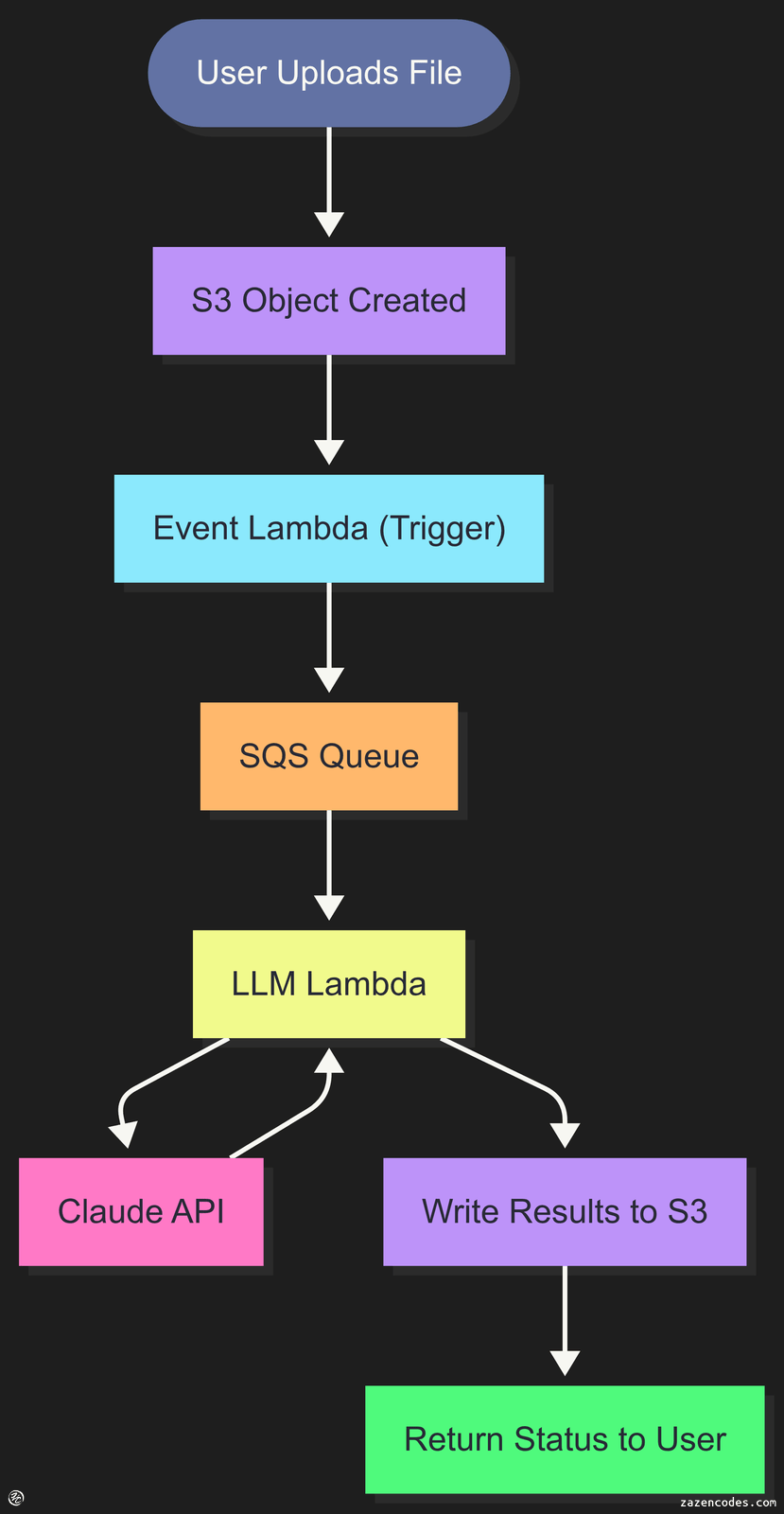
Here’s an example of content moderation using AWS Lambda with both Python and Go implementations. This Lambda function is triggered by an event when a new document is uploaded to S3, and the script uses Claude to analyze that document for inappropriate content.
Flow:
- User uploads content to S3 bucket
- S3 event triggers Lambda function
- Lambda reads content from S3
- Content is sent to Claude API for analysis
- Claude returns moderation assessment
- Results are stored back in S3 under moderation-results/
- Success/failure response returned
import json
import os
import anthropic
from aws_lambda_powertools import Logger
import boto3

logger = Logger()

def moderate_content(event, context):
    client = anthropic.Anthropic() # Use default api_key ANTHROPIC_API_KEY

    try:
        # Get content from S3 event
        records = event.get('Records', [])
        if not records:
            return {
                'statusCode': 400,
                'body': json.dumps({'error': 'No records in event'})
            }

        # Process first record
        s3_event = records[0]['s3']
        bucket = s3_event['bucket']['name']
        key = s3_event['object']['key']

        # Get content from S3
        s3_client = boto3.client('s3')
        response = s3_client.get_object(Bucket=bucket, Key=key)
        content = response['Body'].read().decode('utf-8')

        # Send to Claude for moderation
        completion = client.messages.create(
            model="claude-3-5-haiku-latest",
            messages=[{
                "role": "user",
                "content": f"""Please analyze this content for inappropriate material.
                Respond with a JSON object containing:
                - is_appropriate: boolean
                - reason: string explaining why if inappropriate
                - confidence: float between 0 and 1

                Content to analyze: {content}"""
            }]
        )

        # Parse Claude's response
        moderation_result = json.loads(completion.content)

        # Store result back to S3
        result_key = f"moderation-results/{key}"
        s3_client.put_object(
            Bucket=bucket,
            Key=result_key,
            Body=json.dumps(moderation_result)
        )

        return {
            'statusCode': 200,
            'body': json.dumps(moderation_result)
        }

    except Exception as e:
        logger.exception("Error in content moderation")
        return {
            'statusCode': 500,
            'body': json.dumps({'error': str(e)})
        }
This function can be deployed serverlessly using AWS lambda, which would look something like this:
-
Package the function and dependencies:
# For Python pip install -r requirements.txt -t ./package cd package zip -r ../lambda.zip . cd .. zip lambda.zip lambda_function.py -
Create Lambda function via AWS Console or CLI:
aws lambda create-function \ --function-name content-moderation \ --runtime python3.12 \ --handler lambda_function.moderate_content \ --zip-file fileb://lambda.zip \ --role arn:aws:iam::ACCOUNT_ID:role/lambda-role -
Configure environment variables:
- ANTHROPIC_API_KEY
- AWS_S3_BUCKET
-
Set up S3 trigger:
aws lambda add-permission \
  --function-name content-moderation \
  --statement-id S3InvokeFunction \
  --action lambda:InvokeFunction \
  --principal s3.amazonaws.com \
  --source-arn arn:aws:s3:::YOUR_BUCKET_NAME
Example: Content Moderation, AWS Lambda, using Go
Below is an alternate version of this lambda function that’s written in Go. It implements the same thing using the REST API directly. Anthropic also provides an official Go SDK; the HTTP example below illustrates the underlying request without requiring that SDK.
This function could also be deployed using AWS lambda, using one of the Go runtime options.
Unlike the Python code above, which should be easy to follow, this code is more difficult to read and understand. Regardless, the full example has been included so we have the complete context, and we can skip to the interesting part of the code by scrolling about half-way down and looking at the section where we initialize an AnthropicRequest object and then call http.NewRequest.
Warning: Similar to the Java example above, this one is a bit half-baked. Skim through to see the types of hoops we have to jump through when integrating AI into Go.
package main

import (
    "bytes"
    "context"
    "encoding/json"
    "fmt"
    "io"
    "net/http"
    "os"

    "github.com/aws/aws-lambda-go/events"
    "github.com/aws/aws-lambda-go/lambda"
    "github.com/aws/aws-sdk-go-v2/config"
    "github.com/aws/aws-sdk-go-v2/service/s3"
)

type AnthropicRequest struct {
    Model    string    `json:"model"`
    Messages []Message `json:"messages"`
}

type Message struct {
    Role    string `json:"role"`
    Content string `json:"content"`
}

type ModerationResult struct {
    IsAppropriate bool    `json:"is_appropriate"`
    Reason        string  `json:"reason"`
    Confidence    float64 `json:"confidence"`
}

func handleRequest(ctx context.Context, event events.S3Event) (events.APIGatewayProxyResponse, error) {
    // Initialize S3 client
    cfg, err := config.LoadDefaultConfig(ctx)
    if err != nil {
        return errorResponse(err)
    }
    s3Client := s3.NewFromConfig(cfg)

    // Get first record
    if len(event.Records) == 0 {
        return events.APIGatewayProxyResponse{
            StatusCode: 400,
            Body:       `{"error": "No records in event"}`,
        }, nil
    }

    record := event.Records[0]
    bucket := record.S3.Bucket.Name
    key := record.S3.Object.Key

    // Get content from S3
    result, err := s3Client.GetObject(ctx, &s3.GetObjectInput{
        Bucket: &bucket,
        Key:    &key,
    })
    if err != nil {
        return errorResponse(err)
    }

    content, err := io.ReadAll(result.Body)
    if err != nil {
        return errorResponse(err)
    }

    // Prepare request to Anthropic API
    anthropicReq := AnthropicRequest{
        Model: "claude-3-5",
        Messages: []Message{
            {
                Role: "user",
                Content: fmt.Sprintf(`Please analyze this content for inappropriate material.
                    Respond with a JSON object containing:
                    - is_appropriate: boolean
                    - reason: string explaining why if inappropriate
                    - confidence: float between 0 and 1

                    Content to analyze: %s`, string(content)),
            },
        },
    }

    reqBody, err := json.Marshal(anthropicReq)
    if err != nil {
        return errorResponse(err)
    }

    // Make request to Anthropic API
    req, err := http.NewRequest("POST", "https://api.anthropic.com/v1/messages", bytes.NewBuffer(reqBody))
    if err != nil {
        return errorResponse(err)
    }

    req.Header.Set("Content-Type", "application/json")
    req.Header.Set("x-api-key", os.Getenv("ANTHROPIC_API_KEY"))
    req.Header.Set("anthropic-version", "2023-06-01")

    client := &http.Client{}
    resp, err := client.Do(req)
    if err != nil {
        return errorResponse(err)
    }
    defer resp.Body.Close()

    // Parse response
    var moderationResult ModerationResult
    if err := json.NewDecoder(resp.Body).Decode(&moderationResult); err != nil {
        return errorResponse(err)
    }

    // Store result back to S3
    resultKey := fmt.Sprintf("moderation-results/%s", key)
    resultBody, err := json.Marshal(moderationResult)
    if err != nil {
        return errorResponse(err)
    }

    _, err = s3Client.PutObject(ctx, &s3.PutObjectInput{
        Bucket: &bucket,
        Key:    &resultKey,
        Body:   bytes.NewReader(resultBody),
    })
    if err != nil {
        return errorResponse(err)
    }

    return events.APIGatewayProxyResponse{
        StatusCode: 200,
        Body:       string(resultBody),
    }, nil
}

func errorResponse(err error) (events.APIGatewayProxyResponse, error) {
    return events.APIGatewayProxyResponse{
        StatusCode: 500,
        Body:       fmt.Sprintf(`{"error": "%s"}`, err.Error()),
    }, nil
}

func main() {
    lambda.Start(handleRequest)
}
Conclusion
I believe that integrations are an underrepresented topic in AI/ML.[1] They aren’t very exciting, but integrations allow us to unlock a lot of real-world business value.
Key Takeaways
🔗 API integrations with LLMs can be implemented via REST APIs, client libraries, or gRPC, depending on requirements.
🏗️ OpenAI and Anthropic provide client and HTTP integrations and have a similar API.
⚙️ Real-world integrations often involve multiple components working together (e.g., web frontends, microservices, serverless functions).
✅ Best practices include:
- 🔑 Secure API key management using environment variables or secret managers
- ⚠️ Error handling and logging
- 📈 Scalable architectures appropriate for the use case
- 📊 Monitoring and observability
🖥️ Different programming languages and frameworks can be used based on requirements, with official SDKs available for some languages.
Next: Deployment Considerations
I hope you found these example situations and integration examples with different languages helpful. Next, we’ll talk about various considerations for deploying LLM applications.
Footnotes
I came to this realization while researching AI Engineering jobs, in the process of creating my 100 AI Job Postings Later… Here’s What’s Actually in Demand
video. ↩︎
Comments (0)
No comments yet.