Deployment Considerations
Let’s talk about some deployment considerations for building with LLMs APIs from providers like OpenAI and Anthropic.
This Lesson Will Cover
- 🔄 Synchronous vs Asynchronous Processing
- 📡 Streaming Responses
- 🗄️ Caching Mechanisms
- ⚠️ Error Handling and Fallbacks
- 💰 Cost Management
- 🚦 Rate Limiting
Synchronous vs. Asynchronous Processing
When integrating LLMs into our applications, we can choose between synchronous and asynchronous processing.
Synchronous Processing
In synchronous processing, the client (our app) waits for the LLM service (OpenAI or Anthropic) to complete the request and return a response.
Example: Synchronous API Request with Python
Here’s a basic call to GPT-4o mini. As expected, the client.chat.completions.create function call blocks the code below until the OpenAI server has returned the full LLM response.
from openai import OpenAI
client = OpenAI()

def run_example():
    prompt = "Explain Newton's Laws"
    print(f"Making chat request for prompt: {prompt}")

    response = client.chat.completions.create(
        model="gpt-4o-mini",
        messages=[{"role": "user", "content": prompt}]
    )

    # Code here is blocked until LLM response is returned

    response_text = response.choices[0].message.content
    print(f"Response: {response_text}")

run_example()

# Output:
# Making chat request for prompt: Explain Newton's Laws
# Response: Newton's Laws of Motion are three fundamental principles that form the foundation of classical mechanics, explaining the relationship between the motion of an object and the forces acting upon it. They were formulated by Sir Isaac Newton in the 17th century. Here’s a summary of each law:
#
# ### 1. Newton's First Law (Law of Inertia)
# An object at rest will remain at rest, and an object in motion will continue to move at a constant velocity in a straight line, unless acted upon by a net external force. This law introduces the concept of inertia, which is the tendency of an object to resist changes in its state of motion.
# ...
Example: Synchronous API Request with JavaScript
Here’s an analogous example with JS:
import OpenAI from "openai";

const openai = new OpenAI({
  apiKey: process.env.OPENAI_API_KEY,
});

async function runExample() {
  const prompt = "Explain Newton's Laws";
  console.log(`Making chat request for prompt: ${prompt}`);

  const response = await openai.chat.completions.create({
    model: "gpt-4o-mini",
    messages: [{ role: "user", content: prompt }],
  });

  // Code here is blocked until LLM response is returned

  const responseText = response.choices[0].message.content;
  console.log(`Response: ${responseText}`);
}

runExample();
Asynchronous Processing
In asynchronous processing, the client can continue executing other tasks while waiting for the LLM response. This is useful for handling multiple requests simultaneously within the same program, especially when they might be long-running.
Example: Asynchronous API Request with JavaScript
import OpenAI from "openai";

const openai = new OpenAI({
  apiKey: process.env.OPENAI_API_KEY,
});

function processResponse(responseText) {
  console.log(`Processed response: ${responseText}`);
}

function handleError(error) {
  console.error(`Error occurred: ${error}`);
}

function makeAsyncRequest(prompt) {
  console.log(`Making async chat request for prompt: ${prompt}`);

  openai.chat.completions
    .create({
      model: "gpt-4o-mini",
      messages: [{ role: "user", content: prompt }],
    })
    .then((response) => {
      const responseText = response.choices[0].message.content;
      processResponse(responseText);
    })
    .catch(handleError);

  // Code here continues executing while waiting for the LLM response
  console.log("Continuing with other tasks...");
}

makeAsyncRequest("Explain Newton's Laws");
console.log("This will print before the request is complete");
For example, we could make three API requests at (pretty much) the same time and process them concurrently:
makeAsyncRequest("Explain Newton's First Law");
makeAsyncRequest("Explain Newton's Second Law");
makeAsyncRequest("Explain Newton's Third Law");
Streaming Responses
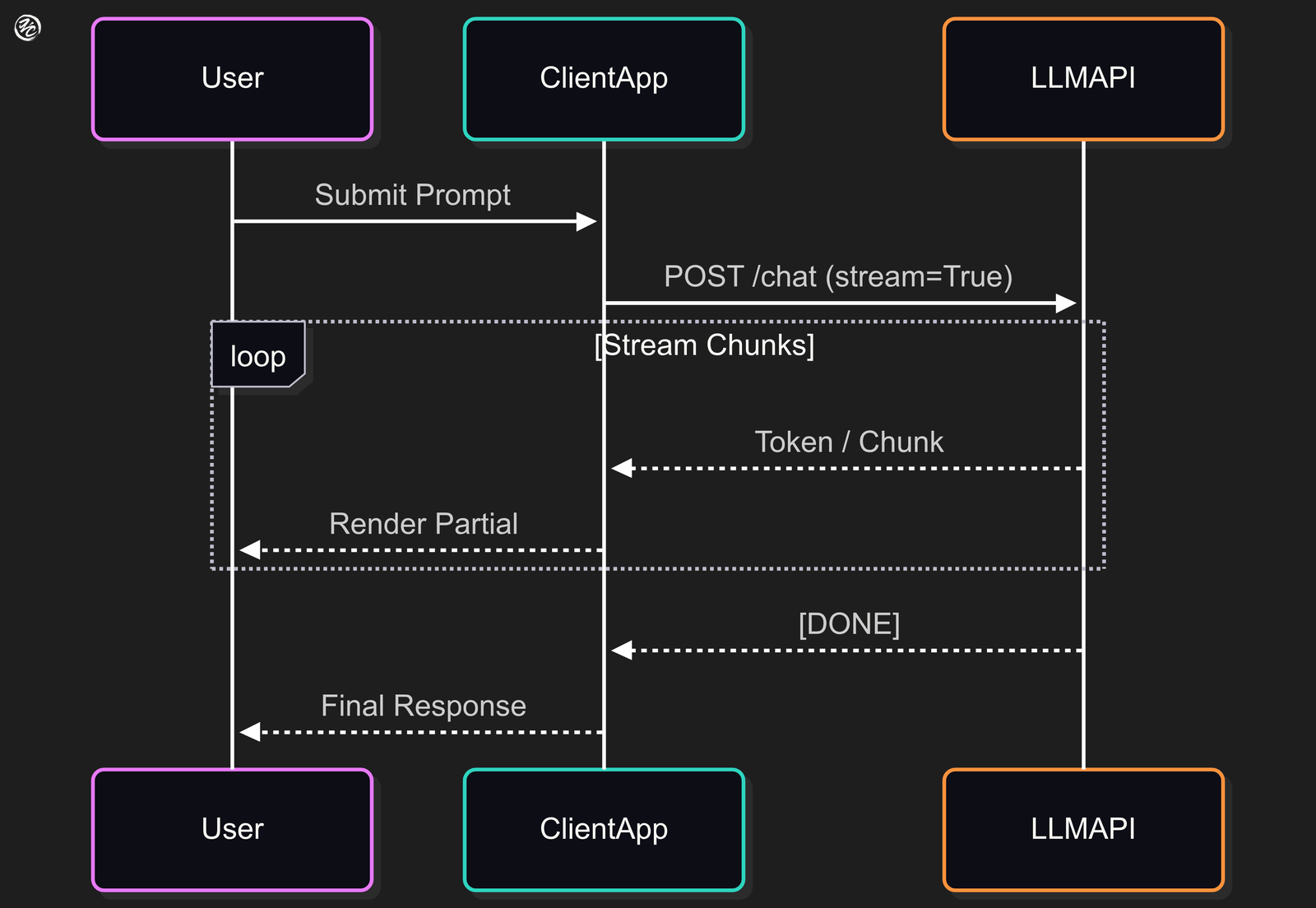
Streaming responses allow data to be sent in chunks, enabling the client to process information incrementally rather than waiting for the entire response. This is especially useful for applications like chatbots, where partial responses can improve the user experience.
Example: Streaming with OpenAI API
from openai import OpenAI
client = OpenAI()

def stream_response(prompt):
    response = client.chat.completions.create(
        model="gpt-4o-mini",
        messages=[{"role": "user", "content": prompt}],
        stream=True
    )
    for chunk in response:
        print(chunk.choices[0].delta.content or "", end="")

stream_response("Write a haiku about the Howe Sound")

# Output:
# Mountains kiss the sky,
# Whispers of the ocean sing,
# Howe Sound's calm embrace.
Example: Streaming with Anthropic API
import anthropic
client = anthropic.Anthropic()

def stream_response(prompt):
    with client.messages.stream(
        model="claude-3-5-haiku-latest",
        messages=[{"role": "user", "content": prompt}],
        max_tokens=1024,
    ) as stream:
        for text in stream.text_stream:
            print(text, end="", flush=True)


stream_response("Write a fan letter to the J-Pop band ZUTOMAYO")

# Output:
# Here's a draft fan letter to ZUTOMAYO:
#
# Dear ZUTOMAYO,
#
# こんにちは! (Hello!)
#
# I'm writing to express my deep admiration for your incredible music and unique artistic style. From the first time I heard "Humanoid" and "Kan Saete Kuyashiiwa," I was completely captivated by your innovative sound and AiRI's mesmerizing vocals.
# ...
In both examples, the responses are streamed in real-time, allowing the application to display output as it’s generated.
Caching Mechanisms
Caching can significantly improve performance and reduce costs by storing and reusing responses for repeated queries.
This can be impractical for some LLM use-cases where queries (in context) are always unique.
In any case, this is a tool we need to have on hand, so let’s have a quick look at how it can be done.
LLMs cache internal neural network states (specifically the key-value pairs from attention layers), so they can reuse these for subsequent prompts in the same conversation.
Re-inserting the key-value tensors in subsequent prompts skips most of the forward pass for the cached portion.
This results in lower latency for API consumers and better cost efficiency in use cases like chatbots and code completion.
Typically these caches are short-lived, e.g. 5-60 minutes, and only take effect once input is past some threshold, e.g. 1,024 tokens.
The discussion below is about conventional caching techniques and is completely different than this internal state caching mechanisms on the LLM provider side.
Types of Caching
- In-Memory Caching: Use libraries like
redisorfunctools.lru_cachefor fast, in-memory storage. - Persistent Caching: Store responses in databases or files for long-term use.
Example: In-Memory Caching with functools.lru_cache
The lru_cache decorator provides a simple way to cache function results in memory with Python. LRU stands for Least Recently Used - when the cache reaches its maximum size, it discards the least recently accessed items first.
from functools import lru_cache
from openai import OpenAI

client = OpenAI()

@lru_cache(maxsize=100)  # Stores up to 100 most recent responses
def cached_response(prompt):
    print("Making API call")
    response = client.chat.completions.create(
        model="gpt-4o-mini",
        messages=[{"role": "user", "content": prompt}]
    )
    return response.choices[0].message.content

# Usage
print(cached_response("Translate and the word プログラミング"))  # Makes API call
print(cached_response("Translate and the word プログラミング"))  # Returns cached result without API call

# Output:
# Making API call
# The word "プログラミング" translates to "programming" in English.
# The word "プログラミング" translates to "programming" in English.
Example: Caching with Redis
Redis provides a more robust, distributed caching solution that persists between program restarts and can be shared across multiple servers.
from datetime import timedelta
from openai import OpenAI
import redis
import json

client = OpenAI()

# Initialize Redis client (assume running locally)
redis_client = redis.Redis(host='localhost', port=6379, db=0)

def get_cached_response(prompt, expire_days=7):  # Cache for 1 week
    # Check if response exists in cache
    cached = redis_client.get(prompt)
    if cached:
        print("Returning cached result")
        return json.loads(cached)

    # If not in cache, call OpenAI API
    print("Making API call")
    response = client.chat.completions.create(
        model="gpt-4o-mini",
        messages=[
            {"role": "system", "content": "Provide a few estimates in hours in a single line."},
            {"role": "user", "content": prompt},
        ]
    )
    result = response.choices[0].message.content

    # Store in cache with expiration
    redis_client.setex(
        prompt,
        timedelta(seconds=int(expire_days * 24 * 3600)),
        json.dumps(result)
    )

    return result

# Usage
print(get_cached_response("How long does it take to learn Japanese?"))  # Makes API call
print(get_cached_response("How long does it take to learn Japanese?"))  # Returns cached result

# Making API call
# It typically takes around 2,200 hours for English speakers to achieve proficiency in Japanese.
# Returning cached result
# It typically takes around 2,200 hours for English speakers to achieve proficiency in Japanese.
Error Handling and Fallbacks
Errors can occur for various reasons: rate limits, model unavailability, or malformed input.
Robust error handling will result in better error logs and helps provides a better user experience.
Example: Basic Error Handling
from openai import OpenAI
import openai
import logging

client = OpenAI()

logging.basicConfig(level=logging.INFO)
logger = logging.getLogger(__name__)

def safe_request(prompt, temperature=0):
    try:
        response = client.chat.completions.create(
            model="gpt-4o-mini",
            messages=[
                {"role": "system", "content": "dont mess up there's lives on the line"},
                {"role": "user", "content": prompt},
            ],
            temperature=temperature
        )
    except openai.error.RateLimitError as e:
        logger.error(f"Rate limit exceeded for prompt: {prompt}, temperature: {temperature}. Error: {str(e)}")
        raise
    except openai.error.APIConnectionError as e:
        logger.error(f"API connection error for prompt: {prompt}, temperature: {temperature}. Error: {str(e)}")
        raise
    except Exception as e:
        logger.error(f"Unexpected error for prompt: {prompt}, temperature: {temperature}. Error: {str(e)}")
        raise

    return response.choices[0].message.content

logger.info(safe_request("write me code for a self-driving car", temperature=0.99))


# Output:
# INFO:httpx:HTTP Request: POST https://api.openai.com/v1/chat/completions "HTTP/1.1 200 OK"
# INFO:__main__:Creating a fully functional self-driving car system is an extremely complex task that involves multiple fields such as computer vision, robotics, machine learning, and control systems. Below is a simplified version of components typically found in self-driving cars, focusing on basic concepts. Please note that this example is purely illustrative and is not meant for real-world use.
#
# If you're serious about developing a self-driving car, it’s essential to work with professionals, understand the laws and safety precautions, and perform extensive testing in controlled environments.
#
# Here’s a simple Python pseudocode snippet that represents a high-level structure using some common libraries like OpenCV for computer vision and a hypothetical car control interface.
#
# ```python
# import cv2
# import numpy as np
#
# class SelfDrivingCar:
#     def __init__(self):
#         self.camera = cv2.VideoCapture(0)  # Assuming a camera is connected
#         # Initialize other sensors and controls
# ...
Looks like I’ve got a great prototype for my self-driving car. Look out Elon.
Fallback Strategies
In case an API request fails, our application will need a fallback strategy to stay available, for example:
- Retry Mechanisms: Implement exponential backoff for transient errors.
- Alternative Models: Use a simpler or locally hosted model as a fallback.
- Cached Responses: Serve cached data when the API is unavailable.
Having already talked about caching, let’s focus on the first two strategies.
Example: Retry Mechanism
Retry mechanisms may already be implemented under the hood by client libraries like we have been using, however we can add additional retries, e.g.
import time

def safe_request_with_exponential_backoff(prompt, max_retries=5, backoff_factor=1):
    retries = 0
    while True:
        try:
            raise Exception("Fake exception for testing purposes. Remove this later.")
            return safe_request(prompt)
        except Exception as e:
            if retries >= max_retries:
                raise e
            print(f"Exception raised: {e}")
            sleep_time = backoff_factor * 2 ** retries
            print(f"Retrying in {sleep_time} seconds (retry {retries+1}/{max_retries})")
            time.sleep(sleep_time)
            retries += 1

# Usage
response = safe_request_with_exponential_backoff(
    "remember when we tried to build that self-driving car? well, it didn't work... and it's all your fault",
    max_retries=3,
    backoff_factor=2,
)
logger.info(response)
Notice how we manually inserted an exception for demonstrating how this works.
Here’s the output:
Exception raised: Fake exception for testing purposes. Remove this later.
Retrying in 2 seconds (retry 1/3)
Exception raised: Fake exception for testing purposes. Remove this later.
Retrying in 4 seconds (retry 2/3)
Exception raised: Fake exception for testing purposes. Remove this later.
Retrying in 8 seconds (retry 3/3)
Then our exception actually gets raised:
---------------------------------------------------------------------------
Exception                                 Traceback (most recent call last)
Cell In[9], line 19
     16             retries += 1
     18 # Usage
---> 19 response = safe_request_with_exponential_backoff(
     20     "remember when we tried to build that self-driving car? well, it didn't work... and it's all your fault",
     21     max_retries=3,
     22     backoff_factor=2,
     23 )
     24 logger.info(response)

Cell In[9], line 11
      9 except Exception as e:
     10     if retries >= max_retries:
---> 11         raise e
     12     print(f"Exception raised: {e}")
     13     sleep_time = backoff_factor * 2 ** retries

Cell In[9], line 7
      5 while True:
      6     try:
----> 7         raise Exception("Fake exception for testing purposes. Remove this later.")
      8         return safe_request(prompt)
      9     except Exception as e:

Exception: Fake exception for testing purposes. Remove this later.
This strategy might not be necessary for calling safe_request (which, as we can see above, uses the OpenAI Python client library), however it’s an extremely useful pattern when calling HTTP APIs directly. I do this all the time in my work as a data engineer.
Cost Management
Last but not least, we better talk money.
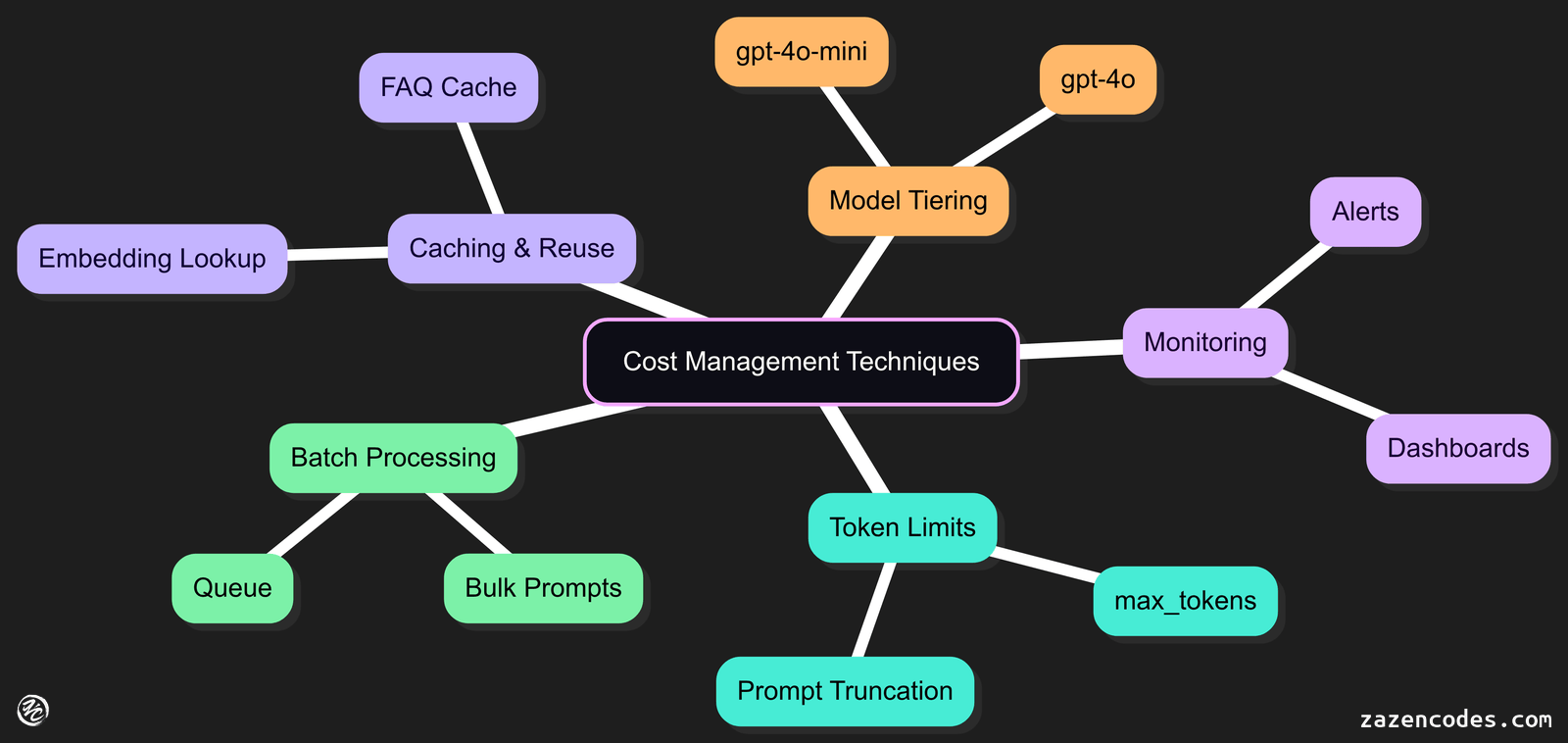
Managing costs is a tricky business when it comes to LLMs. Here are key strategies to control expenses when using provider APIs, e.g. GPT or Claude:
- Set Token Limits:
- Configure
max_tokensparameter to limit response length - Use token counting libraries to estimate costs before making API calls
- Implement hard limits in your application to prevent runaway costs
- Configure
from transformers import GPT2Tokenizer

def estimate_tokens(text):
    tokenizer = GPT2Tokenizer.from_pretrained('gpt2')
    return len(tokenizer.encode(text))

def make_cost_aware_request(prompt, max_cost_cents=5):
    estimated_tokens = estimate_tokens(prompt)
    cost_per_token = 0.0001  # Example rate
    estimated_cost = estimated_tokens * cost_per_token

    if estimated_cost > max_cost_cents/100:
        raise ValueError(f"Estimated cost ${estimated_cost} exceeds budget ${max_cost_cents/100}")

    return client.chat.completions.create(
        model="gpt-4o-mini",
        messages=[{"role": "user", "content": prompt}],
        max_tokens=1024
    )

resp = make_cost_aware_request(
    "what's that you say? an agent architecture costs 100x our old solution?",
    max_cost_cents=0,
)

# Output:
# ValueError: Estimated cost $0.0016 exceeds budget $0.0
- Monitor Usage:
- Implement usage tracking and alerting systems
- Set up spending limits and notifications
- Use logging to track costs per request
class CostTracker:
    def __init__(self):
        self.alert_cost_threshold = 100 # Alert at $100
        self.prompt_tokens = 0
        self.completion_tokens = 0
        self.prompt_cost = 0
        self.completion_cost = 0

    def log_request(self, prompt_tokens, completion_tokens, model="gpt-4o-mini"):
        prompt_rates = {
            "gpt-4o-mini": 0.15 / 1e6   # $0.15 / 1M tokens
            "gpt-4o": 2.50 / 1e6        # $2.50 / 1M tokens
        }
        completion_rates = {
            "gpt-4o-mini": 0.6 / 1e6    # $0.60 / 1M tokens
            "gpt-4o": 10 / 1e6          # $10 / 1M tokens
        }

        self.prompt_tokens += prompt_tokens
        self.completion_tokens += completion_tokens

        prompt_cost = prompt_tokens * prompt_rates[model]
        completion_cost = completion_tokens * completion_rates[model]

        self.prompt_cost += prompt_cost
        self.completion_cost += completion_cost

        total_cost = self.prompt_cost + self.completion_cost
        if total_cost > self.alert_cost_threshold:
            self.send_alert()

    def send_alert(self):
        # Implement notification system (email, Slack, etc.)
        pass
- Fallback Strategies:
- Implement model tiering based on task importance
- Use smaller models for initial processing
- Consider open-source alternatives for non-critical tasks
def smart_model_selection(prompt, importance="low"):
    models = {
        "low": "gpt-4o-mini",
        "medium": "gpt-4o",
        "high": "gpt-4o"
    }

    temperatures = {
        "low": 0.9,
        "medium": 0.7,
        "high": 0.5
    }

    return client.chat.completions.create(
        model=models[importance],
        messages=[{"role": "user", "content": prompt}],
        temperature=temperatures[importance]
    )
- Batch Processing:
- Combine multiple requests when possible
- Implement request queuing during peak times
- Use bulk processing for non-time-critical tasks
class RequestBatcher:
    def __init__(self, batch_size=10, separator="\n---\n"):
        self.queue = []
        self.batch_size = batch_size
        self.separator = separator

    def add_request(self, prompt):
        self.queue.append(prompt)
        if len(self.queue) >= self.batch_size:
            return self.process_batch()
        return None

    def process_batch(self):
        if not self.queue:
            return []

        prompts = self.queue[:self.batch_size]
        self.queue = self.queue[self.batch_size:]

        # Process multiple prompts in one API call with clear separation
        combined_prompt = (
            "Process each section separately and return responses in order, "
            "separated by '---':\n\n" +
            self.separator.join(prompts)
        )

        response = client.chat.completions.create(
            model="gpt-4o-mini",
            messages=[{"role": "user", "content": combined_prompt}]
        )

        # Split response back into individual answers
        answers = response.choices[0].message.content.split(self.separator)
        return [answer.strip() for answer in answers]

# Example usage
batcher = RequestBatcher(batch_size=3)

# Add three requests
prompts = [
    "Who would win in a fight superman or batman. Just tell me the winner",
    "Is a snake plant a good pet?",
    "Whats the fastest growing country in the world?",
    "I love coffee but it's 11pm so what do I do?",
]

for prompt in prompts:
    results = batcher.add_request(prompt)
    if results:
        print("Batch Results:")
        for i, result in enumerate(results, 1):
            print(f"\nResult {i}:")
            print(result)


# Output:
# INFO:httpx:HTTP Request: POST https://api.openai.com/v1/chat/completions "HTTP/1.1 200 OK"
# Batch Results:
#
# Result 1:
# Superman would win in a fight against Batman.
# ---
# A snake plant is a good choice for a pet in terms of low maintenance, as it requires minimal care and is non-toxic to pets.
# ---
# The fastest growing country in the world, in terms of GDP growth rate, is often reported to be Qatar or other nations in the Middle East, but this can vary based on specific years and economic conditions.
Looking at the output above, we can see that only one request was made, and we were able to get all of our answers and (in this case) parse them properly.
Also notice how the fourth question (about the coffee at 11pm ☕️) was not answered, but it’s been added to the queue:
print(batcher.queue)
# Output: ["I love coffee but it's 11pm so what do I do?"]
- Caching and Reuse:
- Implement response caching for frequently asked questions
- Store and reuse embeddings for similar queries
- Use semantic search to find similar existing responses
These strategies can significantly reduce API costs while maintaining service quality. But it’s important to regularly monitor and adjust these measures as time goes on and the model or application logic changes.
Rate Limiting
Most APIs impose rate limits to ensure fair usage. For instance, OpenAI allows a specific number of requests per minute based on your subscription.
At time of writing (early 2025), the Tier 3 rate limits ($100+ spend) are:
| Model | RPM | TPM | Batch Queue Limit |
|---|---|---|---|
| gpt-4o | 5,000 | 800,000 | 50,000,000 |
| gpt-4o-mini | 5,000 | 4,000,000 | 40,000,000 |
where
- RPM = Max Requests Per Minute
- TPM = Max Tokens Per Minute
- Batch Queue Limit = Max tokens queued for pending batch jobs
Monitoring usage patterns and implementing automatic throttling when approaching limits can help prevent service disruptions.
Conclusion
There’s a lot to consider when deploying any application to production, and—like we saw here - LLMs can introduce many additional complexities and points of uncertainty. But that’s part of what makes AI engineering so interesting and fun.
This lesson was awesome to build out. I find it absolutely mind-blowing how much value can be unlocked through a relatively simple API call to a language model like GPT-4o or GPT-4o-mini.
Key Takeaways
⏳ Choose between synchronous and asynchronous processing based on your application needs.
🔄 Consider streaming responses for a better user experience in interactive applications.
⚡ Implement caching when appropriate to improve performance and reduce costs.
🛠️ Build robust error handling and fallback strategies to maintain service reliability.
💰 Carefully manage costs through token limits, usage monitoring, and smart model selection.
🚦 Respect and plan for API rate limits to prevent service disruptions.
Next: Security
Up next, we’ll talk about securing LLM applications. This is super important, so don’t skip it!
Comments (0)
No comments yet.