API Development
APIs (Application Programming Interfaces) are standardized protocols and tools that enable different software applications to communicate and interact with each other. They provide a set of rules and methods for requesting and exchanging data between systems.
For AI engineering, they enable applications to interact with our machine learning models. In this section, we’ll talk about designing and implementing APIs for serving predictions.
This Lesson Will Cover
- 🌐 RESTful API Design and Principles
- 🐍 Python Frameworks for API Development (FastAPI and Flask)
- 🔒 API Security and Authentication
- ⚖️ API Gateway and Load Balancing
RESTful API Design
REST (Representational State Transfer) is a popular architectural style for designing APIs. It’s based on stateless communication, making it simple, scalable, and widely adopted.
Here’s how REST compares to some alternative approaches:
| API Type | Advantages ✅ | Disadvantages ❌ | Best Used For |
|---|---|---|---|
| REST | • Simple and stateless • Wide support • Uses standard HTTP methods • Flexible data formats |
• Limited real•time capabilities • Can be over•fetching • Multiple round trips for complex data |
• CRUD operations • Public APIs • Simple data exchanges |
| GraphQL | • Single endpoint • Precise data fetching • Strong typing |
• Complex setup • Server processing overhead • Caching challenges |
• Complex data requirements • Mobile apps • Nested data structures |
| gRPC | • High performance • Bi•directional streaming • Strong typing |
• Limited browser support • Steeper learning curve • Binary protocol |
• Microservices • Low•latency systems • Internal services |
| SOAP | • Strong security • Built•in error handling • Language independent |
• XML only • Complex structure • Verbose payload |
• Enterprise systems • Financial services • Legacy systems |
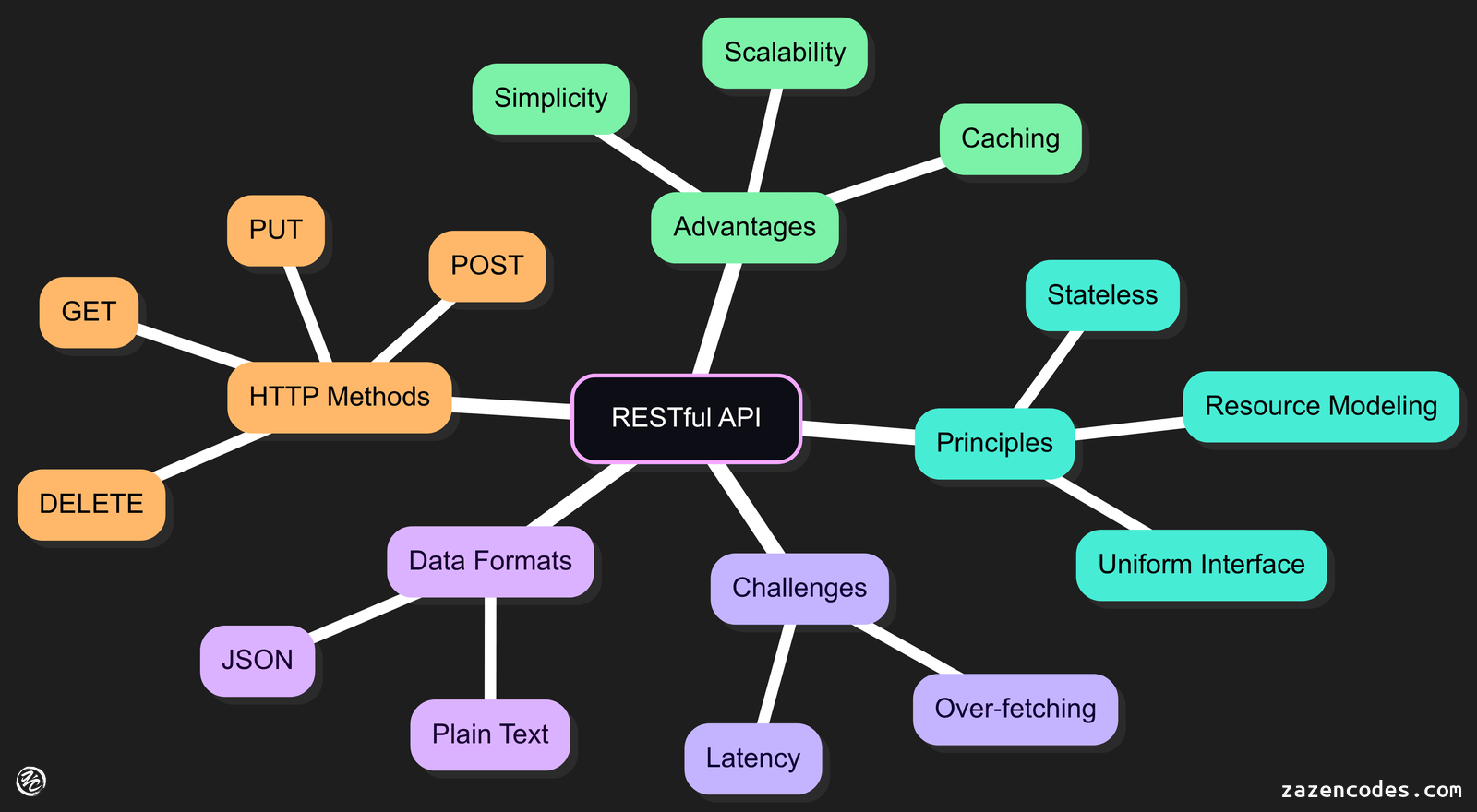
Key Principles of RESTful API Design
- Resource Identification: Use URLs to represent resources. For example,
/predictcan represent the endpoint for predictions. - HTTP Methods:
GET: Retrieve data.POST: Submit data (commonly used for predictions).PUT: Update data.DELETE: Remove data.
- Statelessness: Each request contains all necessary information; the server doesn’t retain client context between calls.
- Standardized Responses: Use JSON for request and response formats for compatibility.
Example of RESTful API Design
- Endpoint:
/predict - Method:
POST - Input:
{"features": [5.1, 3.5, 1.4, 0.2]} - Output:
{"prediction": "Iris-setosa"}
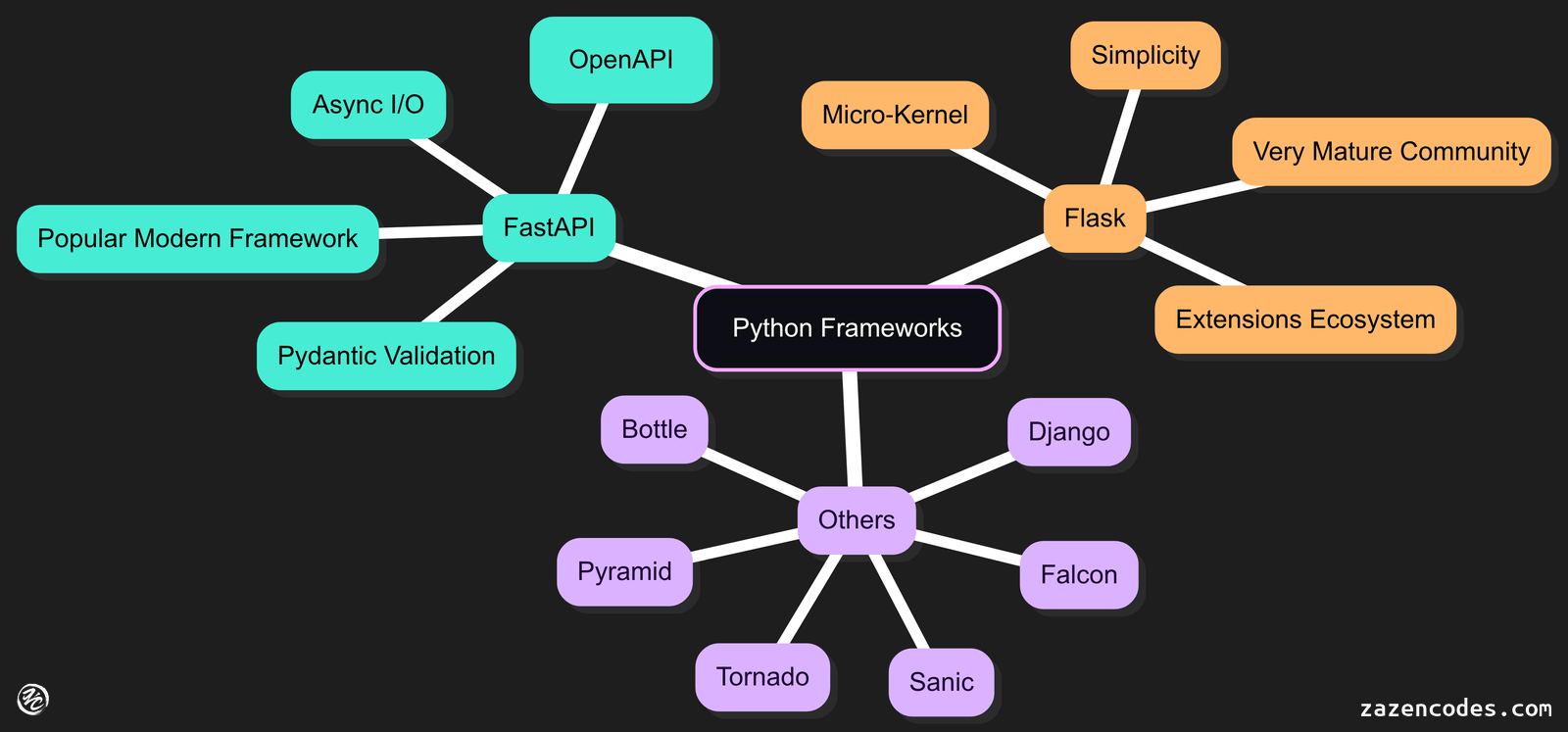
Python Frameworks for API Development
FastAPI
FastAPI is a modern Python framework for building high-performance APIs with asynchronous support and automatic documentation via OpenAPI.
FastAPI Example
from fastapi import FastAPI
from pydantic import BaseModel
import joblib

# Load the model
model = joblib.load("model.pkl")

# Define input schema
class Features(BaseModel):
    features: list[float]

app = FastAPI()

@app.post("/predict")
async def predict(data: Features):
    features = data.features
    prediction = model.predict([features])
    return {"prediction": prediction[0]}
To run this API, we can install FastAPI and uvicorn then execute: uvicorn main:app
Why FastAPI?
- Automatic validation of inputs and outputs.
- Built-in asynchronous support for handling multiple requests.
- Auto-generated API documentation available at
/docs. - Most popular choice these days.
Flask
Flask is another popular framework known for its simplicity and flexibility. It’s great for small-scale applications or quick prototyping.
Flask Example
from flask import Flask, request, jsonify
import joblib

model = joblib.load("model.pkl")
app = Flask(__name__)

@app.route("/predict", methods=["POST"])
def predict():
    data = request.json

    # Ensure "features" exists in the request
    if not (features := data.get("features")):
        return jsonify({"error": "Missing 'features' in request data"}), 400

    prediction = model.predict([features])
    return jsonify({"prediction": prediction[0]})

if __name__ == "__main__":
    app.run(host="0.0.0.0", port=5000)
To run this API, we can install Flask and then execute: python app.py
Side note—did you notice how we used the walrus operator :=. Python is awesome!
Why Flask?
- Minimal setup and configuration.
- A large community and extensive documentation.
- Much older than FastAPI but still a pleasure to build with.
API Security and Authentication
APIs exposed to the internet should be secured to prevent unauthorized access.
Key Security Practices
-
Authentication and Authorization:
- Use API keys, OAuth tokens, or JWTs (JSON Web Tokens) for authentication.
- Restrict sensitive endpoints to authorized users.
Example: API Key Authentication with FastAPI
from fastapi import Depends, HTTPException, Security from fastapi.security.api_key import APIKeyHeader import os API_KEY = os.environ["API_KEY"] if not API_KEY: raise ValueError("API_KEY env variable not set") api_key_header = APIKeyHeader(name="X-API-Key") def get_api_key(api_key: str = Security(api_key_header)): if api_key != API_KEY: raise HTTPException(status_code=403, detail="Invalid API Key") return api_key -
HTTPS: Encrypt communication using HTTPS to protect data in transit.
-
Input Validation:
- Validate and sanitize incoming data to reduce attack surfaces.
-
Rate Limiting:
- Limit requests to prevent abuse.
Example: Rate Limiting with FastAPI
from fastapi import FastAPI, Depends
from fastapi_limiter import FastAPILimiter
from fastapi_limiter.depends import RateLimiter
import redis.asyncio as redis

app = FastAPI()

# Initialize Redis on startup
@app.on_event("startup")
async def startup():
    redis_client = redis.Redis.from_url("redis://localhost")
    await FastAPILimiter.init(redis_client)

# Apply Rate Limiting (2 requests per 5 seconds)
@app.get("/predict", dependencies=[Depends(RateLimiter(times=2, seconds=5))])
async def predict():
    return {"message": "Prediction endpoint"}
API Gateway
An API Gateway acts as a single entry point for multiple APIs and microservices, handling tasks like routing, authentication, rate limiting, and load balancing.
It serves as a reverse proxy that directs client requests to appropriate backend services.
Key Functions of API Gateway
Here are some things that API gateways can do:
- Request Routing: Directs incoming requests to appropriate services.
- Authentication: Centralizes security and access control.
- Rate Limiting: Controls API usage and prevents abuse.
- Monitoring: Tracks API usage and performance.
- Protocol Translation: Converts between different protocols (REST, gRPC, etc.).
- Response Transformation: Modifies responses before sending them to clients.
Popular API Gateway Solutions
| Gateway | Features | Best Used For |
|---|---|---|
| Nginx | • Open source • Lightweight • High performance |
Self-hosted solutions |
| Kong | • Open source • Plugin architecture • High performance |
Large-scale deployments |
| AWS API Gateway | • AWS integration • Serverless support • Auto-scaling |
AWS-based applications |
| Azure API Management | • Azure integration • Developer portal • Policy management |
Azure-based systems |
Load Balancing
Load balancing (a component of API gateways, but also an independent concept) distributes incoming network traffic across multiple servers to ensure:
- High availability
- Optimal resource utilization
- Improved response times
- Fault tolerance
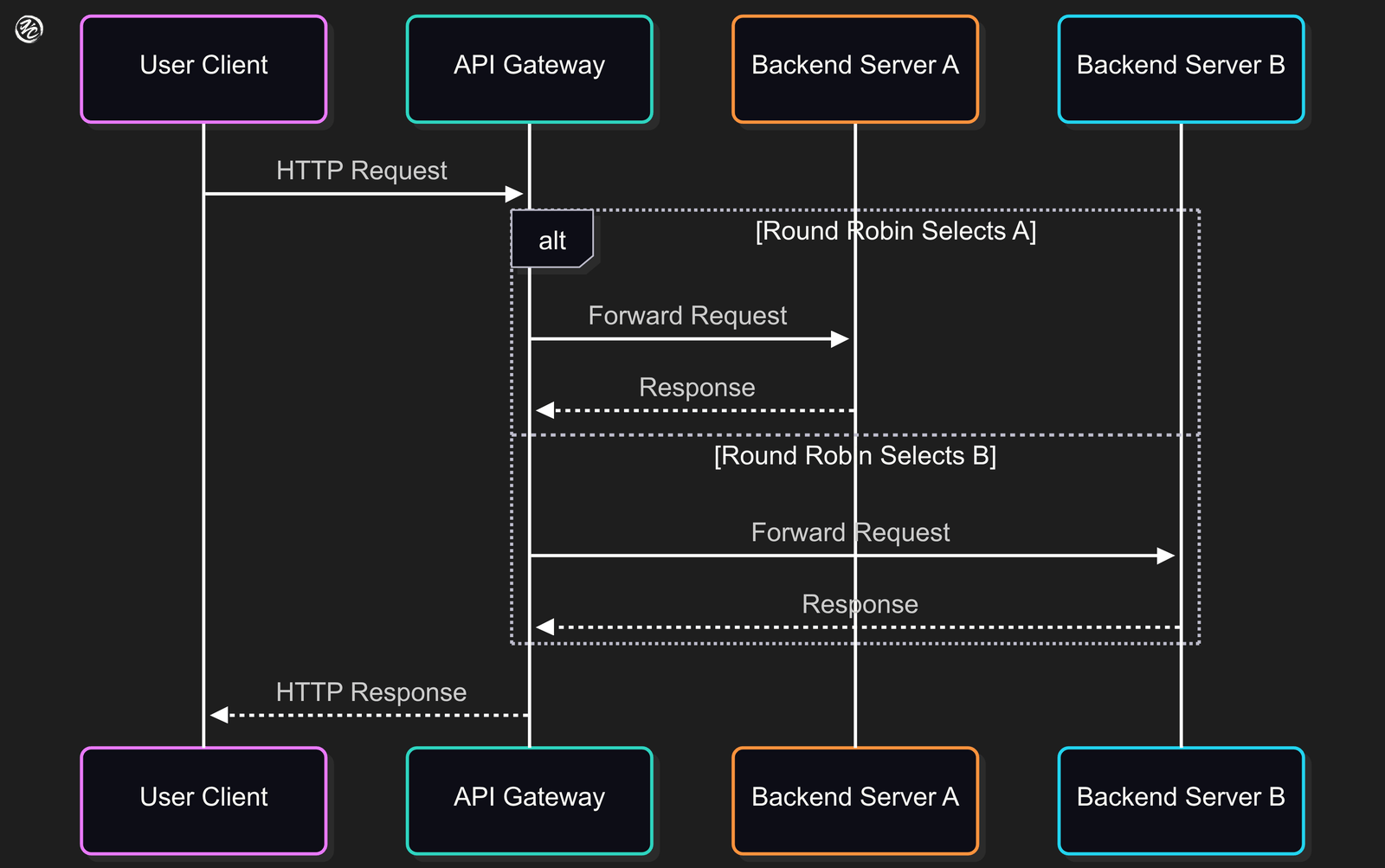
Load Balancing Algorithms
With just a few lines of code, we can make our app available to the world. However, with great power comes great responsibility. Be careful what you expose and keep an eye on those ports![1]
| Algorithm | Description | Best For |
|---|---|---|
| Round Robin | Requests are distributed sequentially | Equal server capabilities |
| Least Connections | Routes to server with fewest active connections | Mixed-length sessions |
| Weighted Round Robin | Servers receive requests proportional to their capacity | Different server capacities |
| IP Hash | Maps client IPs to specific servers | Session persistence |
Example Configuration (Nginx)
Below is a sample Nginx configuration demonstrating how to set up load balancing across multiple backend servers:
events {}
http {
    upstream backend_servers {
        least_conn;  # Load balancing algorithm
        server backend1.example.com:8080;
        server backend2.example.com:8080;
        server backend3.example.com:8080;
    }

    server {
        listen 80;
        location / {
            proxy_pass http://backend_servers;
        }
    }
}

# Note: this code is for demonstration and not suitable for a production setup
To run this Nginx configuration with Docker:
-
Save the config as
nginx.conf -
Create a Dockerfile:
FROM nginx:latest
COPY nginx.conf /etc/nginx/nginx.conf
EXPOSE 80
- Build and run the container:
# Build the image
docker build -t nginx-loadbalancer .

# Run the container
docker run -d -p 80:80 nginx-loadbalancer
Conclusion
There’s nothing quite like throwing together an API to serve a model or some data. With just a few lines of code, we can literally make our app available to the world.
But with great power comes great responsibility. Be careful what you make available to the world, and keep an eye on those ports[1:1]!
Key Takeaways
🌐 RESTful APIs provide a standardized way to serve ML model predictions, following principles like resource identification and stateless communication.
🐍 FastAPI and Flask are popular Python frameworks for API development and FastAPI is excels at at async, argument validation and automatic documentation.
🔒 API security is critical and should include authentication, HTTPS encryption, input validation, and rate limiting.
⚖️ API Gateways and load balancing help manage traffic, security, and scaling across multiple API instances or services.
Next: Containerization
Having seen how we can build APIs with Python, you might be wondering how to actually run them. We did mention briefly how, e.g., uvicorn main:app, but we didn’t really give this topic the time it deserves.
That’s because the best way to run applications like APIs is with containerization. We’ll talk about this in the next section.
Footnotes
Perplexity topic with basic API serving security considerations, e.g. firewalls, auth, etc. ↩︎ ↩︎
Comments (0)
No comments yet.