Agent Architectures
Building upon the foundation of RAG systems we just explored, agents take AI capabilities to the next level by introducing autonomous decision-making and action-taking[1].
Before we dig into this section, I need to stop and share an important point:
AI frameworks like LangGraph (which we use below) as under rapid development.
The demonstrations below are primarily intended to provide a conceptual understanding of agentic architectures (since I believe that seeing actual code is the best way to learn, so long as it’s comprehensible).
The point is that you should reference current documentation when building your own projects, rather than the examples below.
Many applications of LLMs rely on predefined control flows to complete tasks. For instance, RAG retrieves relevant documents, presents them to the LLM, and uses this context to produce grounded responses.
Agent architectures offer a dynamic alternative, where LLMs determine the sequence of operations required to solve a problem. By enabling LLMs to dynamically decide their control flow, agentic AI systems provide a flexible and powerful way to solve complex and evolving tasks.
This Lesson Will Cover
- 🏗️ Core concepts of AI agent architectures
- 🔀 Router agents for single-step decisions
- 🛠️ Tool calling for external system integration
- 🧠 Memory management strategies
- 🔄 Multi-step agents for complex tasks
- 🚀 Advanced architectural patterns
Key Capabilities of AI Agents
- Dynamic Routing: Selecting from multiple decision paths based on context.
- Tool Utilization: Calling specific tools or APIs when needed.
Router Agents
Router agents are the simplest form of agent architecture. They make single-step decisions by routing input to one of several predefined options.
Characteristics:
- Limited Autonomy: Decisions are restricted to predefined choices.
- Structured Outputs: Responses are predictable and easy to interpret.
Techniques:
- Prompt Engineering: Tailoring prompts to guide LLM behavior.
- Output Parsers: Extracting structured data from LLM outputs.
Example: Simple Router Agent with a Single Decision Node
This example uses “generative randomness”. This is okay, but reliable randomness requires tool use[2].
from typing import Literal, TypedDict, Annotated
from langgraph.graph import Graph, START, END
from langchain_core.messages import HumanMessage, AIMessage
from langchain_openai import ChatOpenAI

# Define state
class AgentState(TypedDict):
    messages: list[HumanMessage | AIMessage]
    selected_path: str

# Create LLM
llm = ChatOpenAI(model="gpt-4o-mini")

def route_decision(state) -> Literal["path_a", "path_b"]:
    if "TAKE PATH A" in state["selected_path"]:
        return "path_a"
    elif "TAKE PATH B" in state["selected_path"]:
        return "path_b"
    else:
        raise ValueError(f"Bad response: {decision_text}")

# Define nodes
def get_decision(state):
    # Get the last message
    messages = state["messages"]

    # Ask LLM to make a decision
    response = llm.invoke(
        [
            *messages,
            HumanMessage(content="Flip a coin. Then declare 'TAKE PATH A' if you get heads or 'TAKE PATH B' if you get tails. Let me know the result of the coin experiment. Make sure you keep it fair! After you tell me what path to take stop talking.")
        ]
    )

    # Update state with decision
    state["selected_path"] = response.content
    return state

def path_a(state):
    response = llm.invoke(
        [
            *state["messages"],
            HumanMessage(content="Better to stay home. Justify why this makes sense.")
        ]
    )
    state["messages"].append(response)
    return state

def path_b(state):
    response = llm.invoke(
        [
            *state["messages"],
            HumanMessage(content="Go to Japan. Justify why this makes sense.")
        ]
    )
    state["messages"].append(response)
    return state

# Create workflow
workflow = Graph()

# Add nodes
workflow.add_node("decision", get_decision)
workflow.add_node("path_a", path_a)
workflow.add_node("path_b", path_b)

workflow.add_edge(START, "decision")

# Add conditional edges
workflow.add_conditional_edges(
    "decision",
    route_decision,
)

# Add end
workflow.add_edge("path_a", END)
workflow.add_edge("path_b", END)

# Compile
graph = workflow.compile()

# Run example
response = graph.invoke({
    "messages": [
        HumanMessage(content="I want to go on vacation but I only have $500")
    ],
    "selected_path": ""
})

print("\nFinal Response:")
print(response["messages"][-1].content)
Here we’ve created the following graph using LangGraph:
from io import BytesIO
from PIL import Image
from IPython.display import display

display(Image.open(BytesIO(graph.get_graph().draw_mermaid_png())))
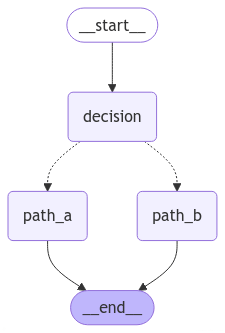
Running this, I got some fantastic news—GPT decided that I should go to Japan!
Final Response:
While $500 may seem like a limited budget for a vacation to Japan, there are various ways to make it work, especially if you plan and get creative. Here are a few justifications and strategies for why this trip could still be a feasible option:

1. **Flight Deals**: If you can find a last-minute flight deal or use points from frequent flyer programs, you might be able to secure a reasonably priced ticket. Occasionally, budget airlines offer special fares to Japan, especially from major hubs.

2. **Accommodation Options**: Japan has a wide range of accommodation options that can fit various budgets. Consider staying at hostels, capsule hotels, or guesthouses, which are not only affordable but also provide a unique cultural experience.

...
Inspecting the response, we can see the next_step data that was added to our state in the conditional step:
>>> response["selected_path"]
'Flipping the coin... \n\nResult: Tails.\n\nTAKE PATH B.'
WOW. Japan… lucky me!
Tool Calling
Tools are just a fancy term for functions. Tool-calling enables agents to interact with external systems like APIs, databases, or software tools. Agents dynamically choose which tools (functions) to call based on user input and task requirements.
Benefits
- Extended Capabilities: Tools enable LLMs to interact with external systems, databases, and APIs
- Real-Time Data: Access to current information beyond training data cutoff
- Specialized Functions: Perform calculations, data processing, and domain-specific tasks
- Verifiable Results: Generate outputs based on concrete data rather than model knowledge
- Reduced Hallucination: Ground responses in factual tool outputs rather than model predictions
Tool Example: Hypotenuse with LangChain
from langgraph.prebuilt import create_react_agent
from langchain_openai import ChatOpenAI
import math

model = ChatOpenAI(model="gpt-4o", temperature=0)

# Importing required modules
from langchain_core.tools import tool

@tool
def square_root(number: float) -> float:
    """Calculates the square root of a given number."""
    if number < 0:
        return "Error: Cannot calculate the square root of a negative number."
    return math.sqrt(number)

@tool
def square(number: float) -> float:
    """Calculates the square of a given number."""
    return number * number

# Assign the tool to the tools list
tools = [square_root, square]

# Define the graph
graph = create_react_agent(model, tools=tools)

inputs = {"messages": [("user", "calculate the hypotenuse of a triangle with sides 5 x 8")]}
for message in graph.stream(inputs):
    print(message)
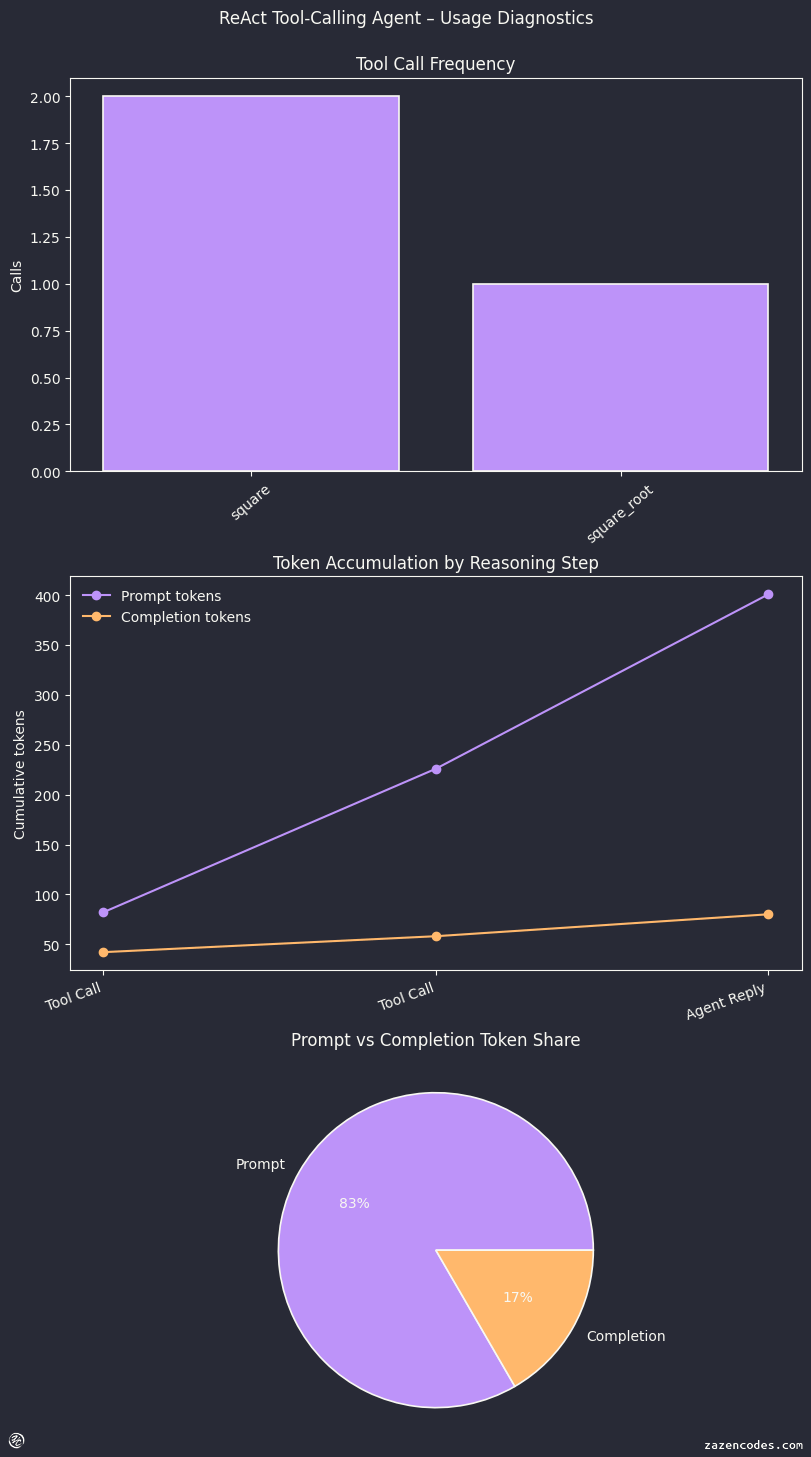
Here we’re taking advantage of create_react_agent, which is a helper function that LangGraph provides in order to spin up a ReAct (reasoning and acting) agent[3].
Here is the output I got when I ran this:
{'agent': {'messages': [AIMessage(content='', additional_kwargs={'tool_calls': [{'id': 'call_00oEOXtytB1Jo7UxpMBdOzj0', 'function': {'arguments': '{"number": 5}', 'name': 'square'}, 'type': 'function'}, {'id': 'call_emkS6FJZHlbsTWyehSuhpGkN', 'function': {'arguments': '{"number": 8}', 'name': 'square'}, 'type': 'function'}], 'refusal': None}, response_metadata={'token_usage': {'completion_tokens': 43, 'prompt_tokens': 82, 'total_tokens': 125, 'completion_tokens_details': {'accepted_prediction_tokens': 0, 'audio_tokens': 0, 'reasoning_tokens': 0, 'rejected_prediction_tokens': 0}, 'prompt_tokens_details': {'audio_tokens': 0, 'cached_tokens': 0}}, 'model_name': 'gpt-4o-2024-08-06', 'system_fingerprint': 'fp_eb9dce56a8', 'finish_reason': 'tool_calls', 'logprobs': None}, id='run-b2b6e626-4a22-4eba-8a9e-229095e45a03-0', tool_calls=[{'name': 'square', 'args': {'number': 5}, 'id': 'call_00oEOXtytB1Jo7UxpMBdOzj1', 'type': 'tool_call'}, {'name': 'square', 'args': {'number': 8}, 'id': 'call_emkS6FJZHlbsTWyehSuhpGkN', 'type': 'tool_call'}], usage_metadata={'input_tokens': 82, 'output_tokens': 43, 'total_tokens': 125, 'input_token_details': {'audio': 0, 'cache_read': 0}, 'output_token_details': {'audio': 0, 'reasoning': 0}})]}}
{'tools': {'messages': [ToolMessage(content='25.0', name='square', id='6d1adadf-79c1-48b9-be1c-32fb4f5ddd67', tool_call_id='call_00oEOXtytB1Jo7UxpMBdOzj1'), ToolMessage(content='64.0', name='square', id='153f6538-83af-45cf-a785-29b9cce8a45e', tool_call_id='call_emkS6FJZHlbsTWyehSuhpGkN')]}}
{'agent': {'messages': [AIMessage(content='', additional_kwargs={'tool_calls': [{'id': 'call_sWxMxZAYjIVLMSLOt8WbTksL', 'function': {'arguments': '{"number":89.0}', 'name': 'square_root'}, 'type': 'function'}], 'refusal': None}, response_metadata={'token_usage': {'completion_tokens': 17, 'prompt_tokens': 144, 'total_tokens': 161, 'completion_tokens_details': {'accepted_prediction_tokens': 0, 'audio_tokens': 0, 'reasoning_tokens': 0, 'rejected_prediction_tokens': 0}, 'prompt_tokens_details': {'audio_tokens': 0, 'cached_tokens': 0}}, 'model_name': 'gpt-4o-2024-08-06', 'system_fingerprint': 'fp_eb9dce56a8', 'finish_reason': 'tool_calls', 'logprobs': None}, id='run-85f4dc27-1039-4ce2-b3d0-8936a8756f82-0', tool_calls=[{'name': 'square_root', 'args': {'number': 89.0}, 'id': 'call_sWxMxZAYjIVLMSLOt8WbTksL', 'type': 'tool_call'}], usage_metadata={'input_tokens': 144, 'output_tokens': 17, 'total_tokens': 161, 'input_token_details': {'audio': 0, 'cache_read': 0}, 'output_token_details': {'audio': 0, 'reasoning': 0}})]}}
{'tools': {'messages': [ToolMessage(content='9.433981132056603', name='square_root', id='2ca7b1fe-8c61-44b3-b9fa-84ae51782176', tool_call_id='call_sWxMxZAYjIVLMSLOt8WbTksL')]}}
{'agent': {'messages': [AIMessage(content='The hypotenuse of a triangle with sides 5 and 8 is approximately 9.43.', additional_kwargs={'refusal': None}, response_metadata={'token_usage': {'completion_tokens': 23, 'prompt_tokens': 175, 'total_tokens': 198, 'completion_tokens_details': {'accepted_prediction_tokens': 0, 'audio_tokens': 0, 'reasoning_tokens': 0, 'rejected_prediction_tokens': 0}, 'prompt_tokens_details': {'audio_tokens': 0, 'cached_tokens': 0}}, 'model_name': 'gpt-4o-2024-08-06', 'system_fingerprint': 'fp_eb9dce56a8', 'finish_reason': 'stop', 'logprobs': None}, id='run-f8f56ea7-c665-49af-9dc7-b1445856ab9d-0', usage_metadata={'input_tokens': 175, 'output_tokens': 23, 'total_tokens': 198, 'input_token_details': {'audio': 0, 'cache_read': 0}, 'output_token_details': {'audio': 0, 'reasoning': 0}})]}}
Looking at this output, we can see the model (GPT-4o-mini) requesting tool calls automatically as needed, in order to provide the final answer: The hypotenuse of a triangle with sides 5 and 8 is approximately 9.43.
We can see a mix of calls to the square and square_root tools, and the results that we get back (25.0 and 9.433981132056603).
We can also see how the LLM requests tool calls, e.g. in the first message:
'tool_calls': [
  {
    'id': 'call_00oEXtytB1Jo7UxpMBdOzj1',
    'function': {
      'arguments': '{"number": 5}',
      'name': 'square'
    },
    'type': 'function'
  },
  {
    'id': 'call_emkS6FJZHlbsTWyehSuhpGkN',
    'function': {
      'arguments': '{"number": 8}',
      'name': 'square'
    },
    'type': 'function'
  }
]
It’s fascinating how GPT is deciding to call the tools and determining what arguments are needed, without any explicit programming.
Memory
Memory is important for maintaining context across interactions. We’re all familiar with how memory works in the context of LLM chats, but it’s less obvious how memory should work when it comes to AI Agents.
Types of Memory for LLMs
- Short-Term Memory: Immediate context within a task, e.g. conversation history, tool outputs.
- Long-Term Memory: Information from past interactions for future reference.
Memory Components for AI Agents
-
Message History
- Maintains conversation flow
- Tracks user inputs and agent responses
- Preserves context for decision-making
-
User History
- Stores personalization settings
- Has knowledge of past interactions
- Builds user behavior profiles over time
-
Tool State
- Stores results and execution status from tool calls
- Records tool usage patterns
- Caches frequent tool results
- Tracks tool success/failure rates
-
Task State
- Monitors completion status
- Stores intermediate calculations
- Maintains decision tree history
These categories describe the information’s role, rather than separate storage systems. Tool results can be included in message history, stored in task state or cached separately. The application controls which results are passed back to the model.
Example: Memory Integration
from langchain.memory import ConversationBufferMemory
from langchain_core.messages import HumanMessage, AIMessage
from langchain_openai import ChatOpenAI

# Initialize memory
memory = ConversationBufferMemory(
    memory_key="chat_history",
    return_messages=True
)

# Initialize chat model
llm = ChatOpenAI()

# Example conversation
memory.chat_memory.add_message(HumanMessage(content="My name is Alice"))
memory.chat_memory.add_message(AIMessage(content="Hello Alice! Nice to meet you."))

# Retrieve context for next interaction
chat_history = memory.load_memory_variables({})["chat_history"]

# Use memory in next interaction
response = llm.invoke(
    [
        *chat_history,
        HumanMessage(content="What's my name?")
    ]
)

print(response.content)  # Should reference "Alice"

# Output:
# Your name is Alice!
Memory Strategies
LLM memory has to be managed in order to keep the context window size within model limits. Here are a few strategies to consider:
-
Sliding Window
- Maintains fixed-size recent history
- Drops oldest entries at threshold
-
Summary-Based
- Periodically summarizes old context
- Preserves key information
-
Hierarchical
- Multiple memory layers
- Organizes information at different abstraction levels
Best Practices
Here are some operational considerations when it comes to handling LLM memory:
-
Memory Management
- Regular cleanup of stale data
- Token budget monitoring
- Context relevance filtering
-
State Persistence
- Reliable storage backends
- Crash recovery mechanisms
- Data consistency checks
-
Privacy Considerations
- Secure data handling
- User consent management
- Retention policy enforcement
Multi-step Agents
Compared to router agents that make single decisions, multi-step agents can execute more complicated reasoning to accomplish tasks. With this design, LLMs are allowed to make a series of consecutive decisions before being explicitly routed into a different step.
Example: Travel Planning Agent
This example demonstrates a multi-step travel planning agent that:
- Evaluates if the budget is sufficient
- Suggests appropriate destinations
- Plans optimal travel dates
The agent maintains state across steps and can make different decisions based on the outcomes of previous steps. This is more sophisticated than a simple router agent, as it builds a complete travel plan through multiple consecutive decisions and can adapt its recommendations based on the evolving context of the conversation.
from typing import TypedDict, Annotated, Sequence
from langgraph.graph import Graph, START, END
from langchain_core.messages import HumanMessage, AIMessage
from langchain_openai import ChatOpenAI

# Define state
class AgentState(TypedDict):
    messages: Sequence[HumanMessage | AIMessage]
    current_step: str
    budget_confirmed: bool
    destination_confirmed: bool
    dates_confirmed: bool

# Create LLM
llm = ChatOpenAI()

# Define nodes
def process_budget(state):
    messages = state["messages"]
    response = llm.invoke(
        [
            *messages,
            HumanMessage(content="Analyze the budget mentioned. Is it reasonable for a vacation? Respond with SUFFICIENT or INSUFFICIENT. Do not include any other words in your response.")
        ]
    )
    state["budget_confirmed"] = response.content.strip() == "SUFFICIENT"
    state["messages"].append(AIMessage(content=f"Budget analysis: {response.content}"))
    return state

def route(state):
    return state

def suggest_destination(state):
    messages = state["messages"]
    response = llm.invoke(
        [
            *messages,
            HumanMessage(content="Based on the budget and preferences, suggest a specific destination.")
        ]
    )
    state["destination_confirmed"] = True
    state["messages"].append(response)
    return state

def plan_dates(state):
    messages = state["messages"]
    response = llm.invoke(
        [
            *messages,
            HumanMessage(content="Suggest optimal travel dates considering the destination and budget.")
        ]
    )
    state["dates_confirmed"] = True
    state["messages"].append(response)
    return state

def insufficient_budget(state):
    response = llm.invoke(
        [
            *state["messages"],
            HumanMessage(content="I need you to tell me that the budget is insufficient. Console me the best you can, but be clear that my vacation dreams are over.")
        ]
    )
    state["messages"].append(response)
    return state

# Define conditional routing
def route_next_step(state):
    if not state["budget_confirmed"]:
        return "insufficient_budget"
    elif not state["destination_confirmed"]:
        return "suggest_destination"
    elif not state["dates_confirmed"]:
        return "plan_dates"
    else:
        return "end"

# Create workflow
workflow = Graph()

# Add nodes
workflow.add_node("process_budget", process_budget)
workflow.add_node("route", route)
workflow.add_node("insufficient_budget", insufficient_budget)
workflow.add_node("suggest_destination", suggest_destination)
workflow.add_node("plan_dates", plan_dates)

# Add edges
workflow.add_edge(START, "process_budget")
workflow.add_edge("process_budget", "route")
workflow.add_edge("insufficient_budget", END)
workflow.add_edge("suggest_destination", "route")
workflow.add_edge("plan_dates", "route")

# Add conditional edges
workflow.add_conditional_edges(
    "route",
    route_next_step,
    {
        "insufficient_budget": "insufficient_budget",
        "suggest_destination": "suggest_destination",
        "plan_dates": "plan_dates",
        "end": END,
    }
)

# Compile
graph = workflow.compile()

# Run example
response = graph.invoke({
    "messages": [
        HumanMessage(content="I want to plan a vacation with a budget of $2000")
    ],
    "current_step": "process_budget",
    "budget_confirmed": False,
    "destination_confirmed": False,
    "dates_confirmed": False
})

print("\nFinal Itinerary:")
for message in response["messages"]:
    print(message.content)
This is what our graph looks like:
from io import BytesIO
from PIL import Image
from IPython.display import display

display(Image.open(BytesIO(graph.get_graph().draw_mermaid_png())))
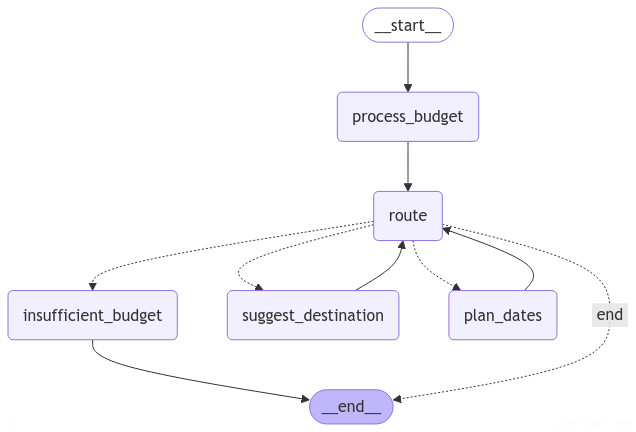
Here’s the output I got:
Final Itinerary:
I want to plan a vacation with a budget of $2000
Budget analysis: SUFFICIENT
One great destination that can be enjoyed on a budget of $2000 is Cancun, Mexico. With its beautiful beaches, vibrant nightlife, and rich culture, Cancun offers a mix of relaxation and excitement. You can take advantage of all-inclusive resort packages, enjoy delicious local cuisine, explore Mayan ruins, and go on various excursions such as snorkeling, zip-lining, or swimming with dolphins. Flights to Cancun from the US are usually affordable, and accommodations can be found at budget-friendly prices. Overall, Cancun is a fantastic destination that offers great value for your vacation budget.
For optimal travel dates to Cancun with a budget of $2000, it's important to consider both the weather and the potential for lower prices. The best time to visit Cancun for good weather and lower prices is during the shoulder seasons of late April to early June or late November to mid-December. During these times, you can find lower prices on flights and accommodations compared to the peak tourist season.

Additionally, mid-week flights are often cheaper than weekend flights, so consider flying out on a Tuesday or Wednesday and returning on a Tuesday or Wednesday as well. This can help stretch your budget further and allow you to enjoy more activities and excursions during your trip.

Overall, planning your trip to Cancun during the shoulder seasons and booking mid-week flights can help you make the most of your $2000 budget while still experiencing all the beauty and excitement that Cancun has to offer.
Looking at the response object, I can see the full history of messages generated by the graph, and I can also see the state:
{'messages': [HumanMessage(content='I want to plan a vacation with a budget of $2000', additional_kwargs={}, response_metadata={}),
  AIMessage(content='Budget analysis: SUFFICIENT', additional_kwargs={}, response_metadata={}),
  AIMessage(content='One great destination that can be enjoyed on a budget of $2000 is Cancun, Mexico. With its beautiful beaches, vibrant nightlife, and rich culture, Cancun offers a mix of relaxation and excitement. You can take advantage of all-inclusive resort packages, enjoy delicious local cuisine, explore Mayan ruins, and go on various excursions such as snorkeling, zip-lining, or swimming with dolphins. Flights to Cancun from the US are usually affordable, and accommodations can be found at budget-friendly prices. Overall, Cancun is a fantastic destination that offers great value for your vacation budget.', additional_kwargs={'refusal': None}, response_metadata={'token_usage': {'completion_tokens': 123, 'prompt_tokens': 46, 'total_tokens': 169, 'completion_tokens_details': {'accepted_prediction_tokens': 0, 'audio_tokens': 0, 'reasoning_tokens': 0, 'rejected_prediction_tokens': 0}, 'prompt_tokens_details': {'audio_tokens': 0, 'cached_tokens': 0}}, 'model_name': 'gpt-3.5-turbo-0125', 'system_fingerprint': None, 'finish_reason': 'stop', 'logprobs': None}, id='run-b51178f7-7d3a-4d47-ad0c-dacbd45b7f54-0', usage_metadata={'input_tokens': 46, 'output_tokens': 123, 'total_tokens': 169, 'input_token_details': {'audio': 0, 'cache_read': 0}, 'output_token_details': {'audio': 0, 'reasoning': 0}}),
  AIMessage(content="For optimal travel dates to Cancun with a budget of $2000, it's important to consider both the weather and the potential for lower prices. The best time to visit Cancun for good weather and lower prices is during the shoulder seasons of late April to early June or late November to mid-December. During these times, you can find lower prices on flights and accommodations compared to the peak tourist season.\n\nAdditionally, mid-week flights are often cheaper than weekend flights, so consider flying out on a Tuesday or Wednesday and returning on a Tuesday or Wednesday as well. This can help stretch your budget further and allow you to enjoy more activities and excursions during your trip.\n\nOverall, planning your trip to Cancun during the shoulder seasons and booking mid-week flights can help you make the most of your $2000 budget while still experiencing all the beauty and excitement that Cancun has to offer.", additional_kwargs={'refusal': None}, response_metadata={'token_usage': {'completion_tokens': 179, 'prompt_tokens': 171, 'total_tokens': 350, 'completion_tokens_details': {'accepted_prediction_tokens': 0, 'audio_tokens': 0, 'reasoning_tokens': 0, 'rejected_prediction_tokens': 0}, 'prompt_tokens_details': {'audio_tokens': 0, 'cached_tokens': 0}}, 'model_name': 'gpt-3.5-turbo-0125', 'system_fingerprint': None, 'finish_reason': 'stop', 'logprobs': None}, id='run-ed186439-da52-4bb5-8c26-10b6ba88fcc9-0', usage_metadata={'input_tokens': 171, 'output_tokens': 179, 'total_tokens': 350, 'input_token_details': {'audio': 0, 'cache_read': 0}, 'output_token_details': {'audio': 0, 'reasoning': 0}})],
 'current_step': 'process_budget',
 'budget_confirmed': True,
 'destination_confirmed': True,
 'dates_confirmed': True}
Just for fun, I re-ran it with a budget of $1 and received some disheartening news:
Final Itinerary:
I want to plan a vacation with a budget of $1
Budget analysis: INSUFFICIENT
I'm sorry to inform you that your budget of $1 is insufficient to plan a vacation. I understand that this may be disappointing, but there are still other ways to have a fun and enjoyable time without going on a traditional vacation. Perhaps you could consider having a staycation, exploring local attractions, or even just taking a day trip to a nearby destination. Remember, the most important thing is to make the most out of the resources you have available. I'm here to help you brainstorm alternative ideas within your budget constraints.
Other Architecture Concepts
Real-world problems might require AI agents that incorporate even more sophisticated architectural patterns beyond basic routing, tool usage, and multi-step graphs.
Here are some patterns to consider:
Human-in-the-Loop
- Involves human oversight for high-stakes tasks
- Ensures reliability in decision-making
- Introduces accountability in the process
- Useful for ambiguous situations
Parallelization
- Enables concurrent task processing
- Enhances efficiency for independent subtasks
- Allows multiple agents to work simultaneously
- Optimizes system performance
Subgraphs
- Provides modular organization of multi-agent systems
- Enables hierarchical system structuring
- Manages isolated states effectively
- Controls communication between system components
Reflection
- Enables agents to self-assess performance
- Allows iterative revision of actions
- Improves adaptability over time
- Minimizes errors through continuous learning
Error Recovery
- Implements fallback mechanisms
- Provides automatic error detection
- Enables graceful degradation
- Supports self-healing capabilities
Context Management
- Maintains conversation history effectively
- Implements context switching mechanisms
- Manages multiple conversation threads
- Supports context prioritization
Resource Management
- Optimizes computational resource usage
- Implements token budget management
- Controls API call frequency
- Balances performance and cost
AI Agents are an area of rapidly advancing research, with new approaches and methodologies emerging frequently, so it’s important to stay up to date on what strategies are being tested and what’s been working for people.
Conclusion
The state of AI is evolving so fast that it’s going to be difficult to keep the examples in this section relevant (at least, when it comes to the details).
The examples above use LangGraph, which was only released in January 2024, and will certainly go through major revisions and breaking changes in the coming years as the framework develops further.
The point, as I mentioned at the start of this lesson, is that you should reference current documentation when building your projects and use the demonstrations above to build a conceptual understanding of agentic architectures.
Key Takeaways
📡 Router agents provide simple but effective single-step decision-making.
🛠️ Tool calling enables agents to interact with external systems and data.
🧠 Memory management is crucial for maintaining context and user history.
🔄 Multi-step agents can handle complex tasks through sequential decision-making.
🚀 Advanced patterns enable sophisticated agent architectures.
⚙️ Proper resource and context management are essential for production systems.
Next: AI Agent Capabilities
We’ve introduced a lot of new concepts here, so let’s backtrack and break some of these ideas down in more detail. In the next and final section on AI agents, we’ll discuss AI agent capabilities.
Footnotes
Chip Huyen, who was “happily unemployed” in early 2025 (having sold her ML company, and having published an AI Engineering book) and wrote some amazing blog posts, including one on Agents. It’s a great in-depth introduction. ↩︎
You can Give your LLM proper random decision-making abilities with the Random Number Generator MCP server. This was the first MCP server that I built and I love it because it’s so simple (but still very effective). ↩︎
I have a couple YouTube videos that explain ReAct agents with some hands-on examples (arXiv “research agent”) ↩︎
Comments (0)
No comments yet.