Advanced Patterns
As we build more complex knowledge-intensive applications, we’ll encounter scenarios that go beyond simple retrieval and response generation. This lesson will explore some of these.
This Lesson Will Cover
- 🧠 Multi-Step Reasoning for Complex Queries
- 🔍 Self-Querying Systems for Query Refinement
- 🔁 Recursive Retrieval for Deep Context Exploration
- 🎯 Response Synthesis Optimization Techniques
Multi-Step Reasoning
Multi-step reasoning involves breaking down a complex query into smaller, manageable sub-queries. Each step retrieves or generates intermediate results that build towards a final answer.
Use Cases
Answering multi-hop questions, e.g.
-
“What is the maximum operating temperature of the cooling system in the A320neo compared to the previous A320 model?”
- Find specs for A320neo cooling system
- Find specs for original A320 cooling system
- Compare temperature ratings
-
“What safety certifications are needed to sell our industrial robot in both EU and Japanese markets?”
- Find EU certification requirements for industrial robots
- Find Japanese certification requirements
- Identify all necessary certifications to meet both standards
Workflow
- Decompose the query into sub-questions.
- Retrieve documents and generate responses iteratively.
- Synthesize the final response.
Diagram
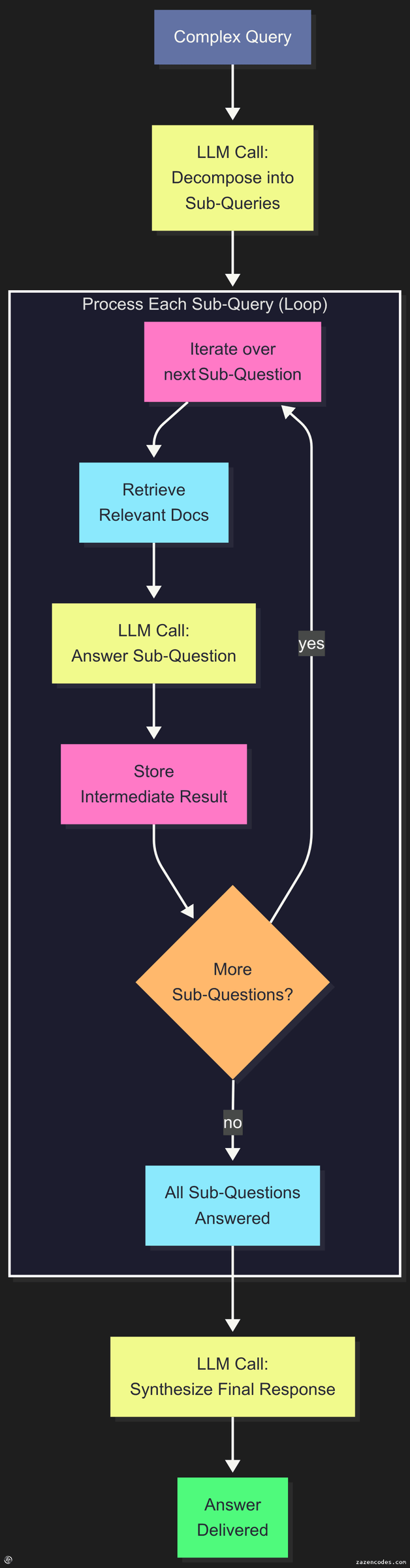
Example: Multi-step reasoning with intermediate queries
from langchain.chat_models import ChatOpenAI
from langchain.prompts import ChatPromptTemplate
from langchain.retrievers import BM25Retriever
from langchain.schema import Document
from typing import List

# Initialize components
llm = ChatOpenAI(model="gpt-4o-mini")
retriever = BM25Retriever.from_documents([
    Document(page_content="A320neo cooling system max temp: 85°C"),
    Document(page_content="Original A320 cooling system max temp: 75°C"),
])

def multi_step_query(complex_query: str) -> str:
    # Step 1: Decompose query into sub-questions
    decompose_prompt = ChatPromptTemplate.from_messages([
        ("system", "Break down this complex query into specific sub-questions. Only include numbered questions in your response. One question per line."),
        ("user", "{query}")
    ])

    decompose_response = llm.invoke(
        decompose_prompt.format_messages(query=complex_query)
    )
    sub_questions = decompose_response.content.split("\n")

    print("Decomposed into sub-questions:")
    for i, question in enumerate(sub_questions):
        print(question)
    print("--------------------------------------")

    # Step 2: Process each sub-question
    intermediate_results = []
    for question in sub_questions:
        # Retrieve relevant documents
        docs = retriever.get_relevant_documents(question)

        # Generate answer for sub-question
        answer_prompt = ChatPromptTemplate.from_messages([
            ("system", "Answer the question using the provided context."),
            ("user", "Context: {context}\nQuestion: {question}")
        ])

        context = "\n".join([doc.page_content for doc in docs])
        answer = llm.invoke(
            answer_prompt.format_messages(
                context=context,
                question=question
            )
        )

        print("Question:", question)
        print("Context:\n", context)
        print("Answer:", answer)
        print("--------------------------------------")

        intermediate_results.append(answer.content)

    # Step 3: Synthesize final response
    synthesis_prompt = ChatPromptTemplate.from_messages([
        ("system", "Synthesize a final answer from these intermediate results."),
        ("user", "Results: {results}\nOriginal Question: {query}")
    ])

    final_response = llm.invoke(
        synthesis_prompt.format_messages(
            results="\n".join(intermediate_results),
            query=complex_query
        )
    )


    return final_response.content

# Example usage
query = "What is the maximum operating temperature difference between the A320neo and original A320 cooling systems?"
result = multi_step_query(query)
print(f"Final Answer: {result}")
Here’s the sub-questions output:
Decomposed into sub-questions:
1. What is the maximum operating temperature of the A320neo cooling system?
2. What is the maximum operating temperature of the original A320 cooling system?
3. How is the maximum operating temperature difference calculated?
4. Are there any specific design changes in the A320neo cooling system compared to the original A320?
5. What are the implications of the temperature difference for performance and efficiency?
6. Are there any industry standards or regulations that affect the cooling systems of the A320neo and original A320?
7. How do environmental factors influence the cooling systems of both aircraft models?
8. What materials or technologies in the A320neo contribute to its cooling system performance?
9. Have there been any reported issues related to cooling system temperatures in either aircraft model?
10. What is the significance of understanding the temperature difference for maintenance and operation of the aircraft?
Uh-oh! This is a lot more questions than we wanted 🙈
--------------------------------------
Question: 1. What is the maximum operating temperature of the A320neo cooling system?
Context:
 Original A320 cooling system max temp: 75°C
A320neo cooling system max temp: 85°C
Answer: content='The maximum operating temperature of the A320neo cooling system is 85°C.' additional_kwargs={} response_metadata={'token_usage': {'completion_tokens': 17, 'prompt_tokens': 65, 'total_tokens': 82, 'completion_tokens_details': {'accepted_prediction_tokens': 0, 'audio_tokens': 0, 'reasoning_tokens': 0, 'rejected_prediction_tokens': 0}, 'prompt_tokens_details': {'audio_tokens': 0, 'cached_tokens': 0}}, 'model_name': 'gpt-4o-mini', 'system_fingerprint': 'fp_7fcd609668', 'finish_reason': 'stop', 'logprobs': None} id='run-b09ccb38-448c-436f-8c2b-70a69f11e6a0-0'
--------------------------------------
Question: 2. What is the maximum operating temperature of the original A320 cooling system?
Context:
 Original A320 cooling system max temp: 75°C
A320neo cooling system max temp: 85°C
Answer: content='The maximum operating temperature of the original A320 cooling system is 75°C.' additional_kwargs={} response_metadata={'token_usage': {'completion_tokens': 17, 'prompt_tokens': 65, 'total_tokens': 82, 'completion_tokens_details': {'accepted_prediction_tokens': 0, 'audio_tokens': 0, 'reasoning_tokens': 0, 'rejected_prediction_tokens': 0}, 'prompt_tokens_details': {'audio_tokens': 0, 'cached_tokens': 0}}, 'model_name': 'gpt-4o-mini', 'system_fingerprint': 'fp_7fcd609668', 'finish_reason': 'stop', 'logprobs': None} id='run-923ee15a-b127-4ecc-8b2c-45cce2cc3a93-0'
--------------------------------------
...
...
...
...
--------------------------------------
Question: 10. What is the significance of understanding the temperature difference for maintenance and operation of the aircraft?
Context:
 Original A320 cooling system max temp: 75°C
A320neo cooling system max temp: 85°C
Answer: content="Understanding the temperature difference between the original A320 cooling system (max temp: 75°C) and the A320neo cooling system (max temp: 85°C) is significant for several reasons related to maintenance and operation:\n\n1. **Performance Optimization**: Knowing the maximum operating temperatures helps ensure that the cooling systems function efficiently within their designed parameters, preventing overheating and ensuring optimal performance during flight.\n\n2. **Maintenance Scheduling**: The higher max temperature for the A320neo may influence maintenance schedules and practices. Technicians need to be aware of the different tolerances to prevent premature wear or failure of components in the cooling system.\n\n3. **Safety Considerations**: Understanding the temperature limits is crucial for ensuring the safety of the aircraft. Operating close to or above the maximum temperature could result in system failure, leading to potential safety hazards.\n\n4. **Operational Limits**: Pilots and flight crews must be informed about the differences in cooling system capabilities to adjust their operational procedures accordingly, especially in extreme weather conditions or during high-demand scenarios.\n\n5. **Training and Familiarization**: Maintenance crews and flight crews must be trained on the differences between the A320 and A320neo systems to ensure they understand the implications of these temperature limits on the aircraft's overall operation and maintenance.\n\nBy recognizing the significance of the temperature difference, stakeholders can make informed decisions that enhance the reliability, safety, and efficiency of aircraft operations." additional_kwargs={} response_metadata={'token_usage': {'completion_tokens': 284, 'prompt_tokens': 68, 'total_tokens': 352, 'completion_tokens_details': {'accepted_prediction_tokens': 0, 'audio_tokens': 0, 'reasoning_tokens': 0, 'rejected_prediction_tokens': 0}, 'prompt_tokens_details': {'audio_tokens': 0, 'cached_tokens': 0}}, 'model_name': 'gpt-4o-mini', 'system_fingerprint': 'fp_7fcd609668', 'finish_reason': 'stop', 'logprobs': None} id='run-a5500bdd-9982-41e5-93db-602e2fbde843-0'
--------------------------------------
Final Answer: The maximum operating temperature difference between the A320neo and the original A320 cooling systems is 10°C. The A320neo cooling system has a maximum operating temperature of 85°C, while the original A320 cooling system's maximum is 75°C. This indicates that the A320neo can operate at higher temperatures, which can enhance its performance and efficiency in various conditions.
Well it was pretty inefficient, but at least it was effective!
As a next step we could add tighter constraints to the decomposition prompt.
Self-Querying
Self-querying systems dynamically reformulate queries to improve retrieval accuracy. Instead of relying on a static query, the model adapts the input based on intermediate results.
Use Cases
Answering questions with ambiguous or incomplete information, e.g.
-
“What was the company’s revenue?”
- Initial query finds multiple revenue reports
- System identifies need for time period
- Query refined to “What was the company’s revenue in Q4 2024?”
-
“How do I configure the API?”
- Initial search finds various API documentation
- System identifies multiple versions and environments
- Query refined to “How do I configure the REST API v2.0 in a production environment?”
-
“What’s the delivery time?”
- Initial search retrieves general shipping information
- System identifies need for location and product type
- Query refined to “What’s the delivery time for furniture to the Toronto, ON?”
Workflow
- Use the initial query to retrieve preliminary results.
- Analyze the results to refine the query.
- Perform another retrieval pass with the refined query.
Diagram
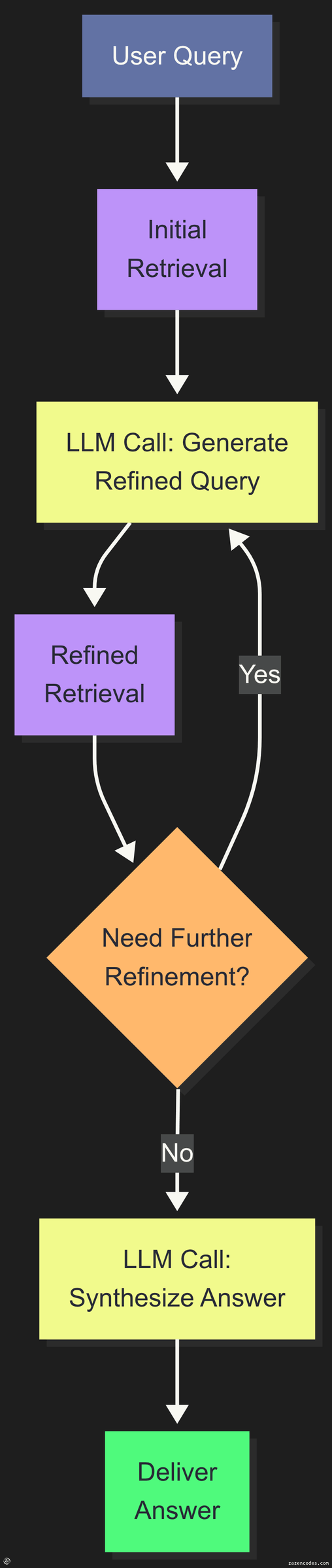
Example: Self-querying implementation
from langchain.chat_models import ChatOpenAI
from langchain.retrievers import BM25Retriever
from langchain.schema import Document
from langchain.prompts import ChatPromptTemplate

# Initialize components
llm = ChatOpenAI(model="gpt-4o-mini")
retriever = BM25Retriever.from_documents([
    Document(page_content="Q1 2023 Revenue: $28M"),
    Document(page_content="Q2 2023 Revenue: $20M"),
    Document(page_content="Q3 2023 Revenue: $48M"),
    Document(page_content="Q4 2023 Revenue: $98M"),
    Document(page_content="Q1 2024 Revenue: $50M"),
    Document(page_content="Q2 2024 Revenue: $45M"),
    Document(page_content="Q3 2024 Revenue: $48M"),
    Document(page_content="Q4 2024 Revenue: $42M"),
])

def self_querying_search(initial_query: str) -> str:
    print("Provided initial query:")
    print(initial_query)
    print("----------------------------------")

    # Step 1: Initial retrieval
    initial_docs = retriever.get_relevant_documents(initial_query)
    initial_context = "\n".join([doc.page_content for doc in initial_docs])

    # Step 2: Analyze and refine query
    refine_prompt = ChatPromptTemplate.from_messages([
        ("system", "Analyze the context and original query. If needed, create a more specific query. Only output the new query that we can pass directly into an LLM to invoke a response."),
        ("user", "Context: {context}\nOriginal Query: {query}")
    ])

    refined_query_response = llm.invoke(
        refine_prompt.format_messages(
            context=initial_context,
            query=initial_query
        )
    )
    refined_query = refined_query_response.content

    print("Generated refined query:")
    print(refined_query)
    print("----------------------------------")

    # Step 3: Perform refined search
    refined_docs = retriever.get_relevant_documents(refined_query)
    refined_context = "\n".join([doc.page_content for doc in refined_docs])

    # Step 4: Generate final response
    answer_prompt = ChatPromptTemplate.from_messages([
        ("system", "Generate a clear answer using the refined context."),
        ("user", "Context: {context}\nQuestion: {query}")
    ])


    rendered_prompt = answer_prompt.format_messages(
        context=refined_context,
        query=refined_query
    )
    print("Prompt for final response:")
    print(rendered_prompt)
    print("----------------------------------")

    final_response = llm.invoke(rendered_prompt)
    return final_response.content

# Example usage
query = "What was the company's revenue?"
result = self_querying_search(query)
print(f"Answer: {result}")
Here’s the full output:
Provided initial query:
What was the company's revenue?
----------------------------------
Generated refined query:
What was the total revenue for the company in 2024?
----------------------------------
Prompt for final response:
[SystemMessage(content='Generate a clear answer using the refined context.', additional_kwargs={}, response_metadata={}), HumanMessage(content='Context: Q4 2024 Revenue: $42M\nQ3 2024 Revenue: $48M\nQ2 2024 Revenue: $45M\nQ1 2024 Revenue: $50M\nQuestion: What was the total revenue for the company in 2024?', additional_kwargs={}, response_metadata={})]
----------------------------------
Answer: To calculate the total revenue for the company in 2024, we add the revenue from each quarter:

Q1 2024: $50M
Q2 2024: $45M
Q3 2024: $48M
Q4 2024: $42M

Total Revenue = $50M + $45M + $48M + $42M = $185M

Therefore, the total revenue for the company in 2024 was $185 million.
In this case the model refined the query to focus on 2024.
Recursive Retrieval
In recursive retrieval, the output of one retrieval step becomes the input for the next. This can be useful for tasks that require context expansion or in-depth exploration.
Use Cases
Exploring interconnected technical documentation, e.g.
-
“What are all the dependencies for deploying our microservice?”
- Find direct deployment requirements
- For each requirement, find its own dependencies
- Recursively explore until complete dependency tree is mapped
-
“What security implications does this API endpoint have?”
- Find immediate security considerations
- Explore referenced security protocols
- Investigate each protocol’s requirements and vulnerabilities
-
“How does this database schema impact other systems?”
- Identify direct schema relationships
- Explore connected tables and views
- Trace data flow through dependent systems
-
“What are all the compliance requirements for this medical device?”
- Find primary regulatory requirements
- Explore each requirement’s sub-requirements
- Investigate referenced standards and guidelines
Workflow
- Perform an initial retrieval for a broad query.
- Use retrieved chunks to generate new, focused queries.
- Iterate until sufficient detail is gathered.
Diagram
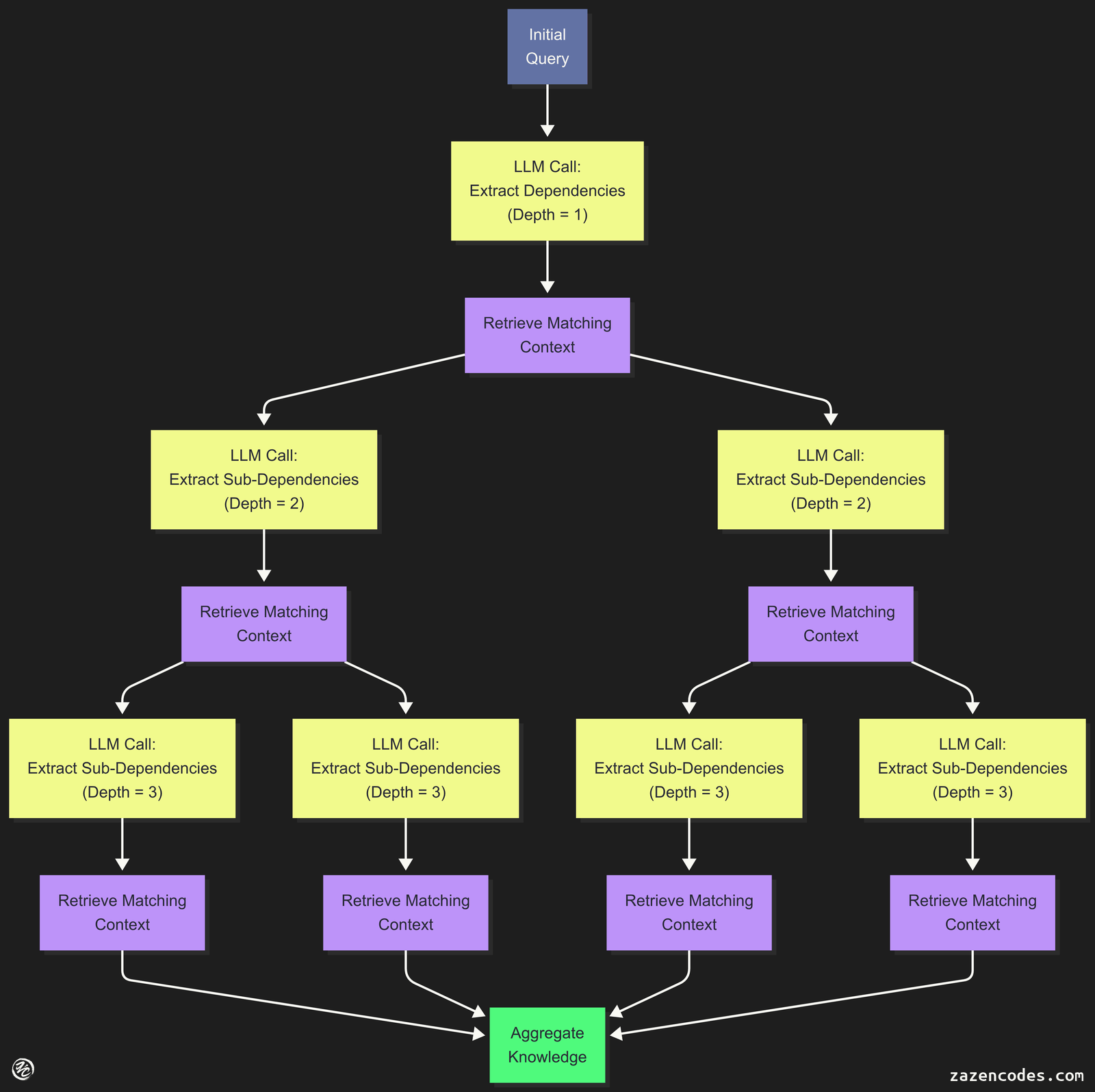
Example: Recursive retrieval implementation
from langchain.chat_models import ChatOpenAI
from langchain.retrievers import BM25Retriever
from langchain.schema import Document
from langchain.prompts import ChatPromptTemplate
from typing import List, Set

# Initialize components
llm = ChatOpenAI(model="gpt-4o-mini")
retriever = BM25Retriever.from_documents([
    Document(page_content="Service 'Alpha' requires Redis and PostgreSQL"),
    Document(page_content="Redis requires TCP port 6379"),
    Document(page_content="PostgreSQL requires TCP port 5432 and WAL logging"),
])

def recursive_retrieval(initial_query: str, max_depth: int = 3) -> str:
    explored = set()
    all_findings = []

    def explore_topic(query: str, depth: int) -> None:
        if depth >= max_depth or query in explored:
            print(f"[Depth {depth}] Skipping query (Already explored or max depth reached): {query}\n")
            return

        print(f"[Depth {depth}] Exploring query: {query}\n")
        explored.add(query)

        # Retrieve documents for current query
        docs = retriever.get_relevant_documents(query)
        context = "\n".join([doc.page_content for doc in docs])
        all_findings.append(context)

        print(f"[Depth {depth}] Retrieved Context:\n{context}\n")

        # Generate sub-queries based on findings
        sub_query_prompt = ChatPromptTemplate.from_messages([
            ("system", "Generate follow-up questions based on this context (max of 2). Only output the questions. Output one question per line."),
            ("user", "Context: {context}")
        ])

        sub_queries_response = llm.invoke(
            sub_query_prompt.format_messages(context=context)
        )
        sub_queries = sub_queries_response.content.split("\n")

        print(f"[Depth {depth}] Generated Sub-queries:\n{sub_queries}\n")

        # Recursively explore sub-queries
        for sub_query in sub_queries:
            if sub_query.strip():  # Ensure it's not an empty string
                explore_topic(sub_query.strip(), depth + 1)

    print("Starting Recursive Retrieval Process...\n")
    explore_topic(initial_query, 0)
    print("Recursive Retrieval Complete. Synthesizing Final Response...\n")

    # Synthesize final response
    synthesis_prompt = ChatPromptTemplate.from_messages([
        ("system", "Synthesize all findings into a comprehensive response."),
        ("user", "Findings: {findings}\nOriginal Query: {query}")
    ])

    rendered_synthesis_prompt = synthesis_prompt.format_messages(
        findings="\n".join(all_findings),
        query=initial_query
    )

    print("Prompt for Final Response:")
    print(rendered_synthesis_prompt)
    print("----------------------------------\n")

    final_response = llm.invoke(rendered_synthesis_prompt)
    return final_response.content

# Example usage
query = "Explain the dependency requirements for deploying the Alpha service"
result = recursive_retrieval(query)
print(f"Complete Analysis:\n{result}")
There are two man constraint mechanisms here:
- Setting
max_depthof 3. - Specifying only two follow-up questions in the
sub_query_prompt
Despite these constraints, this code snippet can still result in a lot of API calls, so be careful.
Here’s the full output:
Starting Recursive Retrieval Process...

[Depth 0] Exploring query: Explain the dependency requirements for deploying the Alpha service

[Depth 0] Retrieved Context:
PostgreSQL requires TCP port 5432 and WAL logging
Redis requires TCP port 6379
Service 'Alpha' requires Redis and PostgreSQL

[Depth 0] Generated Sub-queries:
["What are the implications of using both PostgreSQL and Redis together in Service 'Alpha'?  ", "How can we ensure that both PostgreSQL and Redis are properly configured to work seamlessly for Service 'Alpha'?"]

[Depth 1] Exploring query: What are the implications of using both PostgreSQL and Redis together in Service 'Alpha'?

[Depth 1] Retrieved Context:
Service 'Alpha' requires Redis and PostgreSQL
Redis requires TCP port 6379
PostgreSQL requires TCP port 5432 and WAL logging

[Depth 1] Generated Sub-queries:
["What are the specific configurations needed for PostgreSQL's WAL logging in the context of Service 'Alpha'?  ", "How does the use of Redis enhance the functionality of Service 'Alpha'?"]

[Depth 2] Exploring query: What are the specific configurations needed for PostgreSQL's WAL logging in the context of Service 'Alpha'?

[Depth 2] Retrieved Context:
PostgreSQL requires TCP port 5432 and WAL logging
Service 'Alpha' requires Redis and PostgreSQL
Redis requires TCP port 6379

[Depth 2] Generated Sub-queries:
['What are the implications of using TCP port 5432 for PostgreSQL in a production environment?  ', "How does WAL logging in PostgreSQL enhance data integrity for the 'Alpha' service?"]

[Depth 3] Skipping query (Already explored or max depth reached): What are the implications of using TCP port 5432 for PostgreSQL in a production environment?

[Depth 3] Skipping query (Already explored or max depth reached): How does WAL logging in PostgreSQL enhance data integrity for the 'Alpha' service?

[Depth 2] Exploring query: How does the use of Redis enhance the functionality of Service 'Alpha'?

[Depth 2] Retrieved Context:
Service 'Alpha' requires Redis and PostgreSQL
PostgreSQL requires TCP port 5432 and WAL logging
Redis requires TCP port 6379

[Depth 2] Generated Sub-queries:
['What are the specific configurations needed for enabling WAL logging in PostgreSQL?  ', 'Are there any specific security measures recommended for exposing TCP ports 5432 and 6379?']

[Depth 3] Skipping query (Already explored or max depth reached): What are the specific configurations needed for enabling WAL logging in PostgreSQL?

[Depth 3] Skipping query (Already explored or max depth reached): Are there any specific security measures recommended for exposing TCP ports 5432 and 6379?

[Depth 1] Exploring query: How can we ensure that both PostgreSQL and Redis are properly configured to work seamlessly for Service 'Alpha'?

[Depth 1] Retrieved Context:
Service 'Alpha' requires Redis and PostgreSQL
Redis requires TCP port 6379
PostgreSQL requires TCP port 5432 and WAL logging

[Depth 1] Generated Sub-queries:
["What are the steps to configure WAL logging for PostgreSQL in the context of Service 'Alpha'?  ", 'How can we ensure that both Redis and PostgreSQL are running properly on their respective ports?']

[Depth 2] Exploring query: What are the steps to configure WAL logging for PostgreSQL in the context of Service 'Alpha'?

[Depth 2] Retrieved Context:
PostgreSQL requires TCP port 5432 and WAL logging
Service 'Alpha' requires Redis and PostgreSQL
Redis requires TCP port 6379

[Depth 2] Generated Sub-queries:
['What configurations are necessary for ensuring both PostgreSQL and Redis can run simultaneously without port conflicts?  ', "How does WAL logging in PostgreSQL impact the performance of Service 'Alpha'?"]

[Depth 3] Skipping query (Already explored or max depth reached): What configurations are necessary for ensuring both PostgreSQL and Redis can run simultaneously without port conflicts?

[Depth 3] Skipping query (Already explored or max depth reached): How does WAL logging in PostgreSQL impact the performance of Service 'Alpha'?

[Depth 2] Exploring query: How can we ensure that both Redis and PostgreSQL are running properly on their respective ports?

[Depth 2] Retrieved Context:
Redis requires TCP port 6379
PostgreSQL requires TCP port 5432 and WAL logging
Service 'Alpha' requires Redis and PostgreSQL

[Depth 2] Generated Sub-queries:
["What configurations are needed for WAL logging in PostgreSQL for Service 'Alpha'?  ", "Are there any potential port conflicts when running Redis and PostgreSQL together for Service 'Alpha'?"]

[Depth 3] Skipping query (Already explored or max depth reached): What configurations are needed for WAL logging in PostgreSQL for Service 'Alpha'?

[Depth 3] Skipping query (Already explored or max depth reached): Are there any potential port conflicts when running Redis and PostgreSQL together for Service 'Alpha'?

Recursive Retrieval Complete. Synthesizing Final Response...

Prompt for Final Response:
[SystemMessage(content='Synthesize all findings into a comprehensive response.', additional_kwargs={}, response_metadata={}), HumanMessage(content="Findings: PostgreSQL requires TCP port 5432 and WAL logging\nRedis requires TCP port 6379\nService 'Alpha' requires Redis and PostgreSQL\nService 'Alpha' requires Redis and PostgreSQL\nRedis requires TCP port 6379\nPostgreSQL requires TCP port 5432 and WAL logging\nPostgreSQL requires TCP port 5432 and WAL logging\nService 'Alpha' requires Redis and PostgreSQL\nRedis requires TCP port 6379\nService 'Alpha' requires Redis and PostgreSQL\nPostgreSQL requires TCP port 5432 and WAL logging\nRedis requires TCP port 6379\nService 'Alpha' requires Redis and PostgreSQL\nRedis requires TCP port 6379\nPostgreSQL requires TCP port 5432 and WAL logging\nPostgreSQL requires TCP port 5432 and WAL logging\nService 'Alpha' requires Redis and PostgreSQL\nRedis requires TCP port 6379\nRedis requires TCP port 6379\nPostgreSQL requires TCP port 5432 and WAL logging\nService 'Alpha' requires Redis and PostgreSQL\nOriginal Query: Explain the dependency requirements for deploying the Alpha service", additional_kwargs={}, response_metadata={})]
----------------------------------

Complete Analysis:
To deploy the Alpha service, there are specific dependency requirements related to the underlying technologies it utilizes. Here’s a comprehensive overview of those requirements:

1. **Redis Requirements**:
   - **TCP Port**: Redis operates on TCP port **6379**. This port must be open and accessible to allow the Alpha service to communicate with Redis effectively.

2. **PostgreSQL Requirements**:
   - **TCP Port**: PostgreSQL uses TCP port **5432** for its operations. Similar to Redis, this port must be accessible for the Alpha service to interact with the PostgreSQL database.
   - **WAL Logging**: PostgreSQL requires Write-Ahead Logging (WAL) to ensure data integrity and durability. This feature is essential for the proper functioning of PostgreSQL, particularly in scenarios involving data recovery and replication.

3. **Service 'Alpha' Dependencies**:
   - The Alpha service explicitly requires both Redis and PostgreSQL to function. This means that both of the above components (Redis and PostgreSQL) must be correctly configured and running for the Alpha service to operate smoothly.

In summary, to successfully deploy the Alpha service, you need to ensure that:
- TCP port **6379** is open for Redis.
- TCP port **5432** is open for PostgreSQL.
- Write-Ahead Logging (WAL) is enabled in PostgreSQL.

Both Redis and PostgreSQL must be properly set up and running as they are critical dependencies for the Alpha service.
We get quite a comprehensive and well thought out answer, but it comes at a much higher cost than a simple “one-off” strategy.
Response Synthesis Optimization
Response synthesis focuses on combining multiple sources into a coherent, accurate response.
Techniques
- Weighted Fusion: Prioritize more reliable sources.
- Conflict Resolution: Handle contradictory information by summarizing or flagging uncertainties.
- Summarization: Condense large amounts of context into a concise response.
Workflow
- Retrieve multiple chunks from different sources.
- Assign weights based on source reliability or relevance.
- Synthesize the final response by aggregating weighted chunks.
Diagram
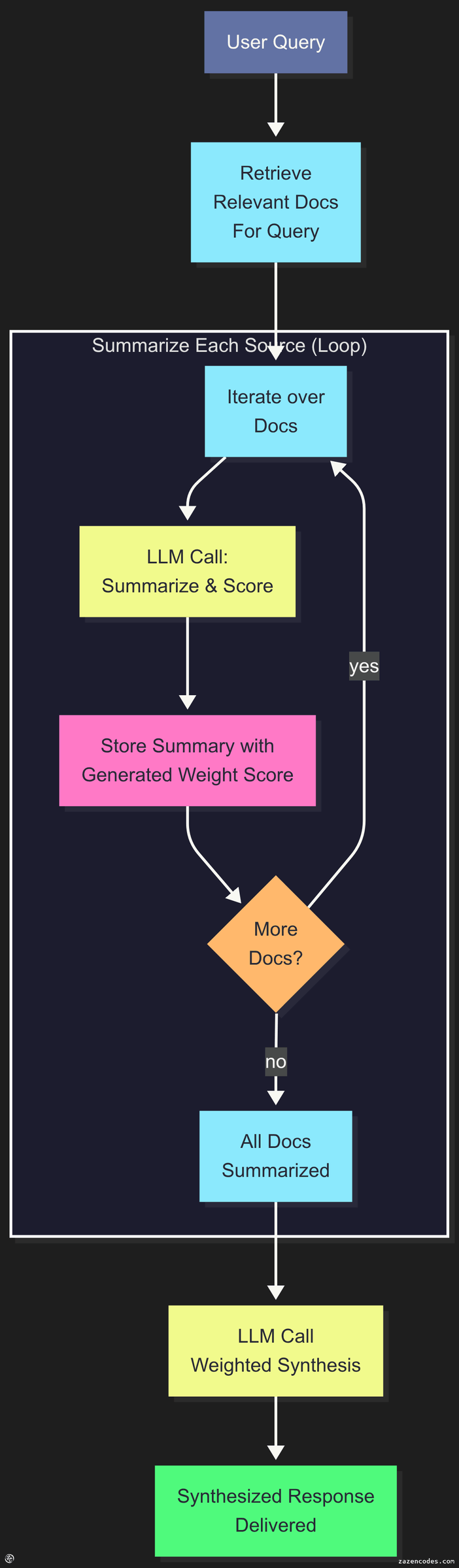
Example: Response synthesis with weighted sources
from langchain.chat_models import ChatOpenAI
from langchain.retrievers import BM25Retriever
from langchain.schema import Document
from langchain.prompts import ChatPromptTemplate
from typing import List, Dict, Tuple

# Initialize components
llm = ChatOpenAI(model="gpt-4o-mini")
retriever = BM25Retriever.from_documents([
    Document(page_content="Official docs: Product X requires 2GB RAM", metadata={"reliability": 0.9}),
    Document(page_content="Forum post: Product X works with 1GB RAM", metadata={"reliability": 0.5}),
    Document(page_content="Benchmark test: Product X performs best with 4GB RAM", metadata={"reliability": 0.8}),
])

def weighted_synthesis(query: str) -> str:
    print("Starting Weighted Synthesis Process...\n")

    # Step 1: Retrieve relevant documents
    print(f"Retrieving documents for query: {query}\n")
    docs = retriever.get_relevant_documents(query)

    print("Retrieved Documents:")
    for doc in docs:
        print(f"- Content: {doc.page_content}, Reliability: {doc.metadata.get('reliability')}")
    print("----------------------------------\n")

    # Step 2: Prepare weighted contexts
    weighted_contexts: List[Tuple[str, float | None]] = [
        (doc.page_content, doc.metadata.get("reliability"))
        for doc in docs
    ]

    # Step 3: Generate initial summaries with confidence scores
    summary_prompt = ChatPromptTemplate.from_messages([
        ("system", "Summarize this information and assign a confidence score (0-1)."),
        ("user", "Content: {content}")
    ])

    summaries: List[Dict] = []
    print("Generating Summaries with Confidence Scores...\n")
    for content, weight in weighted_contexts:
        print(f"Processing Content (Weight {weight}): {content}\n")
        summary_response = llm.invoke(
            summary_prompt.format_messages(content=content)
        )
        summaries.append({
            "summary": summary_response.content,
            "weight": weight
        })

    print("Generated Summaries:")
    for s in summaries:
        print(f"- [Weight: {s['weight']}] {s['summary']}")
    print("----------------------------------\n")

    # Step 4: Synthesize final response with conflict resolution
    synthesis_prompt = ChatPromptTemplate.from_messages([
        ("system", """Synthesize a final response from these weighted summaries.
                     Resolve conflicts by favoring higher-weighted sources.
                     Acknowledge uncertainties when appropriate."""),
        ("user", "Summaries: {summaries}\nQuery: {query}")
    ])

    print("Synthesizing Final Response...\n")
    rendered_synthesis_prompt = synthesis_prompt.format_messages(
        summaries="\n".join([
            f"[Weight: {s['weight']}] {s['summary']}"
            for s in summaries
        ]),
        query=query
    )

    print("Prompt for Final Response:")
    print(rendered_synthesis_prompt)
    print("----------------------------------\n")

    final_response = llm.invoke(rendered_synthesis_prompt)
    return final_response.content

# Example usage
query = "What are the RAM requirements for Product X?"
result = weighted_synthesis(query)
print(f"Synthesized Response:\n{result}")
This results in some pretty interesting output:
Starting Weighted Synthesis Process...

Retrieving documents for query: What are the RAM requirements for Product X?

Retrieved Documents:
- Content: Official docs: Product X requires 2GB RAM, Reliability: 0.9
- Content: Forum post: Product X works with 1GB RAM, Reliability: 0.5
- Content: Benchmark test: Product X performs best with 4GB RAM, Reliability: 0.8
----------------------------------

Generating Summaries with Confidence Scores...

Processing Content (Weight 0.9): Official docs: Product X requires 2GB RAM

Processing Content (Weight 0.5): Forum post: Product X works with 1GB RAM

Processing Content (Weight 0.8): Benchmark test: Product X performs best with 4GB RAM

Generated Summaries:
- [Weight: 0.9] Product X requires a minimum of 2GB RAM according to the official documentation. Confidence score: 1.0
- [Weight: 0.5] Summary: A forum post indicates that Product X is compatible with devices that have 1GB of RAM.

Confidence Score: 0.9
- [Weight: 0.8] Summary: Product X shows optimal performance with 4GB of RAM based on benchmark testing.

Confidence Score: 0.9
----------------------------------

Synthesizing Final Response...

Prompt for Final Response:
[SystemMessage(content='Synthesize a final response from these weighted summaries.\n                     Resolve conflicts by favoring higher-weighted sources.\n                     Acknowledge uncertainties when appropriate.', additional_kwargs={}, response_metadata={}), HumanMessage(content='Summaries: [Weight: 0.9] Product X requires a minimum of 2GB RAM according to the official documentation. Confidence score: 1.0\n[Weight: 0.5] Summary: A forum post indicates that Product X is compatible with devices that have 1GB of RAM. \n\nConfidence Score: 0.9\n[Weight: 0.8] Summary: Product X shows optimal performance with 4GB of RAM based on benchmark testing. \n\nConfidence Score: 0.9\nQuery: What are the RAM requirements for Product X?', additional_kwargs={}, response_metadata={})]
----------------------------------

Synthesized Response:
Product X requires a minimum of 2GB RAM according to the official documentation, which is the most authoritative source on the matter (Weight: 0.9, Confidence score: 1.0). While a forum post suggests that it may be compatible with devices that have only 1GB of RAM (Weight: 0.5, Confidence score: 0.9), this information is less reliable. Additionally, benchmark testing indicates that Product X performs optimally with 4GB of RAM (Weight: 0.8, Confidence score: 0.9). Therefore, it is best to adhere to the official requirement of 2GB RAM for proper functionality, while noting that there may be limited compatibility with lower RAM configurations.
The RAG dataset is too simplistic to properly demonstrate the utility of this approach, but it still shows the basic idea - which is pretty cool if you ask me!
Conclusion
I hope that you’re enjoying these LangChain examples, and having fun learning about the power and flexibility of RAG.
Key Takeaways
🔄 Multi-step reasoning breaks complex queries into manageable sub-questions for more accurate responses.
🎯 Self-querying systems dynamically refine queries to improve retrieval accuracy.
🔍 Recursive retrieval explores interconnected information by using retrieval outputs as new inputs.
🧩 Response synthesis optimization combines multiple sources while considering reliability and resolving conflicts.
Next: Agents
The examples in this lesson might have us thinking about possibilities of more complicated AI systems beyond RAG. Particularly when considering the flow diagrams with graph dependencies and cyclical components.
Let’s continue on that train of thought and start looking at agents.
Comments (0)
No comments yet.