Data Warehousing Solutions
Data warehouses provide efficient storage and retrieval of structured and semi-structured data for analysis, reporting, and feature engineering.
This Lesson Will Cover
- 🏢 Data Warehousing Solutions (Redshift, BigQuery, Snowflake)
- ⭐ Key Features and Use Cases for Each Platform
- 🤖 Integration with AI/ML Workflows
- 🔄 Data Orchestration Concepts
What is a Data Warehouse?
A data warehouse is a centralized repository designed for storing and analyzing large volumes of data. Unlike transactional databases, which focus on real-time operations, data warehouses are optimized for analytical queries and reporting.
In the ML space, data warehouses provide a scalable solution for storing and processing the massive datasets often required for training and inference pipelines.
These are managed warehouse services, with different choices for compute capacity. Redshift offers provisioned clusters and Redshift Serverless. BigQuery manages query infrastructure and offers on-demand or capacity-based compute pricing. Snowflake manages infrastructure while you choose virtual-warehouse capacity. Managed infrastructure does not mean every deployment has identical provisioning or pricing responsibilities.
Amazon Redshift
Amazon Redshift is a fully managed, cloud-based data warehouse service that integrates seamlessly with the AWS ecosystem.
It is built for handling petabyte-scale datasets** and provides fast query performance through columnar storage and massively parallel processing.
Key Features of Redshift
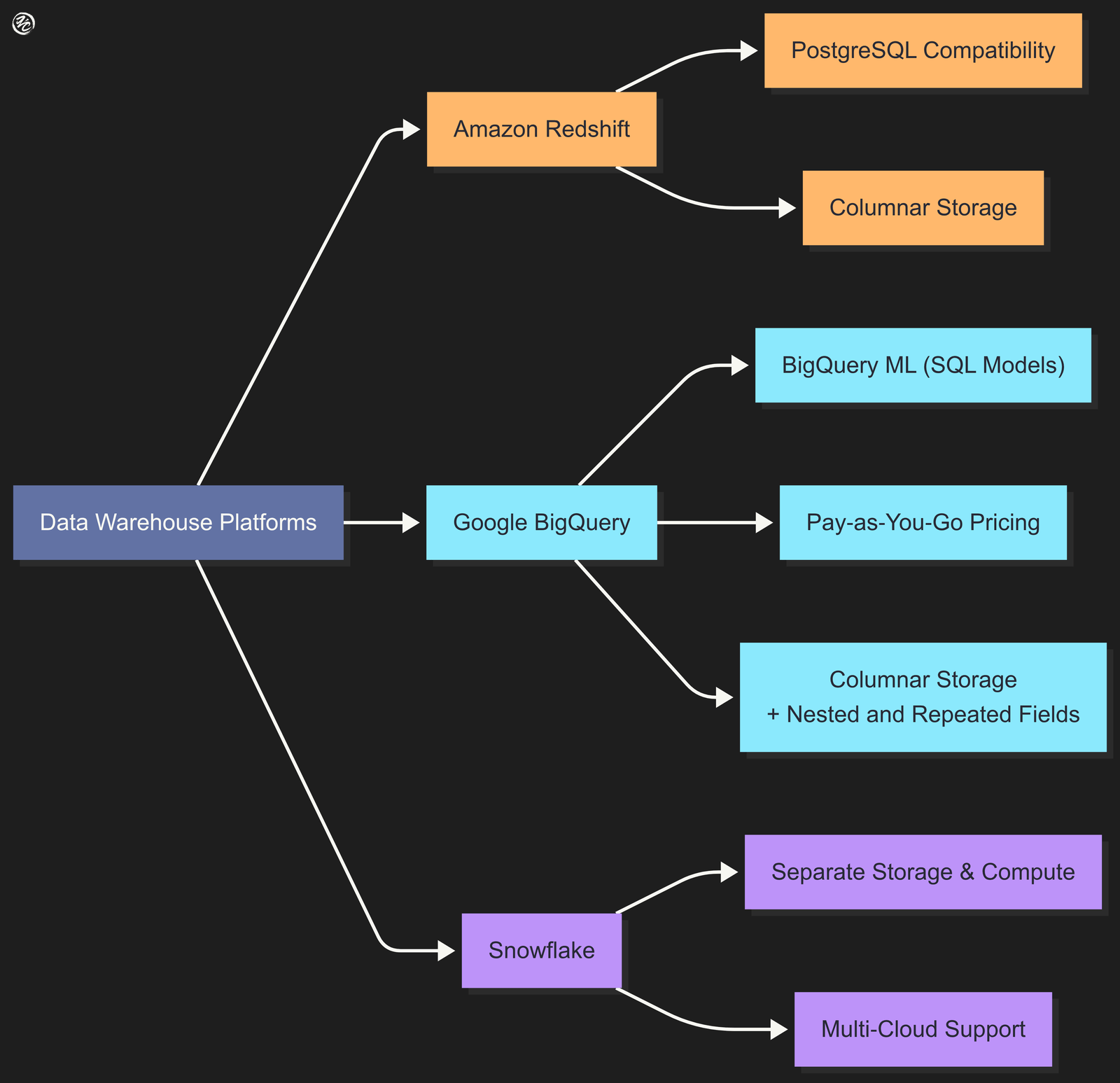
- PostgreSQL Compatibility: Built on PostgreSQL, allowing familiar SQL syntax and tools while adding warehouse-specific optimizations.
- Columnar Storage: Optimized for analytical queries by storing data in columns rather than rows.
- Scalability: Redshift RA3 separates managed storage from compute. Provisioned clusters require capacity choices; Redshift Serverless manages compute capacity for the workload.
- Integration with AWS Services: Works natively with S3, Athena, and Glue for ETL and analytics.
Example: Calculating user engagement metrics with rolling averages
SELECT
    user_id,
    DATE_TRUNC('month', activity_date) AS month,
    COUNT(*) AS monthly_sessions,
    SUM(duration_minutes) AS total_duration,
    ROUND(AVG(duration_minutes), 2) AS avg_session_duration,

    -- Calculate 3-month rolling average of sessions
    ROUND(AVG(COUNT(*)) OVER (
        PARTITION BY user_id
        ORDER BY DATE_TRUNC('month', activity_date)
        ROWS BETWEEN 2 PRECEDING AND CURRENT ROW
    ), 2) AS rolling_3month_sessions,

    -- Rank users by engagement within each month
    RANK() OVER (
        PARTITION BY DATE_TRUNC('month', activity_date)
        ORDER BY COUNT(*) DESC
    ) AS monthly_engagement_rank

FROM user_activity
WHERE
    activity_date >= DATEADD(month, -12, CURRENT_DATE)
GROUP BY
    user_id, DATE_TRUNC('month', activity_date)
HAVING
    COUNT(*) >= 5
ORDER BY
    month DESC, monthly_sessions DESC;
Google BigQuery
Google BigQuery is a serverless, highly scalable data warehouse solution designed for real-time analytics and machine learning integration.
It stands out for its simplicity and ability to handle vast amounts of data with minimal management overhead.
Key Features of BigQuery
- Flexible Pricing: On-demand query pricing charges for data processed; capacity pricing charges for slots over time. Storage is billed separately. Compare BigQuery’s pricing modes for your workload.
- SQL Queries with ML Support: BigQuery ML enables building and training machine learning models directly in SQL.
- Integration with GCP: Works seamlessly with Google Cloud Storage, AI Platform, and Dataflow.
Example: Training a machine learning model using BigQuery ML
-- Train a linear regression model to predict sales
CREATE MODEL `project.dataset.sales_model`
OPTIONS(model_type='linear_reg') AS
SELECT ad_spend, clicks, sales
FROM `project.dataset.marketing_data`;

-- Make predictions using the trained model
CREATE OR REPLACE TABLE `project.dataset.sales_predictions` AS
SELECT
  *,
  ML.PREDICT(MODEL `project.dataset.sales_model`,
    STRUCT(ad_spend, clicks)) AS predicted_sales
FROM `project.dataset.marketing_data`;

-- Update predictions table with evaluation metrics
CREATE OR REPLACE TABLE `project.dataset.prediction_evaluation` AS
SELECT
  *,
  ABS(sales - predicted_sales) AS prediction_error,
  ((sales - predicted_sales) / sales) * 100 AS error_percentage
FROM `project.dataset.sales_predictions`
WHERE sales > 0;
Snowflake
Snowflake is a cloud-agnostic data warehousing platform known for its unique architecture and focus on scalability, performance, and ease of use.
Snowflake separates storage and compute, allowing for independent scaling. BigQuery and Redshift RA3 also separate these resources, so this capability is shared across modern warehouses.
Key Features of Snowflake
- Separation of Storage and Compute: Provides cost efficiency and flexibility by scaling storage and compute independently.
- Data Sharing: Easily share data across teams or organizations without duplicating it.
- Multi-Cloud Support: Runs on AWS, Google Cloud, and Azure.
Example: Querying s3 data in Snowflake using Python
import snowflake.connector
from snowflake.connector.pandas_tools import write_pandas
import pandas as pd

# Connect to Snowflake
conn = snowflake.connector.connect(
    user='username',
    password='password',
    account='account_name',
    warehouse='compute_wh',
    database='my_db',
    schema='public'
)

# Create cursor
cursor = conn.cursor()

# Configure S3 integration
cursor.execute("""
    CREATE OR REPLACE STORAGE INTEGRATION s3_int
    TYPE = EXTERNAL_STAGE
    STORAGE_PROVIDER = 'S3'
    ENABLED = TRUE
    STORAGE_AWS_ROLE_ARN = 'arn:aws:iam::123456789012:role/snowflake-role'
    STORAGE_ALLOWED_LOCATIONS = ('s3://my-bucket/data/')
""")

# Create external stage
cursor.execute("""
    CREATE OR REPLACE STAGE my_s3_stage
    STORAGE_INTEGRATION = s3_int
    URL = 's3://my-bucket/data/'
    FILE_FORMAT = (TYPE = 'CSV')
""")

# Load data from S3 into Snowflake table
cursor.execute("""
    COPY INTO sales_data
    FROM @my_s3_stage/sales.csv
    FILE_FORMAT = (TYPE = 'CSV' SKIP_HEADER = 1)
""")

# Query the loaded data
cursor.execute("SELECT product_id, SUM(sales) FROM sales_data GROUP BY product_id")
for row in cursor:
    print(row)

# Clean up
cursor.close()
conn.close()
How AI Engineers Use Data Warehouses
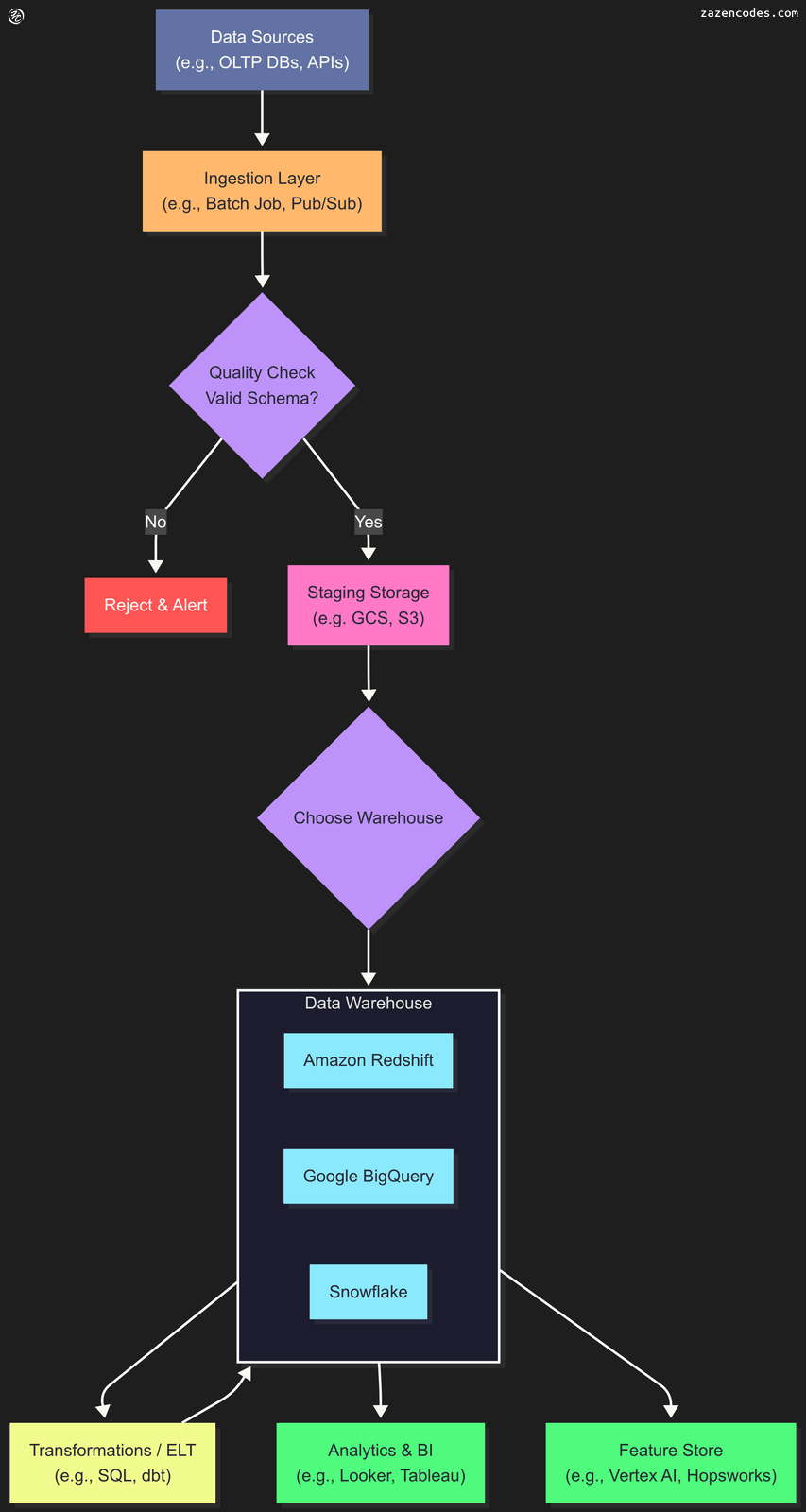
Data warehouses can serve multiple purposes in AI workflows, for example:
- Data Aggregation: Combine data from various sources for unified analysis.
- Feature Engineering: Generate and store features for machine learning models.
- Model Serving: Provide data to real-time AI systems, such as recommendation engines.
Conclusion
The data warehouse is a well-tested and effective tactic that businesses can use to centralize and organize data for analytics, ML, and AI use cases.
A closely related concept is the “data lakehouse”[1]. While these have a ton of appeal, the related tech and best practices are still evolving. But you can keep an eye out for these to start eating into the well-established data warehouse concept.
Key Takeaways
🏛️ Data warehouses are essential tools for storing and analyzing large-scale datasets used in AI/ML workflows.
🔴 Redshift offers tight AWS integration and PostgreSQL compatibility for familiar SQL-based analytics.
🔍 BigQuery provides built-in ML capabilities and seamless integration with Google Cloud Platform.
❄️ Snowflake separates storage and compute and is available across multiple cloud providers.
⚡ All three platforms manage underlying infrastructure, with different capacity and pricing models. Redshift offers both provisioned and serverless options.
🔗 Data warehouses serve critical roles in AI pipelines including data aggregation, feature engineering, and model serving.
Next: Data Orchestration
So far, in this section on Big Data Tools, everything we’ve talked about requires that human touch. At the very least, someone has to click “run”. Sure, you could trigger your Spark jobs before bed every day, but what are you going to do when you’re camping in the middle of Algonquin Park with no cell signal!
Hint: the answer is not Starlink… It’s data orchestration, of course!
Footnotes
Apache iceberg and data lakes compared to data warehouses perplexity thread, if you want to learn more about data lakes. ↩︎
Comments (0)
No comments yet.