Cloud and Deployment
The accessibility of the cloud has made it possible for mere mortals like myself to build and distribute things that people, just a few decades ago, could only have dreamed about.
So let’s learn about these magical places.
This Lesson Will Cover
- ☁️ What is cloud computing?
- 🚀 Key benefits of cloud deployment for AI models
- 📦 Containerization with Docker
- ⚙️ Orchestration with Kubernetes
- 🌐 Major cloud platforms (AWS, Azure, GCP)
- ✅ Best practices for deployment
Cloud Magic
- Enables scalable deployment of AI models to serve anywhere from zero to millions of users.
- Provides cost-effective (or even free) infrastructure for small organizations.
- Offers access to massive datasets and big data processing capabilities at scale.
- Allows rapid experimentation and iteration beyond the scale of your local machine.
Key Concepts for Cloud Deployments
Containerization with Docker
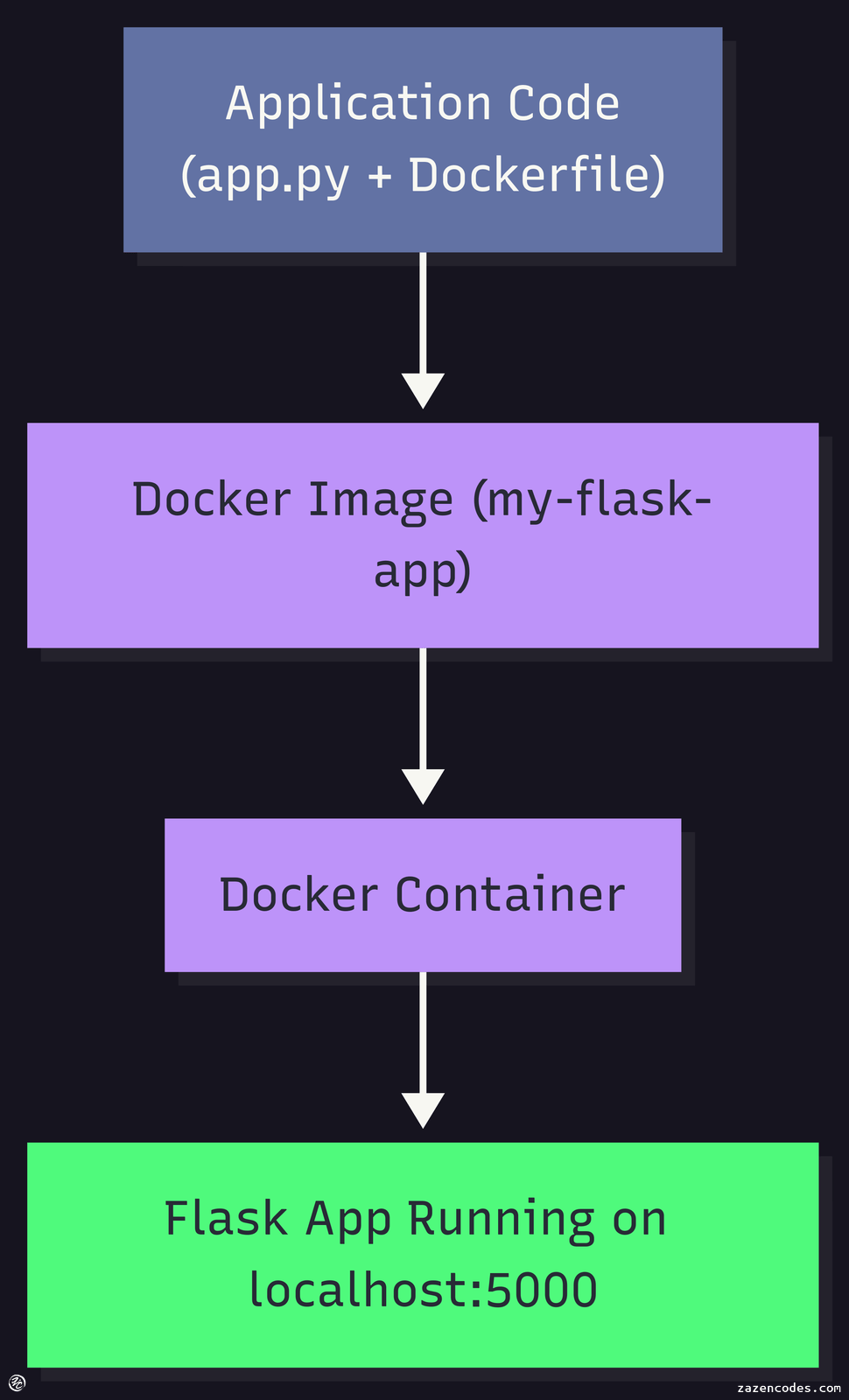
Docker packages applications and their dependencies into lightweight containers that can run consistently across different environments.
- Docker Images: A blueprint of your application.
- Docker Containers: Running instances of Docker images.
Example: Dockerizing a Python Flask Application
Assume that flask_app contains a Flask app, e.g.
>>> tree flask_app

flask_app/
├── app/
│   └── app.py
├── Dockerfile
└── README.md
-
Create a
Dockerfile:# Base image FROM python:3.12-slim # Set working directory WORKDIR /app # Copy application files COPY . /app # Install dependencies RUN pip install flask==3.1.0 # Run the application CMD ["python", "app.py"] -
Build and run the container:
docker build -t my-flask-app .
docker run -p 5000:5000 my-flask-app
Orchestration with Kubernetes
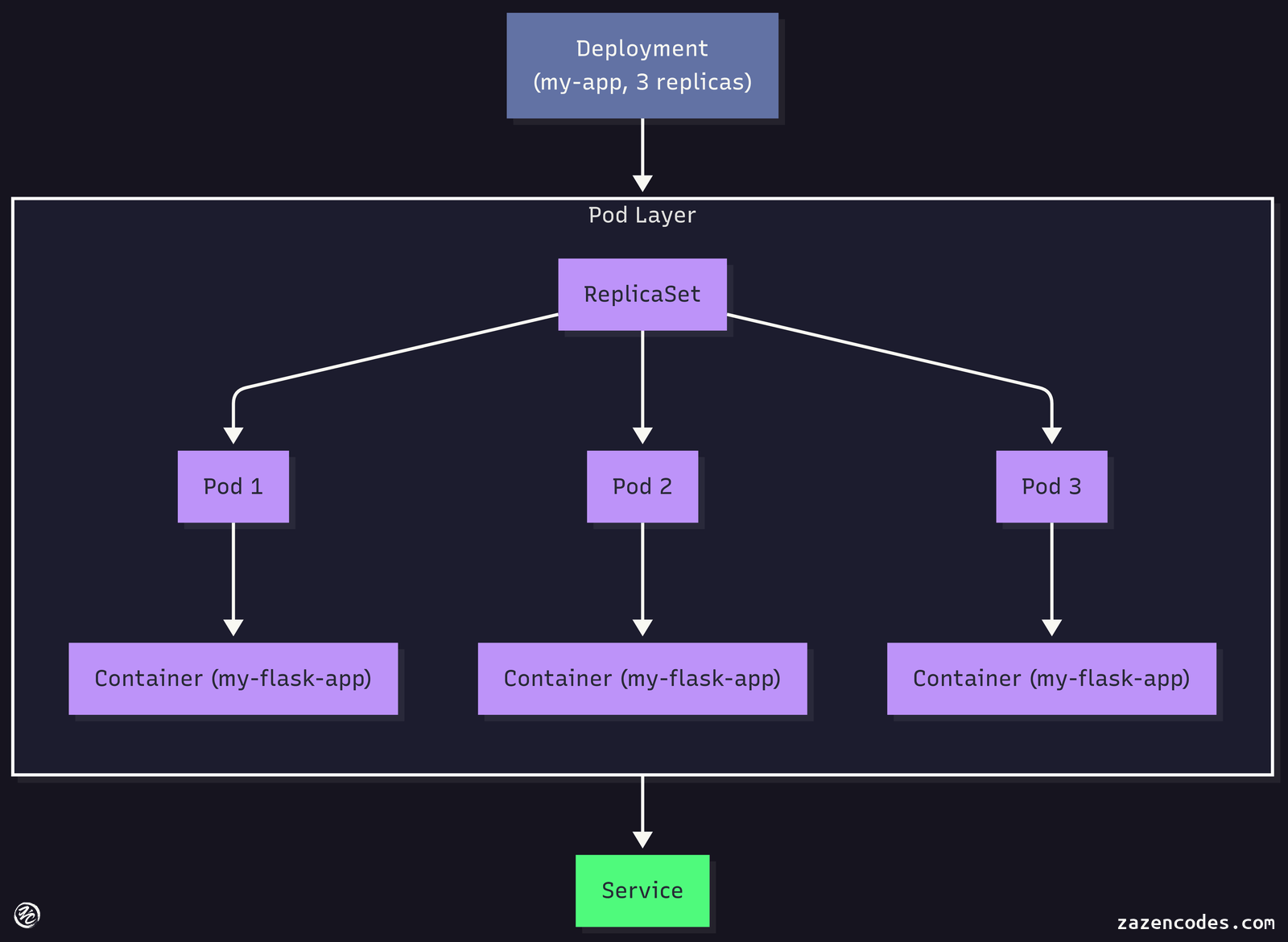
Kubernetes manages the deployment and scaling of containers across multiple nodes, ensuring high availability and resilience.
- Pods: Smallest deployable units, usually one container.
- Services: Expose your application to the network.
- Deployments: Manage application updates.
Example: Kubernetes YAML for Deploying an Application
apiVersion: apps/v1
kind: Deployment
metadata:
  name: my-app
spec:
  replicas: 3
  selector:
    matchLabels:
      app: my-app
  template:
    metadata:
      labels:
        app: my-app
    spec:
      containers:
      - name: my-container
        image: my-flask-app:latest
        ports:
        - containerPort: 5000
Deploy with:
kubectl apply -f deployment.yaml
Cloud Platforms (AWS, Azure, GCP)
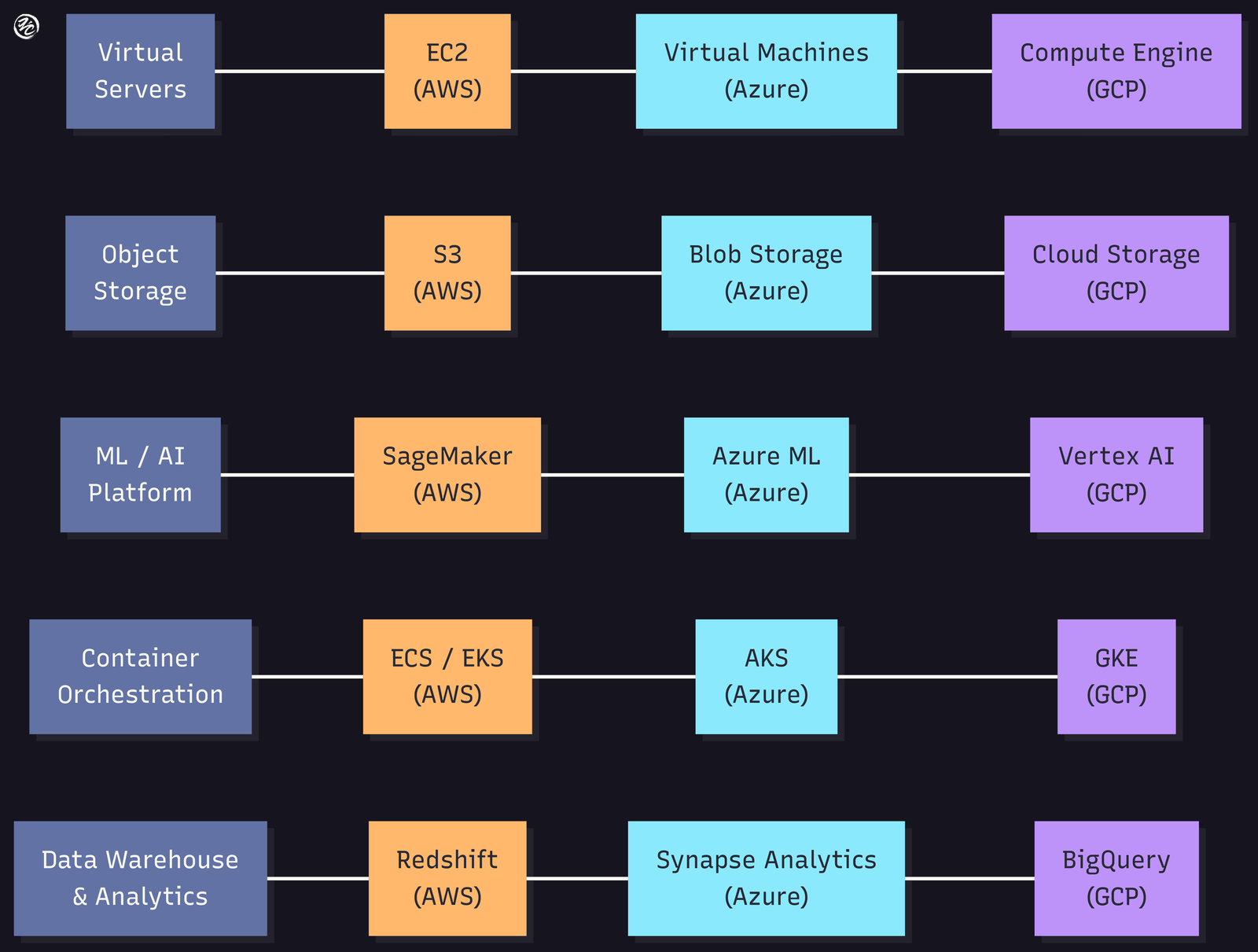
Here are the big three cloud platforms in order of market share (as of 2025).
Below are comparable AI engineering-related services for each:
-
AWS (Amazon Web Services):
- EC2: Virtual servers for hosting applications.
- S3: Object storage for data and models.
- SageMaker: End-to-end platform for ML/AI.
- ECS/EKS: Container orchestration services.
- Redshift: Data warehousing and analytics.
- Lambda: Serverless functions for event-driven compute.
-
Microsoft Azure:
- Virtual Machines: Virtual servers for hosting applications.
- Blob Storage: Object storage for data and models.
- Azure ML: End-to-end platform for ML/AI.
- AKS: Container orchestration service.
- Synapse Analytics: Data warehousing and analytics.
- Azure Functions: Serverless functions for event-driven compute.
-
Google Cloud Platform (GCP):
- Compute Engine: Virtual servers for hosting applications.
- Cloud Storage: Object storage for data and models.
- Vertex AI: End-to-end platform for ML/AI.
- GKE: Container orchestration service.
- BigQuery: Data warehousing and analytics.
- Cloud Functions: Serverless functions for event-driven compute.
Example: Deploying a Trained Model Using AWS SageMaker
-
Upload your model artifacts to S3:
aws s3 cp model.tar.gz s3://my-bucket/models/ -
Deploy the model in SageMaker:
import boto3
sm = boto3.client('sagemaker')
response = sm.create_model(
    ModelName='my-model',
    PrimaryContainer={
        'Image': '123456789012.dkr.ecr.us-west-1.amazonaws.com/my-image:latest',
        'ModelDataUrl': 's3://my-bucket/models/model.tar.gz',
    },
    ExecutionRoleArn='arn:aws:iam::123456789012:role/SageMakerRole'
)
Best Practices for Deployment
Automate Workflows
- Use CI/CD pipelines to automate testing and deployment.
- Tools like GitHub Actions can trigger deployments when code is pushed.
Monitor Performance
- Use cloud monitoring or custom tooling to track application performance.
- Log predictions and track errors for debugging.
Monitor Costs
- Set up budget alerts and notifications to avoid unexpected charges.
- Regularly audit and remove unused resources (instances, storage, endpoints).
- Identify cost-intensive patterns and optimize resource utilization.
Secure Applications
- Restrict access with firewalls and IAM roles.
- Encrypt sensitive data in transit and at rest.
Conclusion
Good news! You’ve made it to the end of the introduction.
Now let me spoil that feeling of accomplishment by telling you that this was by far the easiest section.
Just kidding…
Kind of. 😈
I’m not worried though. It’s going to be great. This course is awesome.
Key Takeaways
☁️ Cloud computing enables scalable, cost-effective AI deployments.
🐳 Docker and Kubernetes simplify deployment and management.
🌍 AWS, Azure, and GCP offer powerful AI-related cloud services.
✅ Best cloud practices include CI/CD automation, monitoring, cost management, and security.
Next: Programming
The next section is all about programming, starting at the lowest of the low levels: computer architecture.
Comments (0)
No comments yet.