Computer Architecture
Welcome to Programming Foundations for AI. In the next few lessons, we’re going back to basics. Then, we can move on to a set of lessons to get started with Python, version control, and writing production code.
Understanding how computers work at a fundamental level is very interesting and can be helpful for our work. But we’re actually not going to go that deep here. I’ve left a great book in the resources section that you can look at if you really want to go deep[1].
In this section we’re going to focus on something that will be far more practical for our work as an AI Engineer: understanding computer hardware terminology.
You know, stuff like CPUs, memory types, and storage technologies.
This stuff is kind of like learning the grammar of a language: It’s possible to pick it up as we hear and speak the language, but it can save us a lot of trouble if we see it all laid out ahead of time.
This Lesson Will Cover
- 🖥️ What is computer architecture?
- 🏗️ Key components of a computer (CPU, Memory, Storage, GPU)
- ⚙️ CPU architectures (32-bit vs. 64-bit)
- 💾 Storage technologies (HDD, SSD, NVMe)
- 🧠 Memory types (RAM, Swap Memory)
- 🎮 GPUs and their role in deep learning
- 🔢 Data units (Bytes, Kilobytes, Gigabytes, etc.)
What is Computer Architecture?
Computer architecture refers to the internal design and functional organization of a computer system. It determines how the computer processes information, stores data, and communicates with other components.
Understanding this helps us approach questions like:
- How many CPUs do I need?
- Should I use NVMe storage?
- Do I need the ARM or AMD binary? And 64-bit or 32-bit?
Key Components of a Computer
Central Processing Unit (CPU)
The CPU is the “brain” of the computer, responsible for executing instructions and performing calculations. It consists of:
- Cores: Modern CPUs have multiple cores, allowing parallel processing. For example, an 8-core CPU can handle 8 tasks simultaneously. (Through concurrency, each core can rapidly switch between multiple tasks, allowing it to juggle many tasks at the same time.)
- Clock Speed: Measured in GHz, this determines how many cycles a CPU can execute per second. Higher clock speeds mean faster processing.
- Instruction Set Architecture (ISA): Defines the set of instructions the CPU can execute, such as x86 or ARM.
CPU Architectures
The evolution of computer architectures has given us several distinct approaches to processing:
CISC vs. RISC
- CISC (Complex Instruction Set Computing): Used by x86 processors (Intel, AMD)
- Historically focused on doing more with each instruction
- More complex hardware, higher power usage
- RISC (Reduced Instruction Set Computing): Used by ARM
- Simpler, more efficient instructions
- Lower power consumption, ideal for mobile devices
Historical Development
- 1978: Intel introduces x86 architecture
- 1985: ARM (originally Acorn RISC Machine) debuts
- 1996: AMD releases their first independently designed x86 processor
- 2020: Apple transitions to ARM-based M1 chips
32-bit vs. 64-bit
- 32-bit systems (introduced in 1985) can only address 4GB of RAM.
- 64-bit systems (introduced in 1991) allow for a theoretical 16 exabytes of RAM (a massive amount).
- Most modern systems are 64-bit, but they may still support 32-bit software.
Software Compatibility
Software must be compiled specifically for each architecture. This is why we often see downloads like:
- Windows x86-64 (Intel/AMD 64-bit)
- Linux ARM64 (64-bit ARM processors)
- macOS Intel (x86_64)
- macOS Apple Silicon (ARM64)
An ARM processor does not identify the operating system: macOS, Windows and Linux can all run on ARM hardware. Choose a native software build for both the processor architecture and the operating system.
Modern Systems and Their Architectures
| Operating System | Common Chips | Architecture |
|---|---|---|
| Windows 11 | Intel, AMD, Snapdragon | x86_64, ARM64 |
| macOS | Apple M1/M2 | ARM64 |
| iOS | Apple A-series | ARM64 |
| Android | Snapdragon | ARM64 |
| Linux | Various | x86_64, ARM64 |
| Chrome OS | Intel, ARM | x86_64, ARM64 |
Memory (RAM)
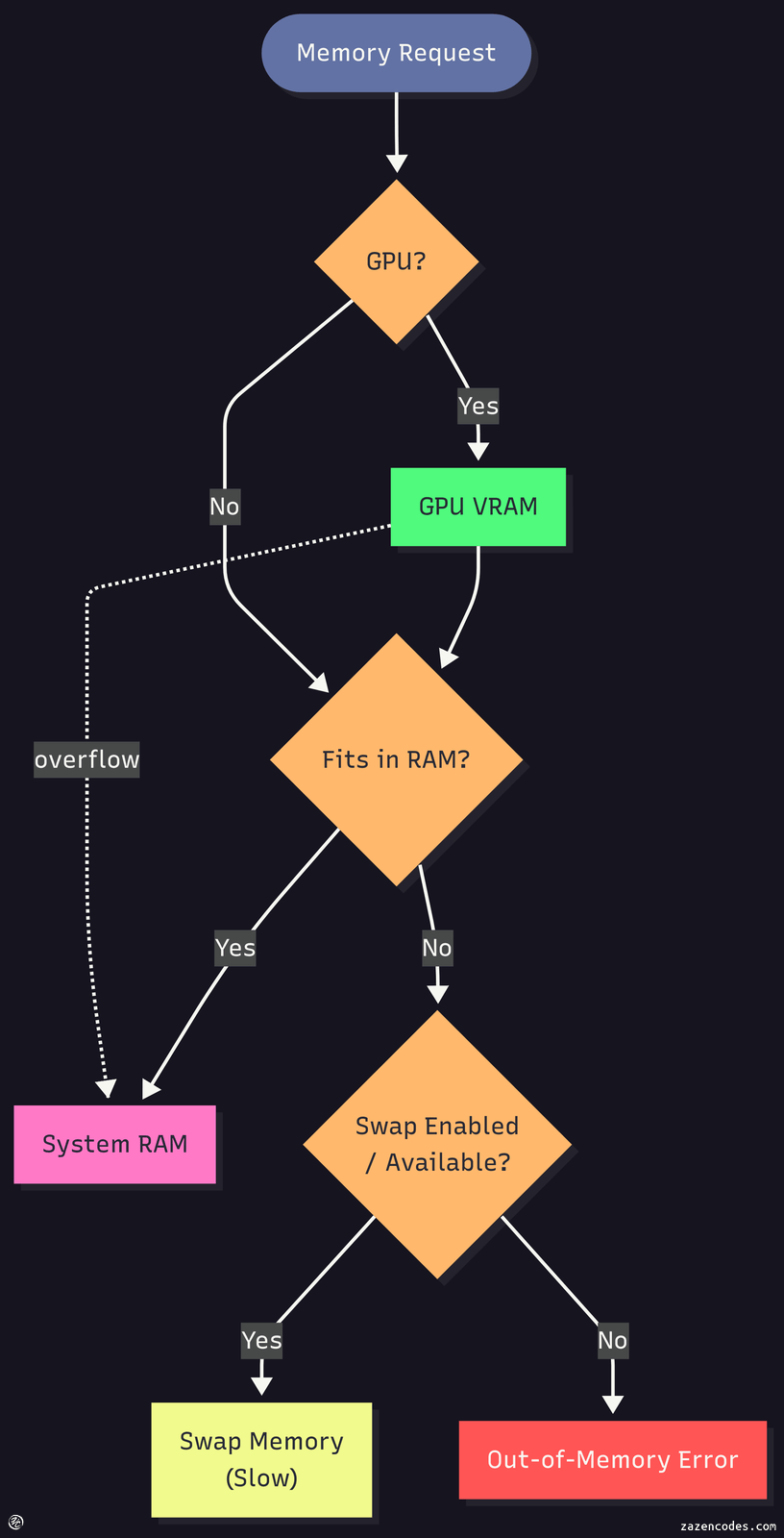
Random Access Memory (RAM) is the computer’s short-term memory. It temporarily stores data that the CPU and GPU can access quickly.
- Capacity: More RAM allows larger datasets and models to fit in memory.
- Speed: RAM speed (measured in MHz) affects how quickly data can be read or written.
- Types: DDR4 and DDR5 are common RAM types, with DDR5 offering higher speeds.
- Swap Memory: Virtual memory that uses disk space as an extension of RAM when physical memory is full, though it’s much slower than actual RAM.
Storage
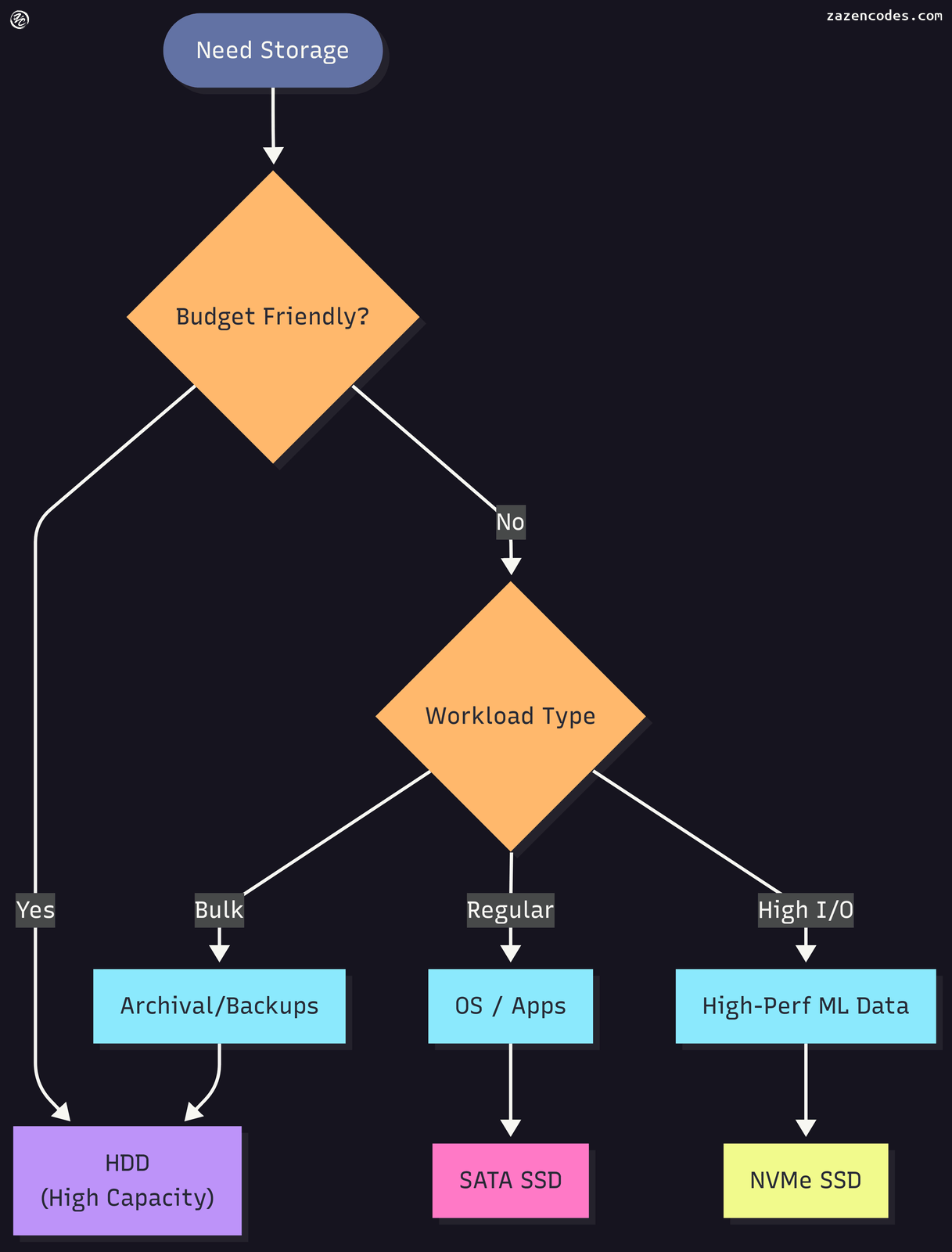
Storage is where data is persisted (saved long-term). Different types serve different use cases:
- HDD (Hard Disk Drive): Cheaper but slower. Best for archival storage and large files that don’t need frequent access, like backups or media libraries.
- SSD (Solid State Drive): Faster and more durable. Ideal for operating systems, frequently accessed files, and applications where load times matter.
- NVMe SSDs: Even faster than regular SSDs, making them ideal for high-performance applications.
Graphics Processing Unit (GPU)
GPUs are specialized processors originally designed for rendering graphics in video games and 3D applications. Their architecture, optimized for parallel processing of simple mathematical operations, unexpectedly made them perfect for deep learning computations.
Historical Evolution
- Initially created for graphics rendering in the 1990s
- In 2006, NVIDIA introduced CUDA, enabling GPUs for general-purpose computing
- Researchers discovered GPUs could accelerate neural network training by 10-50x compared to CPUs
- By 2012, GPUs were crucial in the deep learning revolution, enabling breakthrough models like AlexNet
Why GPUs Excel at Deep Learning
- Parallel Architecture: While CPUs have few powerful cores, GPUs have thousands of simpler cores.
- Matrix Operations: Neural networks primarily use matrix multiplications, which GPUs handle efficiently.
- Memory Bandwidth: GPUs can move data between memory and cores much faster than CPUs.
- Specialized Instructions: Modern GPUs include AI-specific operations like tensor cores.
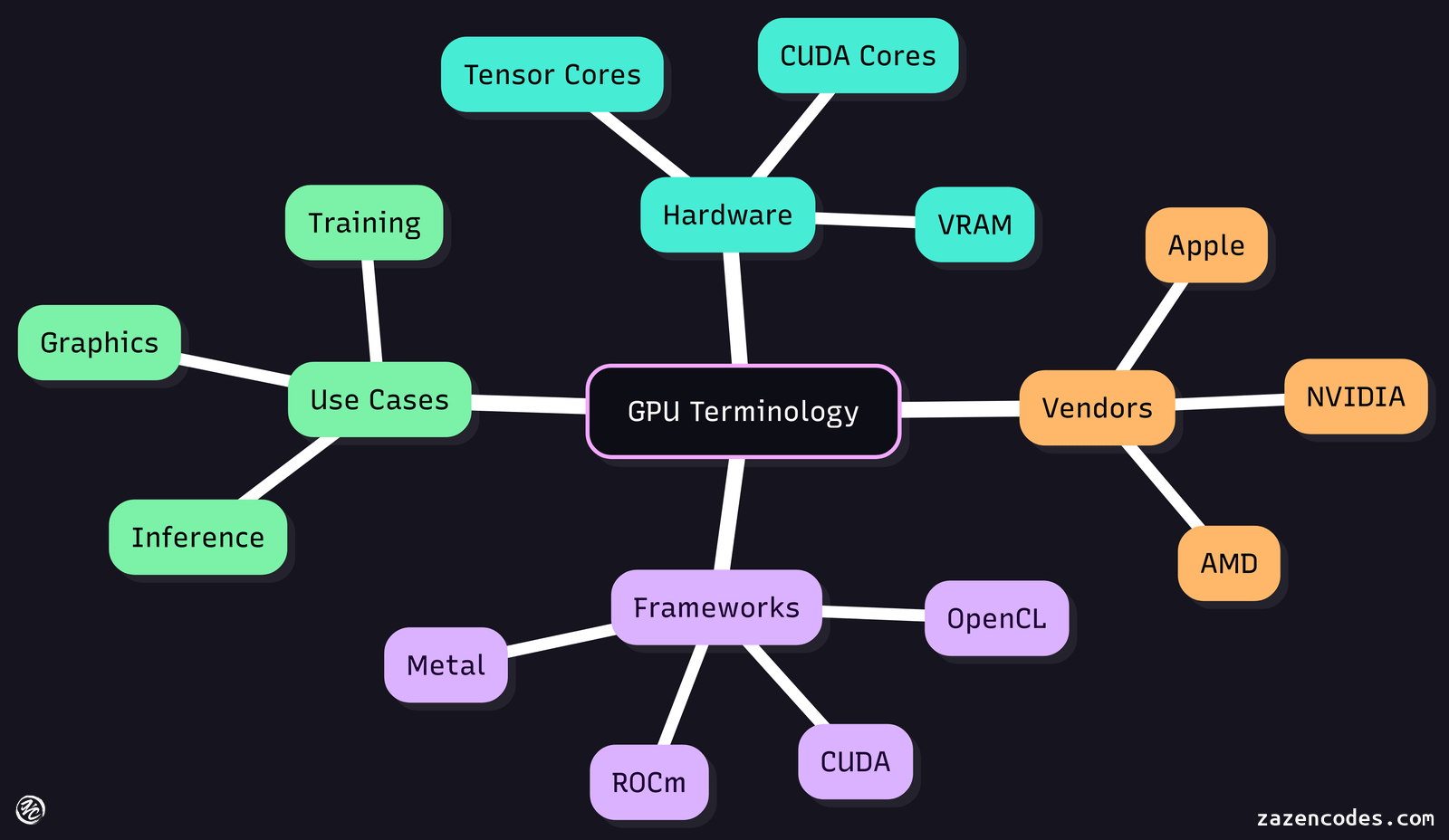
GPU Components and Terms
- CUDA Cores: NVIDIA’s parallel processing units (AMD calls them Stream Processors)
- Tensor Cores: Specialized cores for AI matrix operations
- VRAM: High-bandwidth memory for storing model weights and intermediate computations
- Memory Bus Width: Determines how much data can move at once (e.g., 256-bit, 384-bit)
Common GPU Architectures
- NVIDIA Data Center: A100, H100 (Hopper), L4
- NVIDIA Consumer: RTX 4090, 4080, 3090 (less VRAM but cheaper)
- AMD: Radeon Pro, Instinct MI250
- Apple: M1/M2/M3 Neural Engine (integrated GPU)
Programming Frameworks
- CUDA: NVIDIA’s parallel computing platform
- ROCm: AMD’s open platform for GPU computing
- Metal: Apple’s framework for GPU computing
- OpenCL: Open standard for cross-platform parallel programming
Bits, Bytes, and Data Units
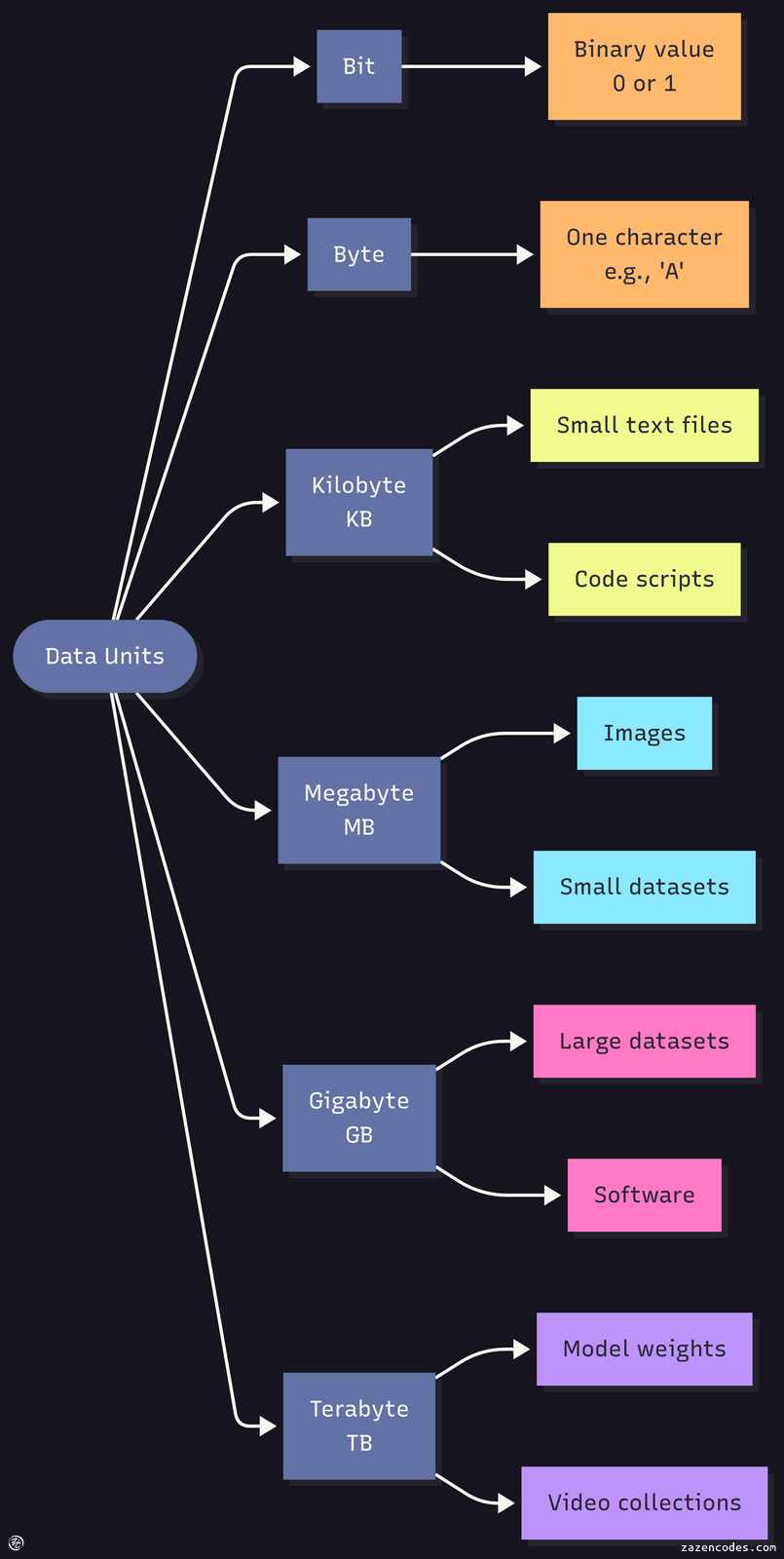
Understanding data units is crucial when working with AI models and datasets:
- Bit: The smallest unit of data (0 or 1).
- Byte: 8 bits. Used to measure file sizes, memory, etc.
Data Units Table
| Decimal unit | Size in bytes | Binary unit | Size in bytes |
|---|---|---|---|
| Kilobyte (kB) | 1,000 | Kibibyte (KiB) | 1,024 |
| Megabyte (MB) | 1,000,000 | Mebibyte (MiB) | 1,048,576 |
| Gigabyte (GB) | 1,000,000,000 | Gibibyte (GiB) | 1,073,741,824 |
| Terabyte (TB) | 1,000,000,000,000 | Tebibyte (TiB) | 1,099,511,627,776 |
Decimal units step by 1,000; binary units step by 1,024. To convert from kB to MB, divide by 1,000. To convert from KiB to MiB, divide by 1,024. Older software sometimes labels binary sizes as KB or MB, so check which convention it uses. See NIST’s binary-prefix definitions.
Examples
| Type of File | Typical Size |
|---|---|
| Python script | 10-50 KB |
| Parquet file | 10 MB |
| High-resolution image | 5-10 MB |
| 4K video (1 hour) | 20-30 GB |
| MNIST dataset (compressed) | 11 MB |
| Pre-trained GPT-3 model | 800 GB |
Conclusion
Having some computer architecture basics, we’ll be better equipped to make informed decisions when configuring and using cloud resources. For example:
- Choosing the right instance type and size when setting up an AWS EC2 server.
- Selecting the right binary to install for our system.
Key Takeaways
💻 Computer architecture defines how a system processes data.
🧠 CPUs, memory, and storage are essential hardware components.
🚀 GPUs accelerate deep learning through parallel computing.
🏗️ Different architectures (x86, ARM) affect software compatibility.
📊 Understanding bits and bytes helps with data management.
Next: C++
Now let’s change gears and learn about low-level programming. Starting with C++.
Comments (0)
No comments yet.