Clean Code
As Bob Martin famously talked about in his book Clean Code, writing clean code is one of the most important skills in software development.
Everything in software development involves trade-offs. Writing clean code requires more time and effort upfront, but this investment pays off when we revisit our code six months later and it now looks like an alien language.
Or rather, since we wrote clean code, it actually looks comprehensible.
This Lesson Will Cover
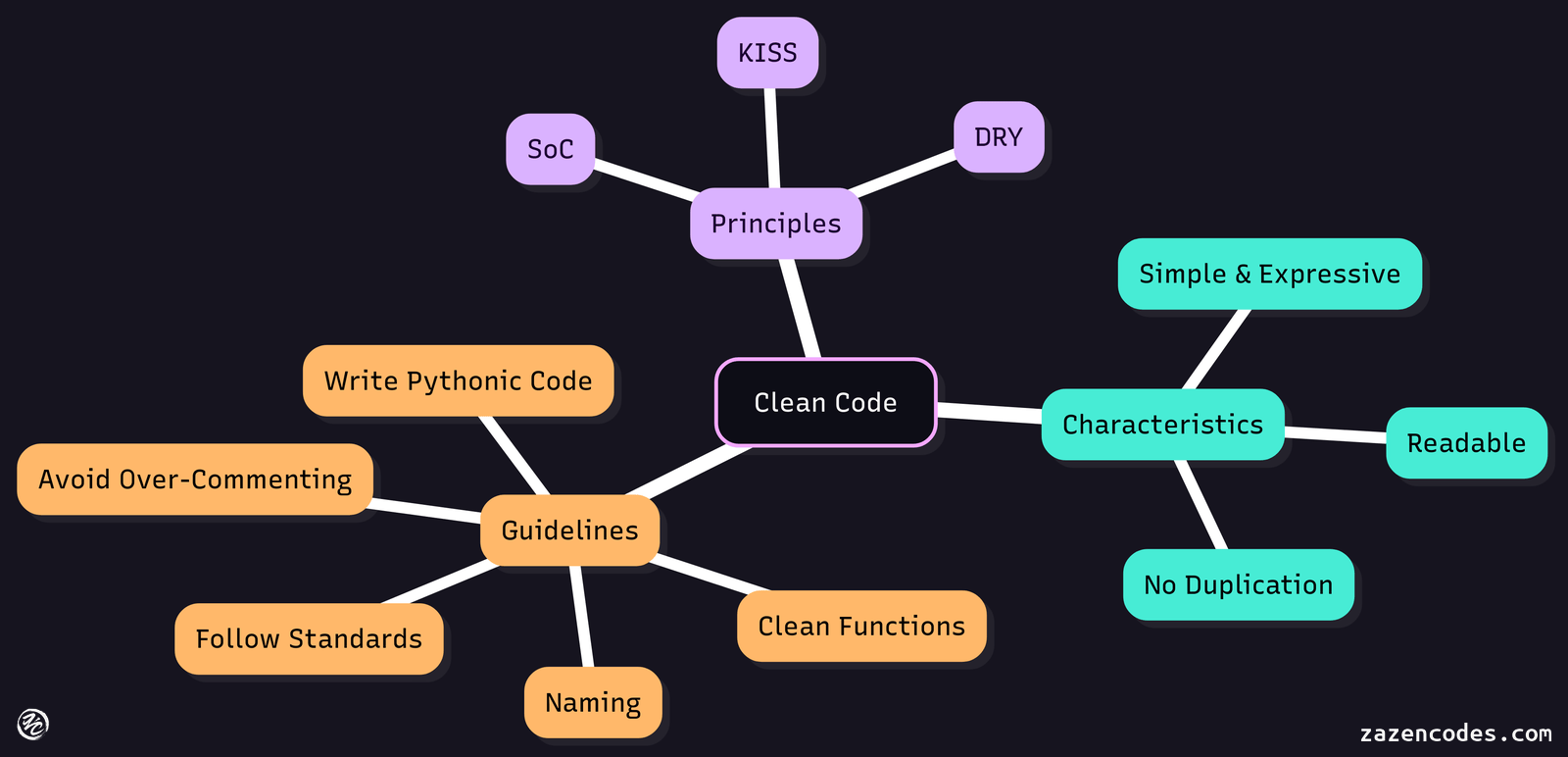
- 🧼 The definition and importance of clean code
- ⭐ Key characteristics of clean code
- 📝 Guidelines for writing clean and maintainable code
- 💡 Examples of coding principles in action
What is Clean Code?
Clean code involves a set of principles and guidelines that make code easy to understand and work with. The motivating idea here is that developers will spend more time reading code than writing it.
Now, this isn’t always true. Sometimes we write code that will never again be read - by ourselves or by anyone else. (I’ve written soooo much code that fits into this category.)
Don’t forget what we talked about with respect to trade-offs. Part of being an effective developer is knowing when to care about writing clean code.
Key Characteristics of Clean Code:
- Simple and expressive: Clearly communicates intent without unnecessary complexity.
- Readable: Other developers (and your future self) can understand it quickly.
- Free of duplication: Reduces redundancy while maintaining clarity.
Example: Expressive Code
Bad:
hpd, dw = 5, 2
total_h = hpd * dw
extra_h = 3
final_h = total_h + extra_h
Good:
hours_per_day = 5
days_worked = 2
total_hours = hours_per_day * days_worked
extra_hours = 3
final_hours = total_hours + extra_hours
The second example is longer, but it clearly explains what the variables represent, making the code easier to follow.
Guidelines for Writing Clean Code
1. Follow Code Standards
Adhering to established coding standards ensures consistency, which is foundational for clean code.
I already talked at length about PEP 8 for Python in the Code Quality Standards lesson.
2. Write Pythonic Code
“Pythonic” code isn’t possible to define exactly. It has a certain “vibe”, something that we get into the groove of[1] - especially if we pay attention to the way that people we respect write code. Language models can also help with this, e.g.,
“Make this code more Pythonic, and explain your reasoning for each change: <PASTE_CODE>”
Example: Pythonic vs. Non-Pythonic
Non-Pythonic:
result = []
for i in range(1, 11):
    result.append(i * 2)
Pythonic:
result = [i * 2 for i in range(1, 11)]
3. Adopt Key Coding Principles
Several coding principles can help maintain clean, structured code:
- DRY (Don’t Repeat Yourself): Reduce duplication by abstracting reusable logic
- Every piece of knowledge should have a single, unambiguous, authoritative representation within a system
- SoC (Separation of Concerns): Separate different parts of your program by their responsibilities
- Includes both function-level separation and architectural design.
- KISS (Keep It Simple, Stupid): Favor simplicity over cleverness.
I like to learn by example, and you probably do as well. So here are examples of each:
Example: DRY (Don’t Repeat Yourself)
Bad:
def calculate_area_of_circle(radius):
    return 3.14159 * radius ** 2

def calculate_area_of_sphere(radius):
    return 4 * 3.14159 * radius ** 2
Good:
PI = 3.14159

def calculate_area(radius, is_sphere=False):
    return 4 * PI * radius ** 2 if is_sphere else PI * radius ** 2
Example: SoC (Separation of Concerns)
Bad:
# All responsibilities combined into one function
def train_model(data):
    # Data preprocessing
    data = [x.strip() for x in data if x]

    # Model training
    model = LinearRegression()
    model.fit(data["X"], data["y"])

    # Evaluation
    predictions = model.predict(data["X"])
    accuracy = sum(predictions == data["y"]) / len(data["y"])
    print(f"Accuracy: {accuracy}")
    return model
Good:
# Responsibilities split into separate functions
def preprocess_data(data):
    return [x.strip() for x in data if x]

def train_model(data):
    model = LinearRegression()
    model.fit(data["X"], data["y"])
    return model

def evaluate_model(model, data):
    predictions = model.predict(data["X"])
    accuracy = sum(predictions == data["y"]) / len(data["y"])
    print(f"Accuracy: {accuracy}")

# Main pipeline
raw_data = load_data()
cleaned_data = preprocess_data(raw_data)
model = train_model(cleaned_data)
evaluate_model(model, cleaned_data)
Example: KISS (Keep It Simple, Stupid)
Bad:
# Overly clever approach using nested list comprehensions
def flatten_list(nested_list):
    return [item for sublist in nested_list for item in sublist if isinstance(sublist, list)]
Good:
# Simpler approach using a clear loop
def flatten_list(nested_list):
    flattened = []
    for sublist in nested_list:
        if isinstance(sublist, list):
            flattened.extend(sublist)
    return flattened
4. Use Meaningful Naming Conventions
You’ve heard of the two hardest problems in computer science, right? They are: Cache invalidation, naming things, and off-by-one errors.
Names should reveal intent. Avoid ambiguous abbreviations and use descriptive, pronounceable names.
Examples:
Bad:
c = 5
a = [1, 2, 3]
Good:
city_count = 5
available_items = [1, 2, 3]
Names should also be consistent throughout our project. If we choose “user” over “member” in one module, we should stick with it everywhere.
5. Write Clean Functions
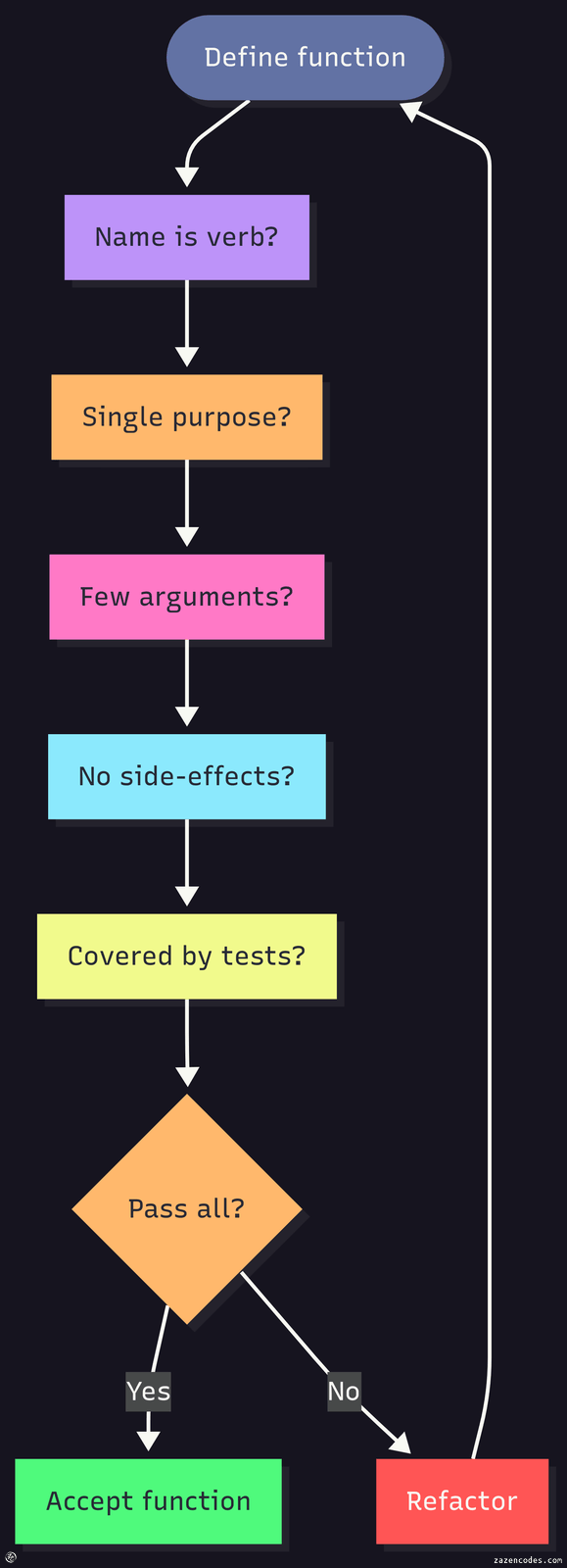
Functions are the building blocks of clean code. Follow these rules:
- Use verbs for function names (e.g.,
calculate_sum, notsum). - Keep functions short and focused - ideally performing one task.
- Avoid side effects like modifying global variables.
- Minimize arguments - pass objects if multiple inputs are required.
Bad:
def process(data, log=False):
    if log:
        print(f"Processing {data}")
    return [x * 2 for x in data]
Good:
def process_data(data):
    return [x * 2 for x in data]

def log_processing(data):
    print(f"Processing {data}")
6. Avoid Over-Commenting
While comments are useful, they should explain why something is done, not what is happening. If our code is readable, we can often skip comments altogether.
Bad:
# Loop through a list of items
for item in items:
    print(item)
Good:
# Log the name of each item
for item in items:
    print(item)
Conclusion
The six guidelines above are by no means a complete set of considerations for writing clean code.[2]
One aspect of clean code that I completely overlooked here is the SOLID Principles[3] for structuring Object-Oriented Programming (OOP).
Key Takeaways
✍️ Writing clean code requires an upfront investment but pays off in the long run.
🛠️ Follow key principles like DRY, KISS, and SoC to improve code maintainability.
🔍 Meaningful naming, short functions, and minimal redundancy lead to better readability.
📖 Code should be self-explanatory, reducing the need for excessive comments.
Next: Mathematics for Machine Learning
I hope you’re ready for some matrix multiplication and calculus, because I’ve got some beautiful equations coming your way in the next section.
Footnotes
Joran Dirk Greef talks about “groove coding” in his awesome talk about designing TigerBeetle. ↩︎
This blog post on testdriven.io has a ton of good clean code examples for Python. ↩︎
ArjanCodes created a ton of great videos a few years back (I’m not a big fan of his more recent stuff) and he has a good video on SOLID principles. ↩︎
Comments (0)
No comments yet.