Requests and APIs
Interacting with data or processes on the web (i.e., anywhere that isn’t your computer) is clearly very important.
This could be fetching data from a database, triggering an invocation of a remote job, making a call to a language model, etc…
In this lesson, we’ll explore how to do some of these things with Python using HTTP.
At the same time, we’ll also see how to create our own APIs using frameworks like Flask and FastAPI.
This Lesson Will Cover
- 🔌 What APIs are and how they work
- 📡 Making GET and POST requests with Python
- 📜 Working with JSON responses
- 🔐 Authentication and error handling
- 🏗️ Creating a simple API with Flask
What Are APIs?
An API (Application Programming Interface) allows software to communicate with other applications. APIs are used to:
- Access data from web services (e.g., weather, stock prices).
- Send data to online systems (e.g., submitting forms, updating databases).
- Integrate services like ChatGPT into our applications.
APIs often use the HTTP protocol. The two most common methods we need to know are:
- GET: A simple method to retrieve data from a server. This is what we send when we type a URL into a browser and press enter.
curl https://jsonplaceholder.typicode.com/posts
- POST: This is used to send data to a server, often resulting in the creation of a new resource. We can include data in key-value pair format as seen in the example below. The data provided in the POST request may also be processed in order to provide some data back in the HTTP response.
curl -X POST https://jsonplaceholder.typicode.com/posts \
-H "Content-Type: application/json" \
-d '{"key": "value", "name": "John"}'
Here, I’ve included cURL examples that we would run in a terminal. Note that this API is just an example and does not actually exist.
The requests Library
This is the go-to library for making HTTP requests. It has a beautifully simple Python API while also supporting advanced use cases like cookies and sessions.
Installation
To install the library, run:
pip install requests
Basic GET Request
Here’s how to fetch data from an API:
import requests

# Send a GET request to an API
response = requests.get("https://jsonplaceholder.typicode.com/posts")

# Check the response status
print(response.status_code)  # 200 means success
# Output:
# 200

# Access the response content
data = response.json()
print(data[:2])  # Print the first two records
# Output:
# [{'userId': 1, 'id': 1, 'title': 'sunt aut facere repellat provident occaecati excepturi optio reprehenderit', 'body': 'quia et suscipit\nsuscipit recusandae consequuntur expedita et cum\nreprehenderit molestiae ut ut quas totam\nnostrum rerum est autem sunt rem eveniet architecto'}, {'userId': 1, 'id': 2, 'title': 'qui est esse', 'body': 'est rerum tempore vitae\nsequi sint nihil reprehenderit dolor beatae ea dolores neque\nfugiat blanditiis voluptate porro vel nihil molestiae ut reiciendis\nqui aperiam non debitis possimus qui neque nisi nulla'}]
Working with APIs
Most APIs require some kind of authentication.
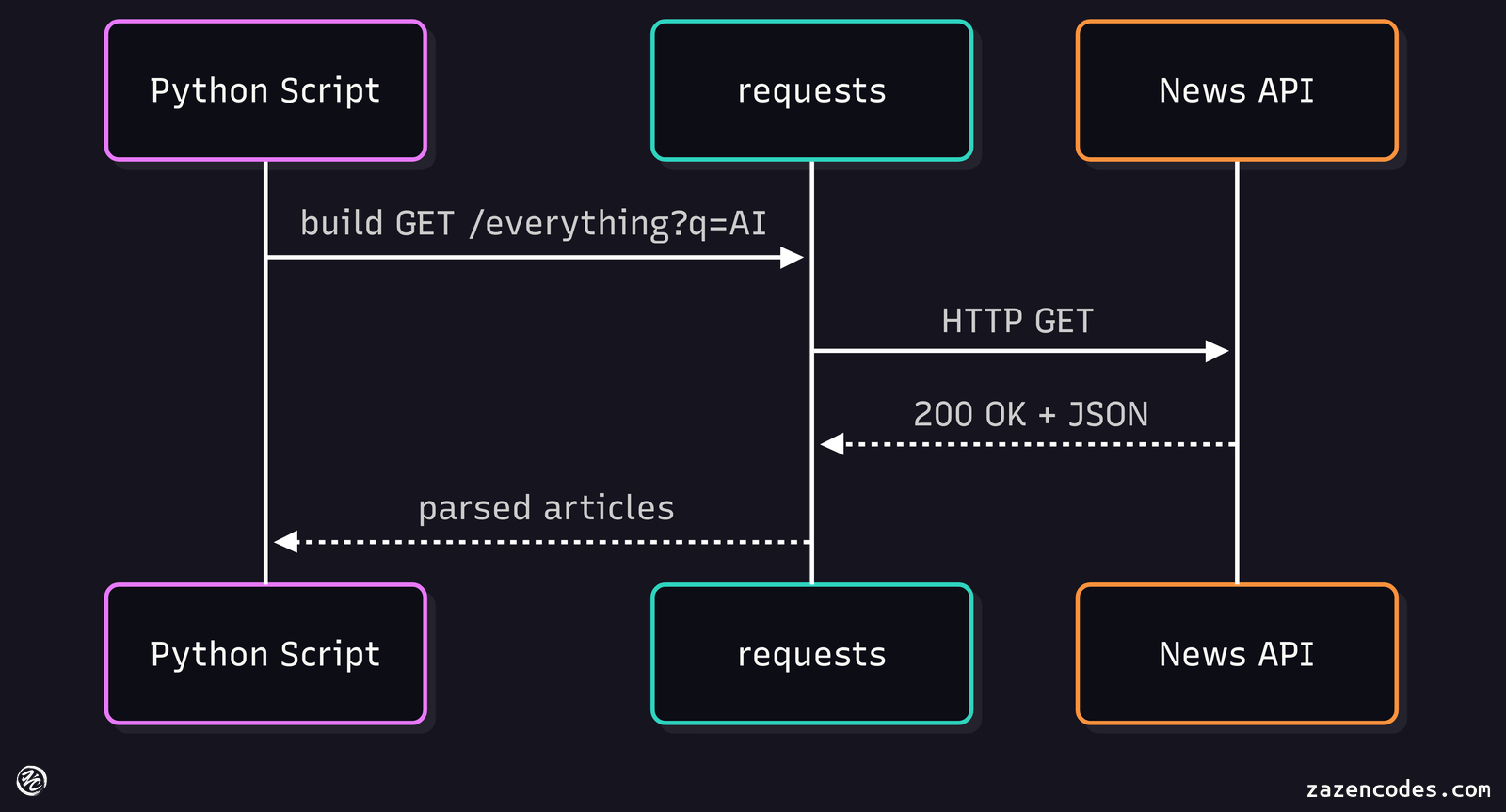
Let’s explore an example with a public news API that requires an API key.
Example: Fetch News Data
You can sign up for a free API key at NewsAPI if you want to try this out yourself.
import os
import requests

# The key below is fake, you'll have to set your own
os.environ["NEWSAPI_API_KEY"] = "ea3f3f2f74824b8a80a3bf3faf1a6068"

api_key = os.getenv("NEWSAPI_API_KEY")
query = "artificial intelligence"
url = f"https://newsapi.org/v2/everything?q={query}&apiKey={api_key}"

response = requests.get(url)

# Check if the request was successful
if response.status_code == 200:
    news_data = response.json() # Explained below
    print(news_data)
else:
    print(f"Error: {response.status_code}")

# Outputs:
# {'status': 'ok', 'totalResults': 21621, 'articles': [{'source': {'id': None, 'name': 'BBC News'}, 'author': None, 'title': "Is China's AI tool DeepSeek as good as it seems?", 'description': 'The artificial intelligence (AI) tool ...
Parsing JSON Responses
API responses are often in JSON format, which can be directly accessed as dictionaries in Python.
Continuing with the response data from the newsapi code above:
# a successful response will contain text, which is a string (e.g. html, json, xml)
response_text = response.text

# it will also contain content, which is the same data but in the raw binary format
# (requests automatically decodes this for us when we ask for response.text)
response_text = response.content

# since we know that this data is in json format, we can parse it as a dictionary
news_data = response.json()
print(news_data.keys())

# extract key details
articles = news_data["articles"]

for article in articles[:3]:  # print first 3 articles
    title = article["title"]
    source = article["source"]["name"]
    print(f"'{title}' from {source}")

# Outputs:
# dict_keys(['status', 'totalResults', 'articles'])
# 'Is China's AI tool DeepSeek as good as it seems?' from BBC News
# 'Elon Musk’s xAI adds ‘Big Brain’ reasoning to Grok-3' from The Verge
# 'Elon Musk: agent of chaos' from The Verge
Sending Data with POST Requests
The GET request allows us to send data by including it in the URL.
For example, we included the topic as a query parameter in the news API request above.
POST requests provide a cleaner way of bundling data to the server when making our request.
Example: Posting Data
url = 'https://jsonplaceholder.typicode.com/posts'
payload = {
    'title': 'AI Engineering with Python',
    'body': 'APIs are essential for building data-driven applications.',
    'userId': 1
}

response = requests.post(url, json=payload)

# Check the response
print(response.status_code)  # 201 means created
print(response.json())

# Outputs:
# 201
# {'title': 'AI Engineering with Python', 'body': 'APIs are essential for building data-driven applications.', 'userId': 1, 'id': 101}
Handling Common Challenges
Authentication
Some APIs require more advanced authentication methods, such as OAuth or API tokens.
These credentials are often sent in the headers:
api_token = os.getenv("[API_TOKEN]")
headers = {"Authorization": f"Bearer {api_token}"}
response = requests.get("https://api.example.com/data", headers=headers)
Rate Limiting
APIs often limit the number of requests we can make in a given time period. To handle this:
- Respect the limits specified in the API documentation.
- Use libraries like
timeto add delays between requests if needed:
import time

time.sleep(1)  # Wait for 1 second
Error Handling
We shouldn’t assume that an API will always provide the expected data.
Instead, we should check for errors:
try:
    response = requests.get("https://api.example.com/data")
    response.raise_for_status()  # Raise an exception for HTTP errors
    data = response.json()
except requests.exceptions.RequestException as e:
    print(f"An error occurred: {e}")
Creating an API
On the other side of the API request, there’s a remote machine running an API server.
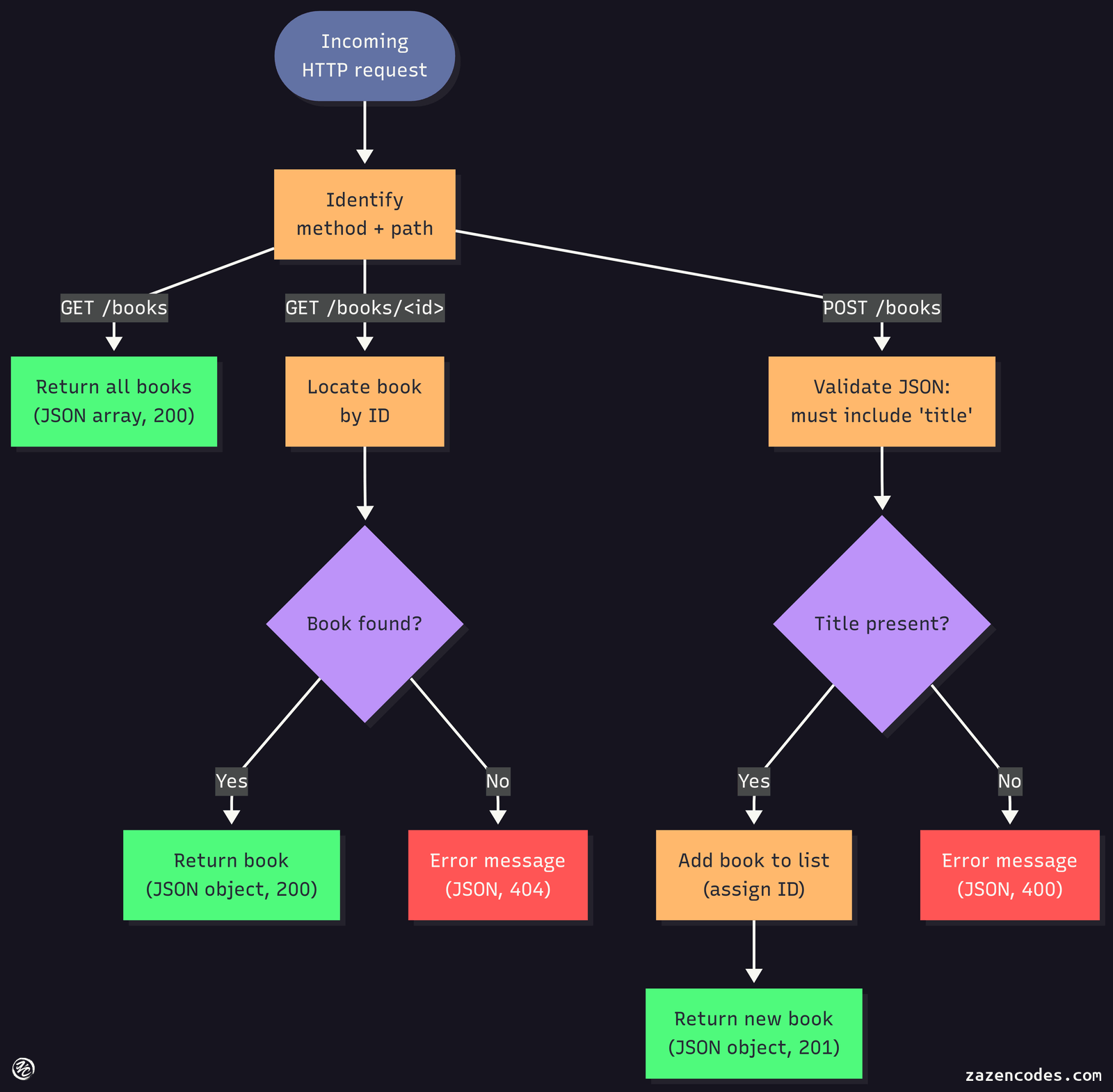
Here’s a simple example of an API server with a lightweight web framework called Flask:
from flask import Flask, request, jsonify

# Initialize Flask app
app = Flask(__name__)

# Sample data (in a real app, this would be a database)
books = [
    {"id": 1, "title": "The Great Gatsby", "author": "F. Scott Fitzgerald"},
    {"id": 2, "title": "1984", "author": "George Orwell"}
]

# GET endpoint to retrieve all books
@app.route('/books', methods=['GET'])
def get_books():
    return jsonify(books)

# GET endpoint to retrieve a specific book
@app.route('/books/<int:book_id>', methods=['GET'])
def get_book(book_id):
    book = next((book for book in books if book['id'] == book_id), None)
    if book is None:
        return jsonify({"error": "Book not found"}), 404
    return jsonify(book)

# POST endpoint to add a new book
@app.route('/books', methods=['POST'])
def add_book():
    if not request.json or 'title' not in request.json:
        return jsonify({"error": "Title is required"}), 400

    new_book = {
        'id': len(books) + 1,
        'title': request.json['title'],
        'author': request.json.get('author', '')
    }
    books.append(new_book)
    return jsonify(new_book), 201

if __name__ == '__main__':
    app.run(debug=True)
To use this API:
# Start the server
python app.py

# Open a new terminal window and make requests using curl
curl http://localhost:5000/books  # Get all books
curl http://localhost:5000/books/1  # Get specific book
curl -X POST -H "Content-Type: application/json" \
     -d '{"title":"Dune","author":"Frank Herbert"}' \
     http://localhost:5000/books  # Add new book
Conclusion
And with this section complete, that wraps up the basics of Python for AI Engineering.
Understanding HTTP is a huge unlock, and it goes way beyond what we covered in this lesson.[1]
What we’ve learned here is high-level, but it’s also very practical. And the examples we looked at can get us a long way.
Key Takeaways
🔗 APIs enable software applications to communicate.
📡 GET requests fetch data; POST requests send data.
🐍 You can use the
requestslibrary to make API calls in Python.🔑 Authentication and error handling are important for reliable API usage.
🛠️ You can create your own API in Python using Flask.
Next: Version Control
We’ve got two more fundamental programming skills left to learn about. Next is version control with Git and GitHub.
Footnotes
Dave does a pretty great job at explaining “How an HTTP Request Gets Served—In Great Detail” ↩︎
Comments (0)
No comments yet.