GitHub
In the previous lessons, we learned how to use Git and didn’t really talk about GitHub.
Developer platforms like GitHub are so important to modern development, and GitHub in particular has so many incredible features. So let’s have a closer look.
This Lesson Will Cover
- 🌍 What GitHub is and why it’s useful
- 📥 How to clone a repository from GitHub
- 🔄 Working with pull requests
- ✅ Code reviews and merging pull requests
- ⚙️ GitHub Actions and automation
What is GitHub?
GitHub is a cloud-based platform for hosting Git repositories.
It extends Git’s functionality with tools for:
- Persistence: Keep a centralized, online version of your project.
- Collaboration: Share your code with others and work together.
- Code reviews: Request feedback on your changes through pull requests.
- Security: Manage access through SSH keys, deploy keys, and fine-grained permissions.
- CI/CD: Automate testing and deployment of your code.
Cloning a Repo from GitHub
I’ve already talked about how to set up a new GitHub repo for our local project. We can hop back to the Git Basics lesson to see that.
I’m also assuming we have Git configured on our local machine and we have added our SSH key to GitHub.
Here’s how to clone an existing repository with SSH:
git clone git@github.com:RockClothing/rag-document-qa.git

# Change into the cloned directory
cd rag-document-qa
Here we’re fetching a project named rag-document-qa from the RockClothing GitHub account/organization.
This is a fictional example. If you want to clone a real repo you have over 500 million to select from!
Working with Pull Requests
Let’s walk through the process of building a feature for this project.
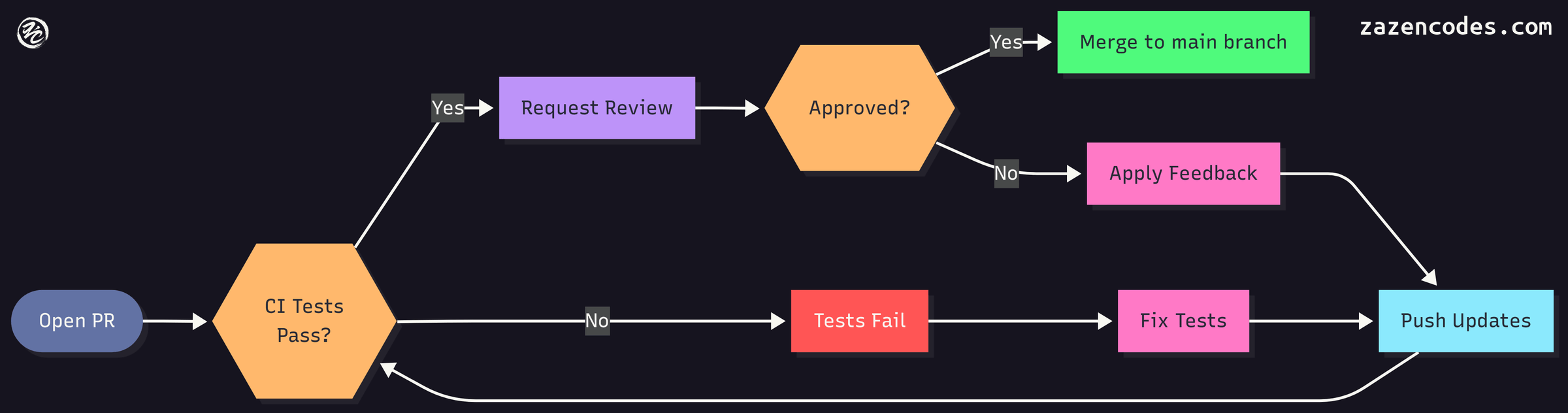
- Creating a Feature Branch:
First, create a branch.
git checkout -b feature/improved-embeddings
We can do this even if have uncommitted changes to our code (it will bring those into the new branch).
- Commit changes:
Having made some changes to the source code, we can commit them.
# Stage specific files
git add src/embeddings.py
git add config/model_params.yaml

# Commit with a descriptive message
git commit -m "Add batch processing for better memory usage"

# Don't commit too many changes at once
git add tests/test_embeddings.py
git commit -m "Add unit tests for new features"

# Push changes to GitHub
git push origin feature/improved-embeddings
- Opening a Pull Request:
In order to merge our feature with the main branch, we can open a pull request.
- Navigate to the feature branch on GitHub:
- For this hypothetical project, it would look like this:
- https://github.com/RockClothing/rag-document-qa/tree/feature/improved-embeddings
- Click “Contribute > Open pull request”
- Describe the changes, e.g., “Improve embedding generation with batching and progress bar”
- Optionally, link related issues and request specific reviewers
We shouldn’t think of a pull request as the final step in creating our feature.
In fact, it would be completely valid to open a pull request on our branch before we’ve made any changes at all—using it as a space to collaborate with our team, gather early feedback, and iteratively refine our code as we develop.
Code Reviews and Merging Pull Requests
Let’s walk through how the code review might look following a pull request.
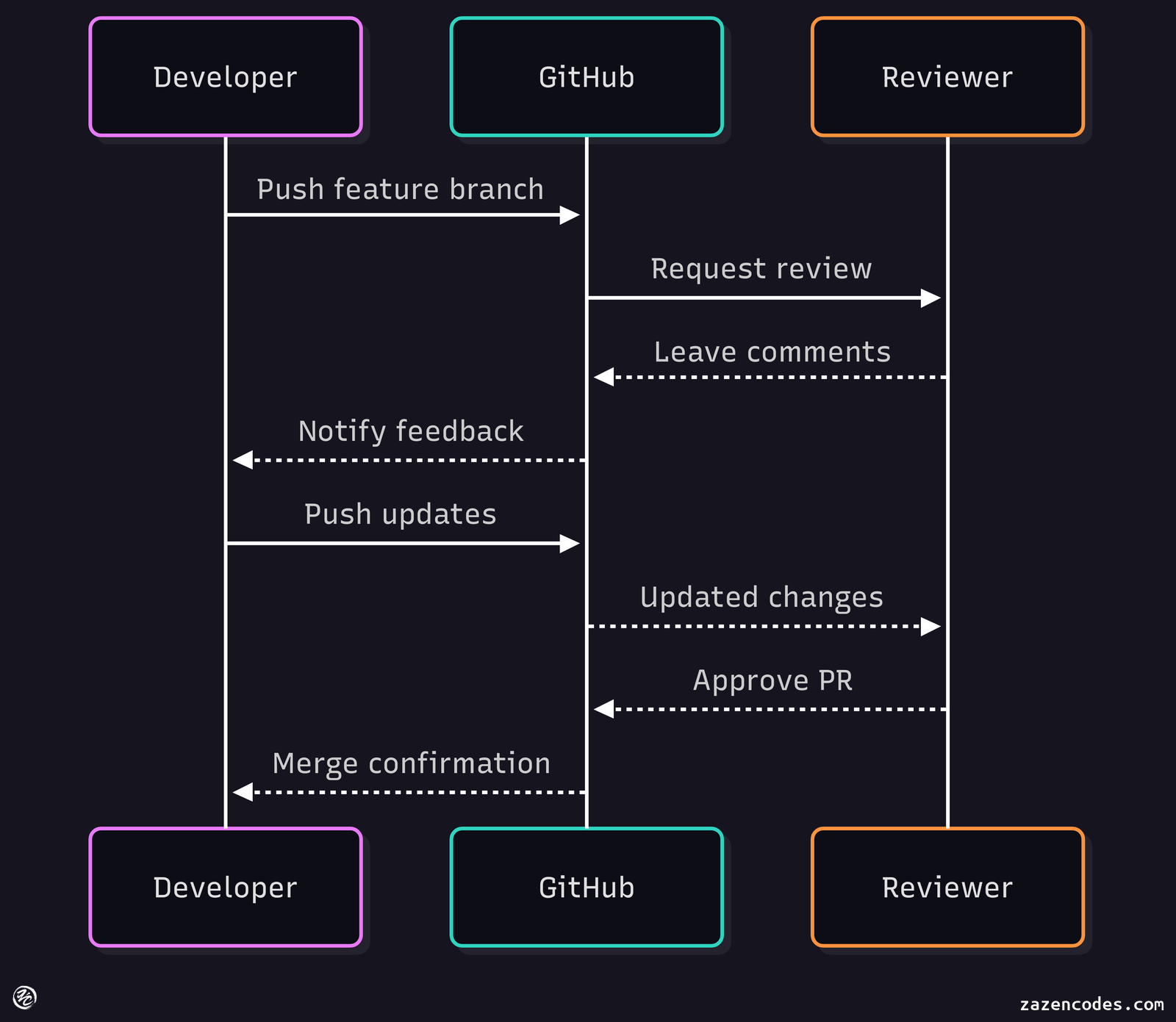
- Initial Review Request:
A teammate leaves comments on our PR at specific lines in the source code:
src/embeddings.py:45
> batch_size = 128

This batch size might be too large for some GPUs.
Can we make this configurable?
src/embeddings.py:67
> embeddings = model.encode(texts)

We should add a progress bar here for long-running jobs.
- Responding and Making Changes:
Update the code and push our changes.
# Make sure we are working with the correct version of the code
git checkout feature/improved-embeddings

# Edit the files and commit our changes
git add src/embeddings.py
git commit -m "Make batch size configurable and add progress bar"
git push origin feature/improved-embeddings
- Comment Resolution:
Reply to the reviewer’s comment:
Got it. I've made the appropriate changes:
- Added batch_size to config.yaml
- Added tqdm progress bar for encoding
- Added memory usage estimates

Let me know what you think.
- Follow-up Review:
Reviewer adds new feedback:
tests/test_embeddings.py
> def test_encode_batch():

Could you add a test case for different batch sizes?
Also, let's add error handling for when batch_size > len(texts)
- Final Changes:
# Add the requested tests
git add tests/test_embeddings.py
git commit -m "Add batch size tests and error handling"
git push origin feature/improved-embeddings
-
Approval and Merge:
Once the reviewer approves the PR, we can merge it:
- On GitHub, click the green “Squash and merge” button.
- Update the commit message if needed.
- Click “Confirm squash and merge.”
After a successful merge:
-
Click “Delete branch” on GitHub to remove the remote feature branch.
-
Update our local repository:
# Switch to main branch
git checkout main

# Get latest changes from remote
git pull origin main

# Delete our local feature branch
git branch -d feature/improved-embeddings

# Verify branch is gone
git branch
GitHub Actions and Automation
GitHub actions is a powerful serverless CI/CD system that we can use for free.
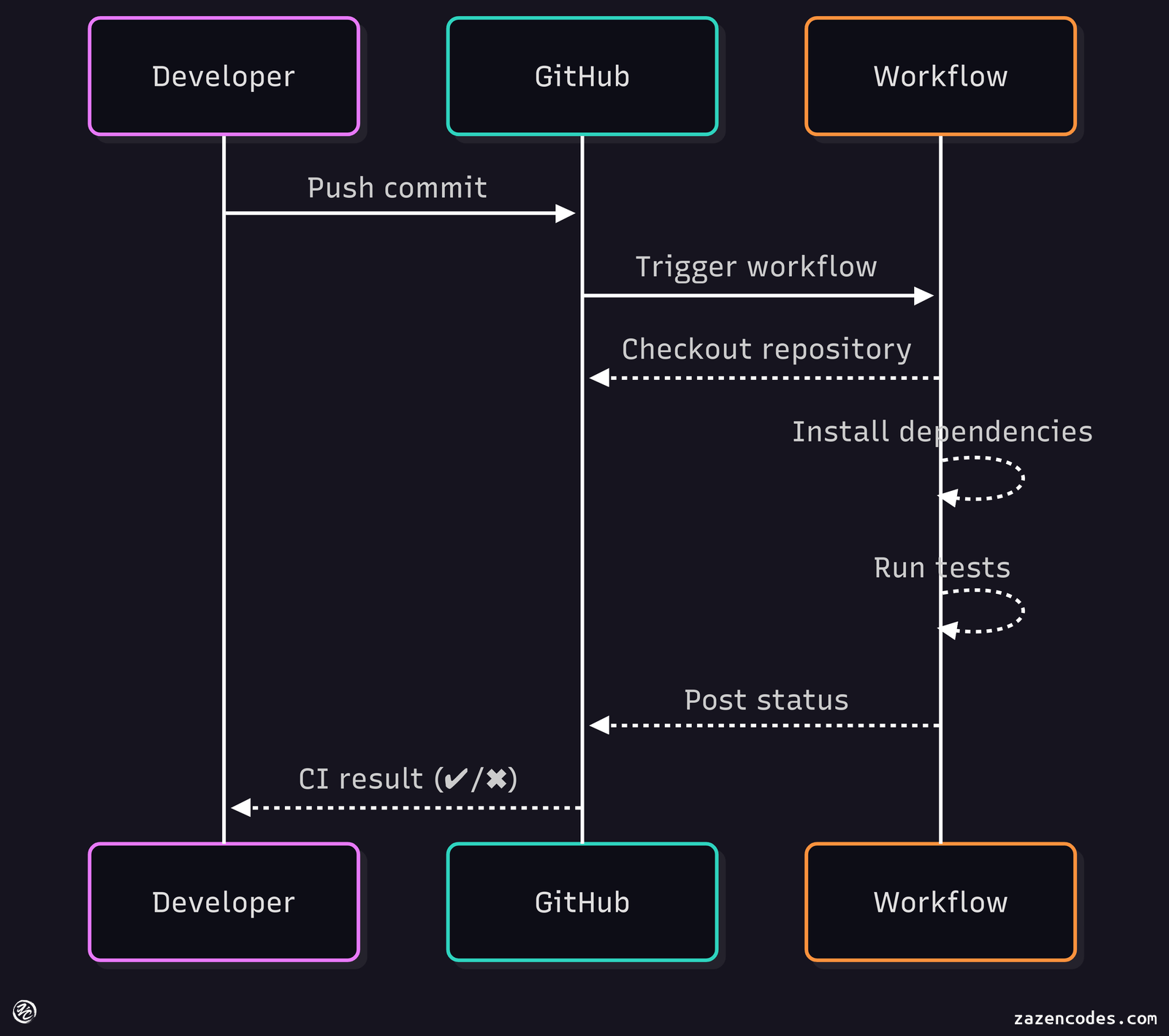
To set up automated testing with GitHub Actions, first create a new file in our repo, in .github/workflows,
e.g. .github/workflows/test.yml
name: Run Tests

on:
  push:
    branches: [main]
  pull_request:
    branches: [main]

jobs:
  test:
    runs-on: ubuntu-latest

    steps:
      - uses: actions/checkout@v3

      - name: Set up Python
        uses: actions/setup-python@v4
        with:
          python-version: "3.10"

      - name: Install dependencies
        run: |
          pip install --upgrade pip
          pip install pytest==8.3.4
          pip install -r requirements.txt

      - name: Run tests
        run: pytest tests/
Here’s a high-level explanation of how this works:
-
Triggers (
on):- The workflow runs automatically when there’s a push or pull request to the
mainbranch.
- The workflow runs automatically when there’s a push or pull request to the
-
Job Definition (
jobs.test):- A single job named
testis defined, which runs on theubuntu-latestenvironment (a fresh Linux machine provided by GitHub).
- A single job named
-
Steps:
-
Checkout Code:
- The
actions/checkoutaction pulls the repository’s code into the runner. - This ensures the latest code is available for testing.
- The
-
Set Up Python Environment:
- The
actions/setup-pythonaction configures Python 3.10 on the runner. - This step makes Python available for the subsequent commands.
- The
-
Install Dependencies:
- This step prepares the environment with the required Python dependencies.
-
Run Tests:
- Runs tests in the
testsfolder using pytest.
- Runs tests in the
-
To set this up:
-
Create the directory structure:
mkdir -p .github/workflows -
Create the file:
touch .github/workflows/tests.yml -
Add the YAML content above to the file
-
Commit and push:
git add .github/workflows/tests.yml
git commit -m "Add GitHub Actions workflow for automated testing"
git push origin main
We can view test results in the “Actions” tab of our GitHub repository.
Conclusion
GitHub is really amazing and it’s hard to believe how much it’s changed for the better (in such little time) since being acquired by Microsoft.
Key Takeaways
🛠️ GitHub enhances Git with collaboration, security, and automation features.
🔄 Pull requests and code reviews improve code quality and teamwork.
⚙️ GitHub Actions enable automated testing and CI/CD workflows.
Next: Writing production code
CI/CD is super important for building high-quality production code.
But there’s a lot of considerations when it comes to this. That’s what we’re talking about in the next section.
Comments (0)
No comments yet.