Data Formats & Storage
In this lesson, we’ll explore the fundamental concepts of how data is represented in computer systems, for the purposes of using in applications (memory) and persistence (storage).
This Lesson Will Cover
- 🔢 Binary Data Fundamentals
- 🔠 Data Encodings
- 📝 ASCII & UTF-8
- 💾 File Storage Formats
- 📊 CSV vs JSON vs Parquet
- 📈 Data Format Comparisons
Crash Course on Encodings
Let’s begin by examining how computers represent data at the lowest level: binary encoding.
Binary Data
Binary data consists of raw sequences of 0s and 1s.
This is how all data is stored on disk or in memory.
Encodings define how this data is interpreted (e.g., as text, images, or videos).
For example:
- Text: Encodings like UTF-8 and ASCII map bytes (e.g., data stored on disk or in memory) to characters in the application, and vice versa.
- Images: PNG files store pixel colors (RGB values), transparency (alpha), and metadata like dimensions in a standardized binary format. Each pixel typically uses 3-4 bytes to represent color information.
- Videos: MP4 stores sequences of compressed image frames (using codecs like H.264) along with audio tracks. A 1-second video at 30fps contains 30 encoded frame images plus audio data.
Files like CSV and JSON use text encodings (e.g., UTF-8) to map binary data to readable characters. These types of files have the benefit of being “human-readable” in the sense that you can open them in a text editor and understand their contents.
On the other hand, formats like Parquet, PNG, and MP4 use internal schemas or specifications to interpret binary data and they cannot be opened with a text editor. Although this is not surprising for image or video data, it might be surprising for Parquet files, which is an alternative to CSV.
It’s commonly said that "Parquet data is “binary” - but this is a bit misleading since all data is ultimately binary. The key difference is that Parquet uses a specialized binary format optimized for columnar storage and efficient querying, rather than a text-based encoding like UTF-8.
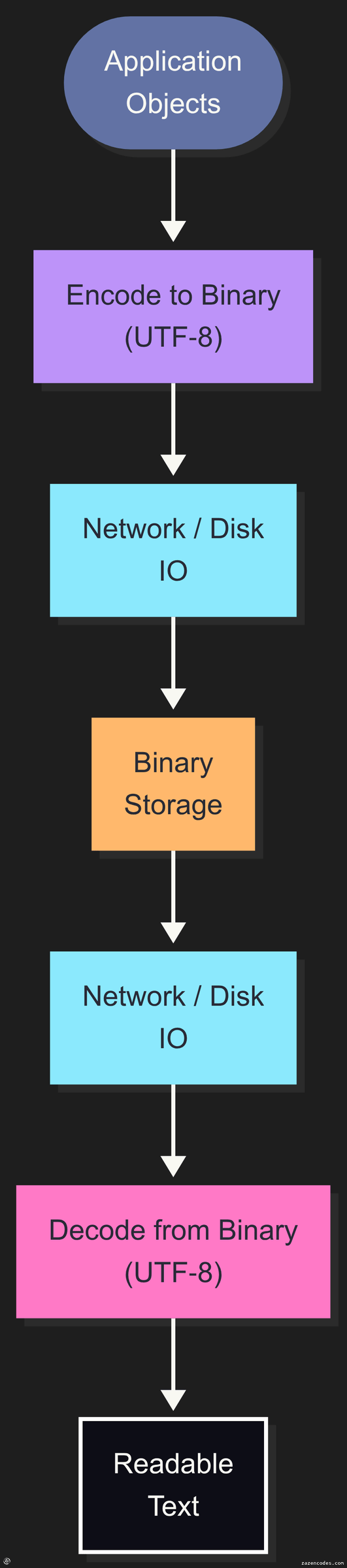
Example: Working with Binary data in Python
# Define an array of bytes corresponding to
# ASCII values for "Hello"
byte_array = bytes([72, 101, 108, 108, 111])

print(f"Byte array: {byte_array}")
print(f"Decoded byte array: {byte_array.decode("ascii")}")
# Output: Byte array: b'Hello'
# Output: Decoded byte array: Hello

# Writing binary data to a file
with open("binary_file", "wb") as f:
    f.write(byte_array)

# Reading binary data from a file
with open("binary_file", "rb") as f:
    byte_array = f.read()
print(f"Data read from file: {byte_array}") # Data read from file: b'Hello'

# Outputs:
# Byte array: b'Hello'
# Decoded byte array: Hello
# Data read from file: b'Hello'
There’s actually a lot going on here.
For example, when we define the array of bytes [72, 101, …], these are actually the code points (numerical values) that represent specific characters in ASCII:
- The number 72 represents ‘H’
- The number 101 represents ‘e’
- etc…
These code points are standardized values that map directly to characters in the ASCII encoding scheme.
When we use ASCII encoding (7-bit), each code point fits in a single byte since ASCII only needs 7 bits to represent its 128 characters.
The same is true for extended ASCII (8-bit) which uses 256 characters (0-255).
When we write this object to disk as “binary_file”, the stored data literally looks like this, in binary format:
# Convert byte array to binary representation
byte_array = bytes([72, 101, 108, 108, 111])  # "Hello"
for byte in byte_array:
    print(f"{byte:08b}")

# Outputs:
# 01001000
# 01100101
# 01101100
# 01101100
# 01101111
Another interesting detail to understand is how Python represents binary content, e.g., b'your string' as opposed to string data 'your string'.
When printing binary content (b'your string'), Python evaluates each byte in the sequence:
- If a byte corresponds to a printable ASCII character, Python displays it as-is.
- However, if a byte falls outside the printable ASCII range, Python represents it using a hexadecimal escape sequence (e.g.
\x07, as demonstrated below).
For example:
# A mix of printable and non-printable bytes
non_printable = bytes([65, 7, 66])  # [ A, "Ring terminal bell", B ]
print(non_printable)

# Output: b'A\x07B'
Common Encodings
Encoding is the process of converting some set of characters, symbols, or data from an application into a specific binary format.
As mentioned earlier, the encoding format is like a map that defines how information should be “encoded” as binary (e.g., for storing on disk or sending somewhere), and then “decoded” (e.g., for reading or using in an application).
Here are a couple of examples to drive home the connection between visible text representations, encodings, and binary data.
- The character “A” is encoded with ASCII to binary as 01000001.
- The character “A” is encoded with UTF-8 to binary as 01000001.
- The character “A” is encoded with UTF-16 (Little-Endian) to binary as 01000001 00000000.
- The character “€” is encoded with UTF-8 to binary as 11100010 10000010 10101100.
ASCII (American Standard Code for Information Interchange)
- Represents 128 characters, English letters, digits, symbols, etc…
- Cannot encode characters from non-English languages, emojis, etc…
Python Example
char = "A"
ascii_value = ord(char)  # Convert to ASCII code
print(f"ASCII ceodepoint value of '{char}': {ascii_value}")

# Output: ASCII ceodepoint value of 'A': 65
UTF-8 (Unicode Transformation Format - 8 bit)
A variable-length encoding that supports all Unicode characters. Backward-compatible with ASCII (i.e., ASCII is a subset).
UTF-8 is efficient for English text since it only uses 1 byte per character for ASCII characters, while also supporting multilingual text by using variable bytes (up to 4 bytes per character) for other Unicode characters.
Note: Unicode is not an encoding itself, but rather a universal character encoding standard. It includes symbols, emojis, and characters from all world languages. UTF-8 is a (complete) implementation of this standard.
Python Example
text = "Hello, 世界"  # Includes Chinese characters

# Convert each character in the string into its corresponding
# binary representation as defined by the UTF-8 standard
encoded = text.encode("utf-8")

print(f"Encoded: {encoded}")

decoded = encoded.decode("utf-8")  # Decode back to text
print(f"Decoded: {decoded}")

# Outputs:
# Encoded: b'Hello, \xe4\xb8\x96\xe7\x95\x8c'
# Decoded: Hello, 世界
Common File Formats for Storing Data
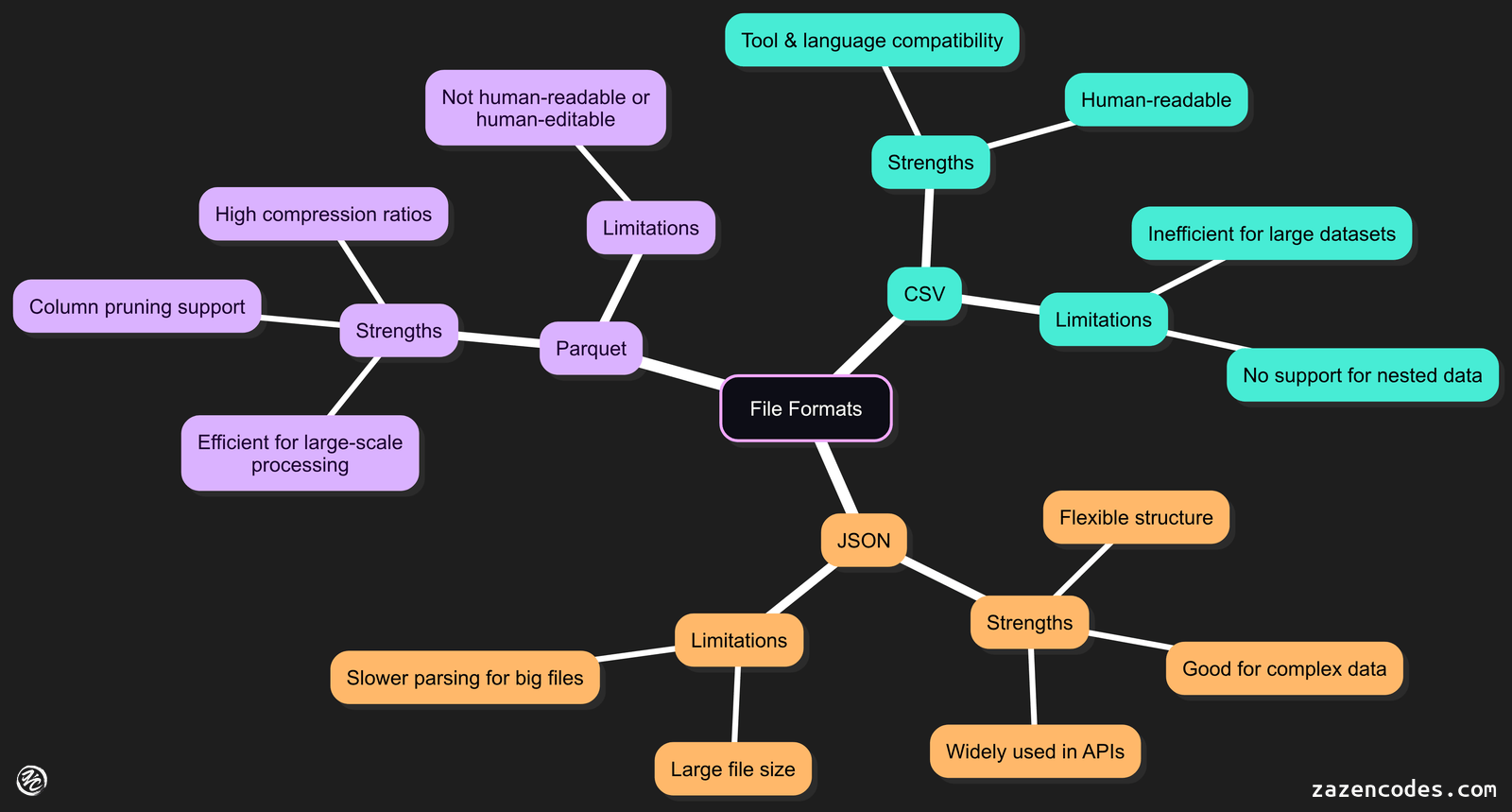
CSV (Comma-Separated Values)
CSV stores tabular data with rows and columns, where columns are separated by commas.
- Strengths:
- Simple, human-readable.
- Compatible with most tools and languages.
- Limitations:
- Inefficient for large datasets (repeated column headers).
- Lacks support for nested or hierarchical data.
Python Example
import pandas as pd

# Save DataFrame to CSV
df = pd.DataFrame({'id': [1, 2], 'name': ['John', 'Jane']})
df.to_csv('data.csv', index=False)
print(open('data.csv').read())

# Outputs:
# id,name
# 1,John
# 2,Jane
JSON (JavaScript Object Notation)
A self-describing format that supports hierarchical (nested) data.
- Strengths:
- Flexible, widely used in APIs.
- Better for representing complex data structures.
- Limitations:
- Larger file size due to text-based storage.
- Parsing can be slower for large datasets.
Python Example
import json

# Save data to JSON
data = {"id": 1, "name": "John", "details": {"age": 30, "city": "New York"}}
with open('data.json', 'w') as f:
    json.dump(data, f)

print(open('data.json').read())

# Output: {"id": 1, "name": "John", "details": {"age": 30, "city": "New York"}}
Parquet
A columnar, binary storage format optimized for analytical workloads.
- Strengths:
- Excellent for large-scale processing (query specific columns efficiently).
- Smaller file size due to compression.
- Limitations:
- Binary format; not human-readable.
How Data is Stored in Parquet:
Parquet stores data by columns rather than rows, which allows for:
- Column Pruning: Load only the columns you need.
- Compression: Compressing similar values in columns leads to better efficiency.
Visual Representation:
Input Data (Tabular):
id   name    age
1    John    30
2    Jane    25

Stored in Parquet:
[id: 1, 2]
[name: John, Jane]
[age: 30, 25]
Python Example
import pandas as pd

# Save DataFrame to Parquet
df = pd.DataFrame({'id': [1, 2], 'name': ['John', 'Jane'], 'age': [30, 25]})
df.to_parquet('data.parquet', index=False)

# Read Parquet file
df_read = pd.read_parquet('data.parquet')
print(df_read)

# Outputs:
#    id  name  age
# 0   1  John   30
# 1   2  Jane   25
Use Case Chart: CSV, JSON, Parquet
Here’s a comparison of when to use each format:
| Feature | CSV | JSON | Parquet |
|---|---|---|---|
| Human Readable | Yes | Yes (readable but verbose) | No |
| File Size | Large (no compression) | Larger than CSV | Small (compressed) |
| Complex Data | Poor support | Good for nested structures | Not supported directly |
| Performance | Slower for large datasets | Moderate | Fast (optimized for big data) |
| Best For | Small, simple datasets | APIs, hierarchical data | Large-scale analytics |
Conclusion
We really got into the weeds here, but I’m sure by now you’re not surprised.
It’s often easy to skim over these fundamentals, but I would encourage you to follow your curiosity[1] and dig into these concepts once in a while e.g., at lest once a day ;)
Key Takeaways
- All data is ultimately stored as binary (0s and 1s), with encodings defining how to interpret it.
- ASCII is simple but limited to English characters, while UTF-8 supports all Unicode characters.
- CSV files are simple and human-readable but inefficient for large datasets.
- JSON is flexible and great for nested data but has larger file sizes.
- Parquet is optimized for analytics with columnar storage and compression.
- Choice of data format depends on use case:
- CSV for simple data
- JSON for complex structures
- Parquet for large-scale analytics.
Next: Data Architectures
Knock knock Who’s there? Reality Oh… hi there.
Let’s get back in touch with the practical aspect (i.e., reality) of data engineering.
In the next section, we’ll pull out of the weeds and talk about data architectures.
Footnotes
More on following your curiosity and daily learning, in the final lesson of this course, on Kaisen. You could check it out now. It’s worth reading again later, anyway. ↩︎
Comments (0)
No comments yet.